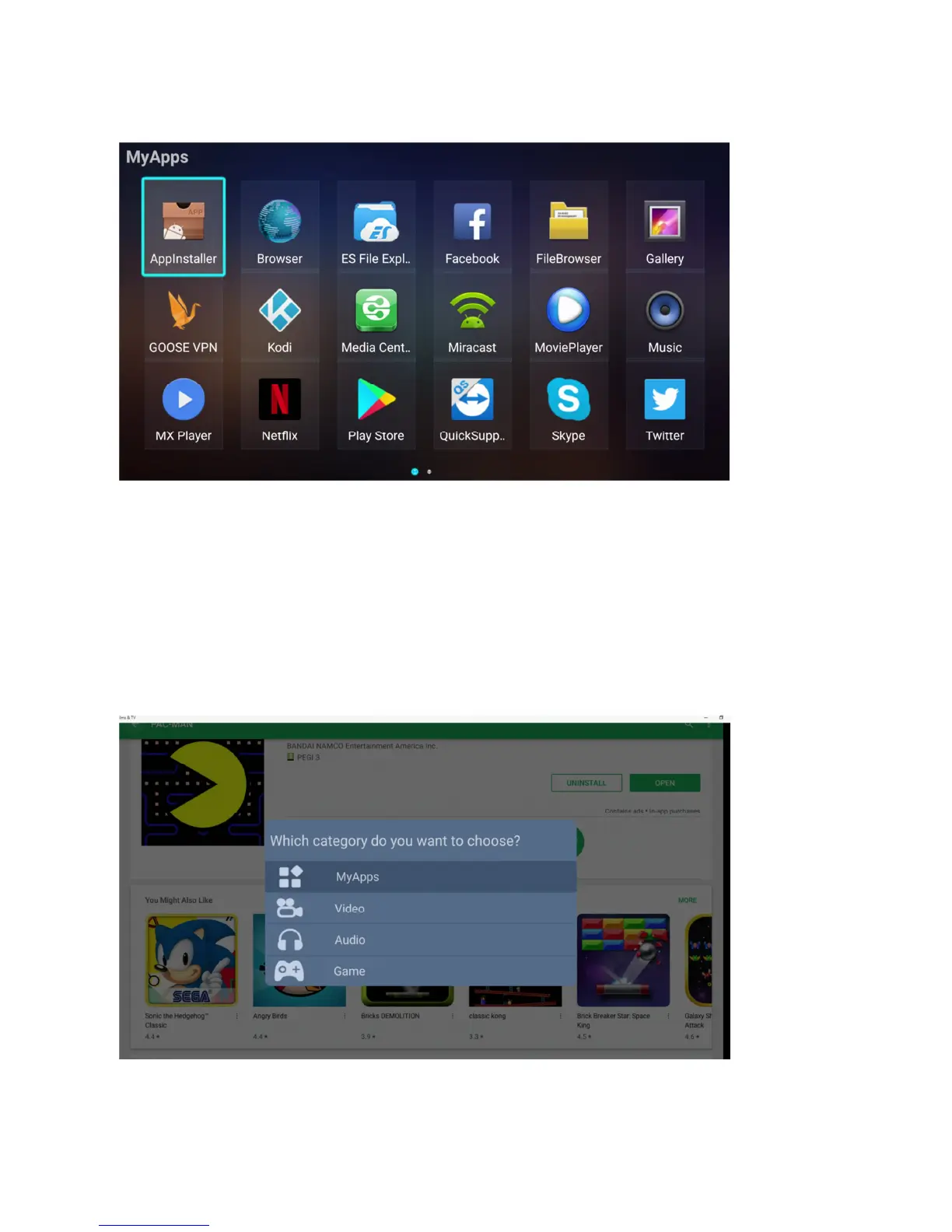
MyApps
ENG: overview and selection menu of all installed apps on the VENZ box
NL: overzicht en selectie menu van alle geïnstalleerde apps op de VENZ box
DE: Übersichts- und Auswahlmenü aller installierten Apps auf der VENZ-Box
Video – Audio – Games
ENG: When installing an app from the Playstore you will be asked in which section you wish to install the app,
My Apps – Video – Audio – Games. Once selected the installed app will appear in the folder of choice
NL: Wanneer u een app installeert in de Playstore word u gevraagd in welke sectie u de app wilt installeren, My
Apps – Video – Audio – Games. Zodra u selecteerd zal de app tonen in de gekozen folder.
DE: Wenn Sie eine App im Playstore installieren, werden Sie gefragt, in welchem Abschnitt Sie die App "Meine
Apps - Video - Audio-Spiele" installieren möchten. Nach der Auswahl wird die App im ausgewählten Ordner
angezeigt.


 To Next Page