In disaster recovery strategies where a set of backup tapes are transferred to a remote site, the following simple series of
steps enables quick data availability at the remote site:
1. Using a NetBackup-supplied utility on the primary server, create a copy of the NetBackup catalog and the media
database associated with the backup tapes being transferred from the primary server. This tape and the backup data
tapes should be transferred to an offsite location or a vault. This operation should be repeated periodically as part of
the ongoing disaster recovery process.
2. In the event of a site disaster, move the tapes (primary or duplicate) from the vault (or library on the primary server) and
transfer them to the remote site.
3. At the remote site, load the NetBackup catalog and media database from the tape created in step (1) above via a
NetBackup-supplied utility and load the tapes into the library or tape drives at the remote site.
4. Restore the backup data to the desired client through the disaster recovery server.
True Image Recovery
True image recovery allows users to restore only their current files in the event that disaster recovery is required. This
capability can be configured on a class-by-class basis so that NetBackup will track file deletion activity and optionally prevent
the restore of deleted files if a directory or file system restore is requested. Without true image recovery, files that were
included in previous backups but subsequently deleted may also be restored.
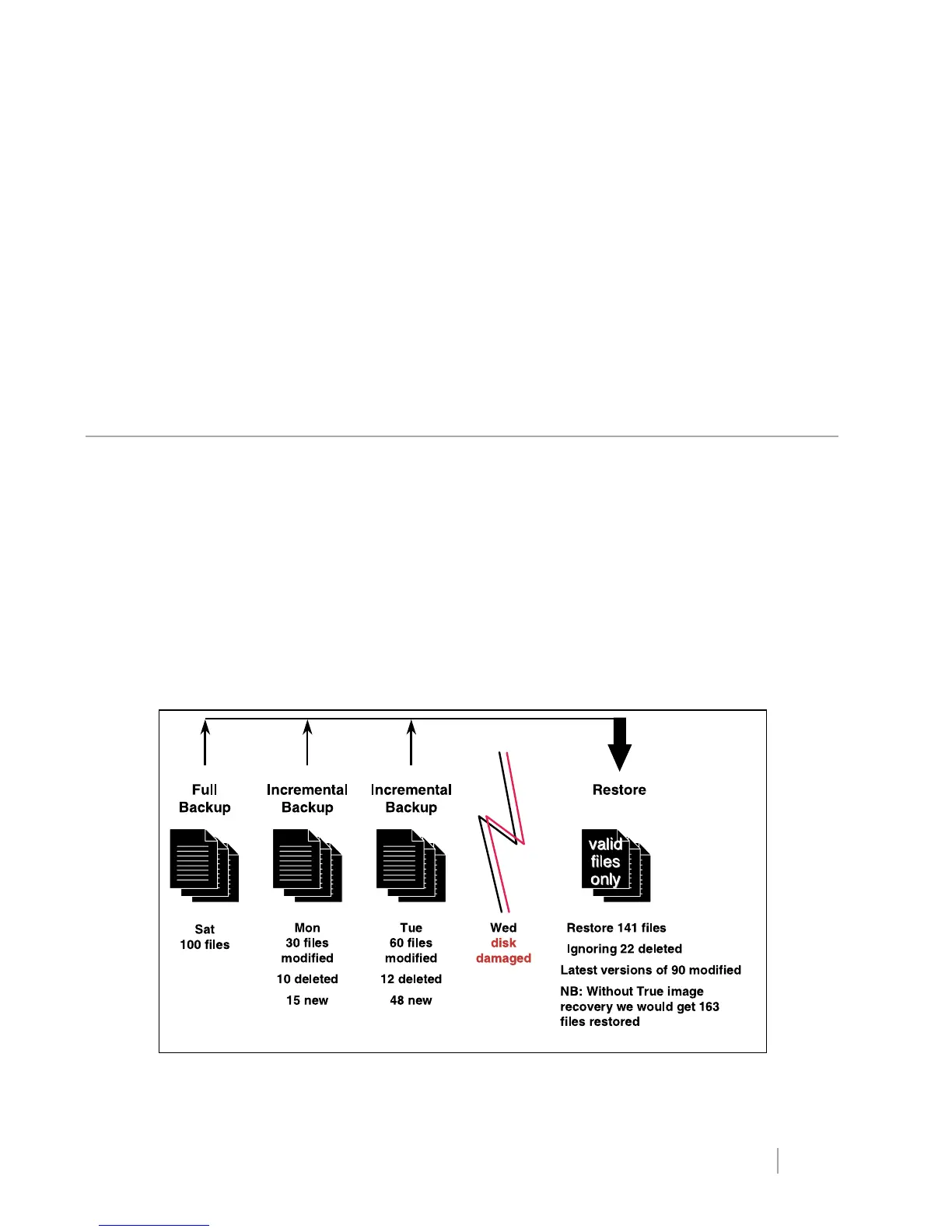
True image recovery provides installations with the option of tracking the environment as it existed at the last backup so that
during recovery only current data is recovered. For example, if a server were to be recovered on a Tuesday, a combination of
the last full backup tapes (Sunday) and Monday’s incremental would be used to recover the server. However, TIR would
ensure that only the data that existed during the time of the Monday incremental backup was restored. This would keep any
data that became obsolete (deleted) between the Sunday full and Monday incremental.
For example, in Figure 23, NetBackup restores 141 files, including the latest versions of 90 files that were modified. The 22
files that were deleted are ignored. Without true image recovery, NetBackup would restore 163 files.
Figure 23: True image recovery.
www.veritas.com Page
27
VERITAS NetBackup Release 3.4 Technical Overview



 To Next Page