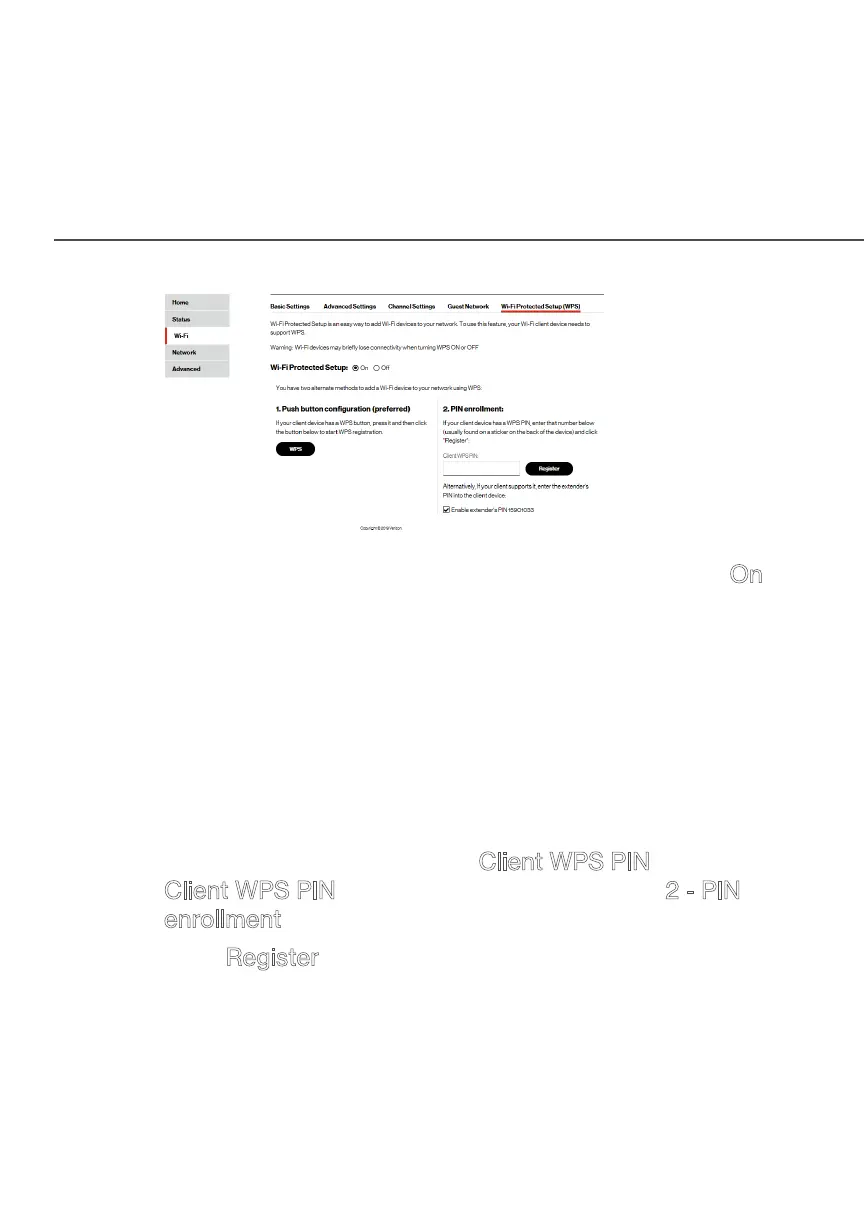
MAIN SCREEN
2. Enable the protected setup by moving the selector to On.
3. Use one of the following methods:
• If your Wi-Fi client device has a WPS button, press the
unified button on your Fios Business Wi-Fi Extender for
more than two seconds, then click the WPS button on
your Wi-Fi device (client) to start the WPS registration
process.
• If your client device has a WPS PIN, locate the PIN
printed on the client’s label or in the client documentation.
Enter the PIN number in the Client WPS PIN field. The
Client WPS PIN field is located in the section 2 - PIN
enrollment on the user interface.
• Click Register.
• Alternatively, you can enter the
Fios Business Wi-Fi Extender’s PIN shown on this screen
into the WPS user interface of your device, if this PIN
mode is supported by your Wi-Fi device.




 To Next Page