Verkada AC42 is capable of supporting Verkada Readers over RS-485 and standard Wiegand readers.
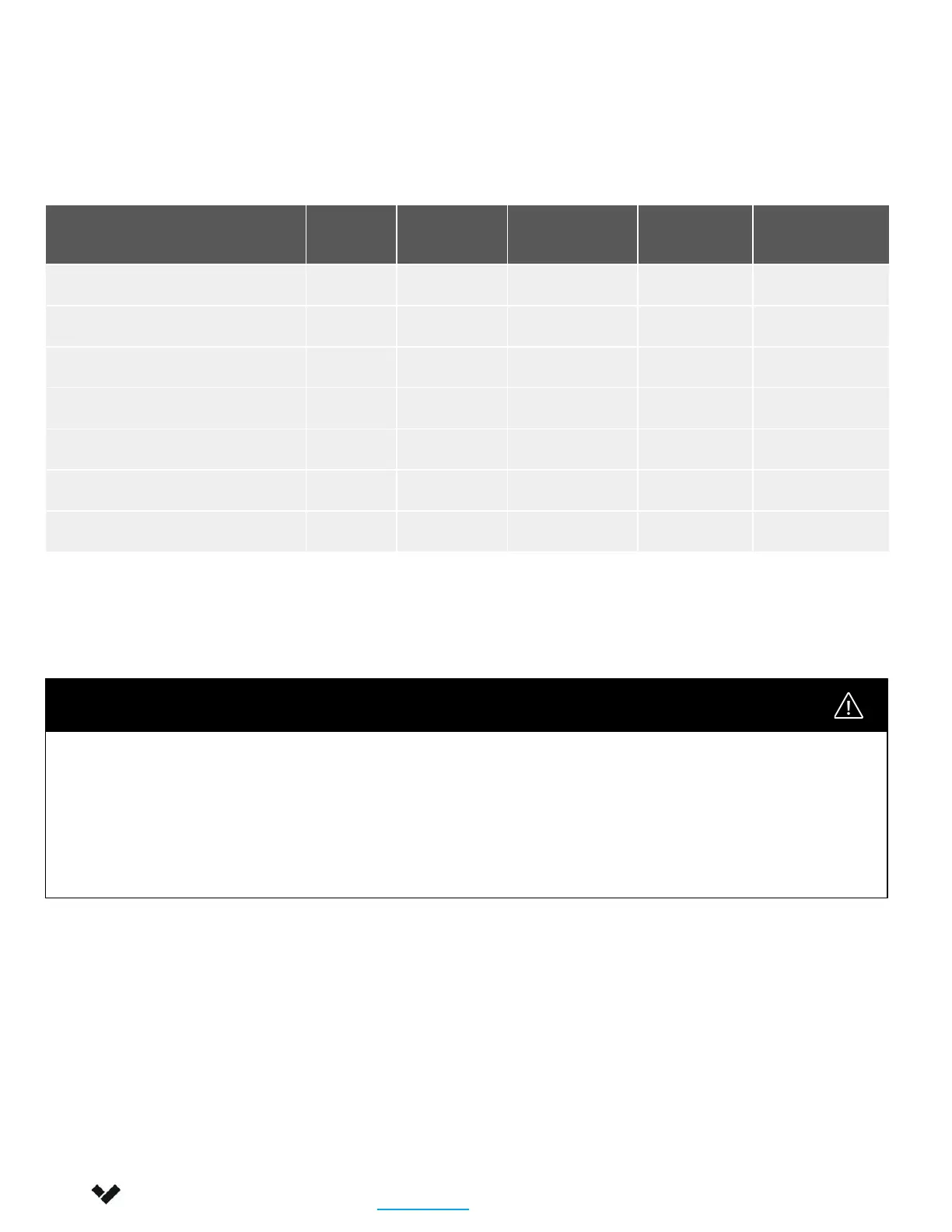
The following diagram shows the wire types that are recommended for use with the Verkada AC42.
We recommend using one twisted pair for power (+/-) and one twisted pair for the data (D0/D1 or A/B).
Wiring methods shall be in accordance with National Electrical Code, ANSI/NFPA 70.
Required Network Settings
An Ethernet connection with DHCP must be used to connect the AC42 to the Local Area Network
(LAN). You also need to configure firewall settings to communicate with the AC42.
● TCP port 443
● UDP port 123 (NTP time synchronization)
13
Signal AWG
Twisted
Pair
Conductor Shielded Max Length
Reader Option 1 (22 AWG) 22 Yes Yes 250 ft
Reader Option 2 (20 AWG) 20 Yes Yes 300 ft
Reader Option 3 (18 AWG) 18 Yes Yes 500 ft
Power (22 Gauge) 22 Yes Yes 600 ft
Power (18 Gauge) 18 Yes Yes 1500 ft
Request-to-Exit 22/18 Yes Yes 1500 ft
Door Contact 22 Yes Yes 1500 ft
You must use shield wiring with the AC42, particularly for the card reader:
● Connect the drain wire (bare metal) from the reader cable bundle to the drain wire in the shielded
cabling. Then, connect the drain wire at the other end of the shielded cabling to Earth ground.
● Improper grounding and shielding may result in unintended product behavior.
It is recommend to connect one of the chassis grounding screws to the building ground at the
installation site.
Shield Wiring and Grounding
Installation
Recommended Wiring
Verkada Inc. 406 E 3rd Ave, San Mateo, CA 94401
sales@verkada.com
All specifications are subject to change without notice
Copyright © 2023 Verkada Inc. All rights reserved.


 To Next Page