16
Verkada/
RS-485
Reader
Standard
Wiegand
Reader
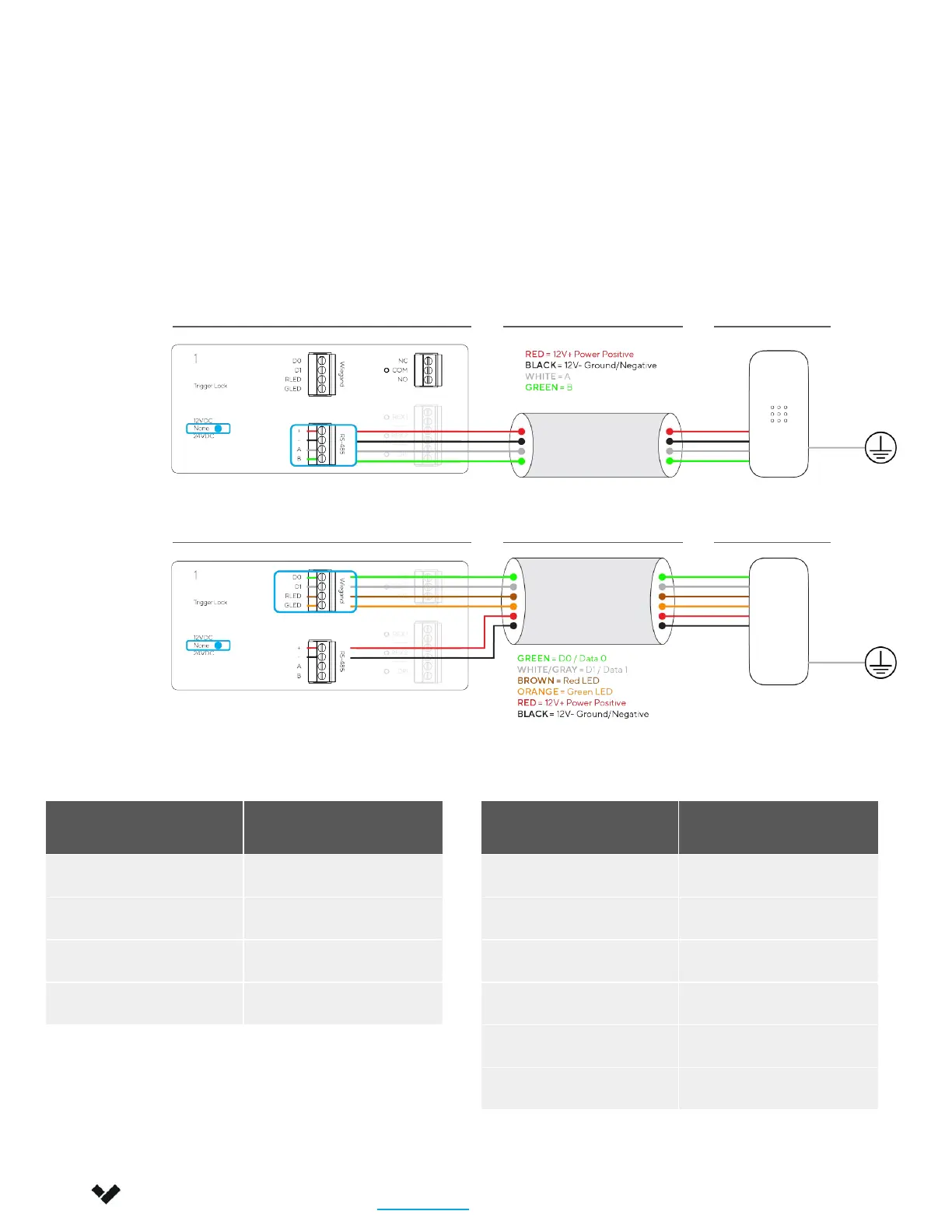
Verkada/RS-485 Reader Wiegand Reader
Wire Color Signal
Red 12V Power+
Black 12V Power-
Green Data 0
White/Gray Data 1
Brown Red LED
Orange Green LED
Wire Color Signal
Red 12V Power+
Black 12V Power-
White A
Green B
3. Connecting the Reader
The AC42 is rated to power readers at 12V up to 250mA via the + (VIN) and – (GND) connection.
Standard Wiegand readers use the top 4-port inputs (powered from + and - of the bottom port)
while Verkada/RS-485 readers use the bottom 4-port inputs. The drain wire of the shielded cable
should be secured to the nearest AC42 chassis ground.
Installation
Connecting a Door 3/5
AC42 Shielded LV Cable Verkada Reader
AC42 Shielded LV Cable Wiegand Reader
Verkada Inc. 406 E 3rd Ave, San Mateo, CA 94401
sales@verkada.com
All specifications are subject to change without notice
Copyright © 2023 Verkada Inc. All rights reserved.


 To Next Page