Introduction
What’s in the box
4
What you’ll need
● A working internet connection
● A smartphone or laptop
● A #2 Phillips head and power drill
● A level
Connect
Connect the AC42 to your network using the
Ethernet port located at the bottom of the
controller. Connect the AC42 power supply
into your power outlet.
Supports 100- 240VAC (50/60Hz).
After connecting the AC42 to network and
power, visit: verkada.com/start
For detailed installation instructions, visit:
verkada.com/support
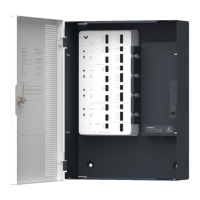
● AC42 Door Controller
● Wall Mount
● Mounting Template
● AC Cable
● 4x Plywood Screws
● Screwdriver
● 2x Keys
Verkada Inc. 406 E 3rd Ave, San Mateo, CA 94401
sales@verkada.com
All specifications are subject to change without notice
Copyright © 2023 Verkada Inc. All rights reserved.


 To Next Page