https://www.zenstores.com/help/how-congure-zebra-gk420d-printer-printing-royal-mails-2d-barcode-labels/#:~:text=How%20to%20congure%20the%20Zebra%20GK420D%20printer%20for,your%20Royal%20Mail%202D%20barcode%20labels%20in%20Zenstores.
https://www.zenstores.com/help/how-congure-zebra-gk420d-printer-printing-royal-mails-2d-barcode-labels/#:~:text=How%20to%20congure%20the%20Zebra%20GK420D%20printer%20for,your%20Royal%20Mail%202D%20barcode%20labels%20in%20Zenstores.https://www.zenstores.com/help/how-congure-zebra-gk420d-printer-printing-royal-mails-2d-barcode-labels/#:~:text=How%20to%20congure%20the%20Zebra%20GK420D%20printer%20for,your%20Royal%20Mail%202D%20barcode%20labels%20in%20Zenstores.
https://www.zenstores.com/help/how-congure-zebra-gk420d-printer-printing-royal-mails-2d-barcode-labels/#:~:text=How%20to%20congure%20the%20Zebra%20GK420D%20printer%20for,your%20Royal%20Mail%202D%20barcode%20labels%20in%20Zenstores.
https://www.zenstores.com/help/how-congure-zebra-gk420d-printer-printing-royal-mails-2d-barcode-labels/#:~:text=How%20to%20congure%20the%20Zebra%20GK420D%20printer%20for,your%20Royal%20Mail%202D%20barcode%20labels%20in%20Zenstores.
14105 Avalon Boulevard, Los Angeles, CA 90061 | Tel 800-465-1660 x1 | Fax 310-353-7109
www.Versatables.com
Assembly
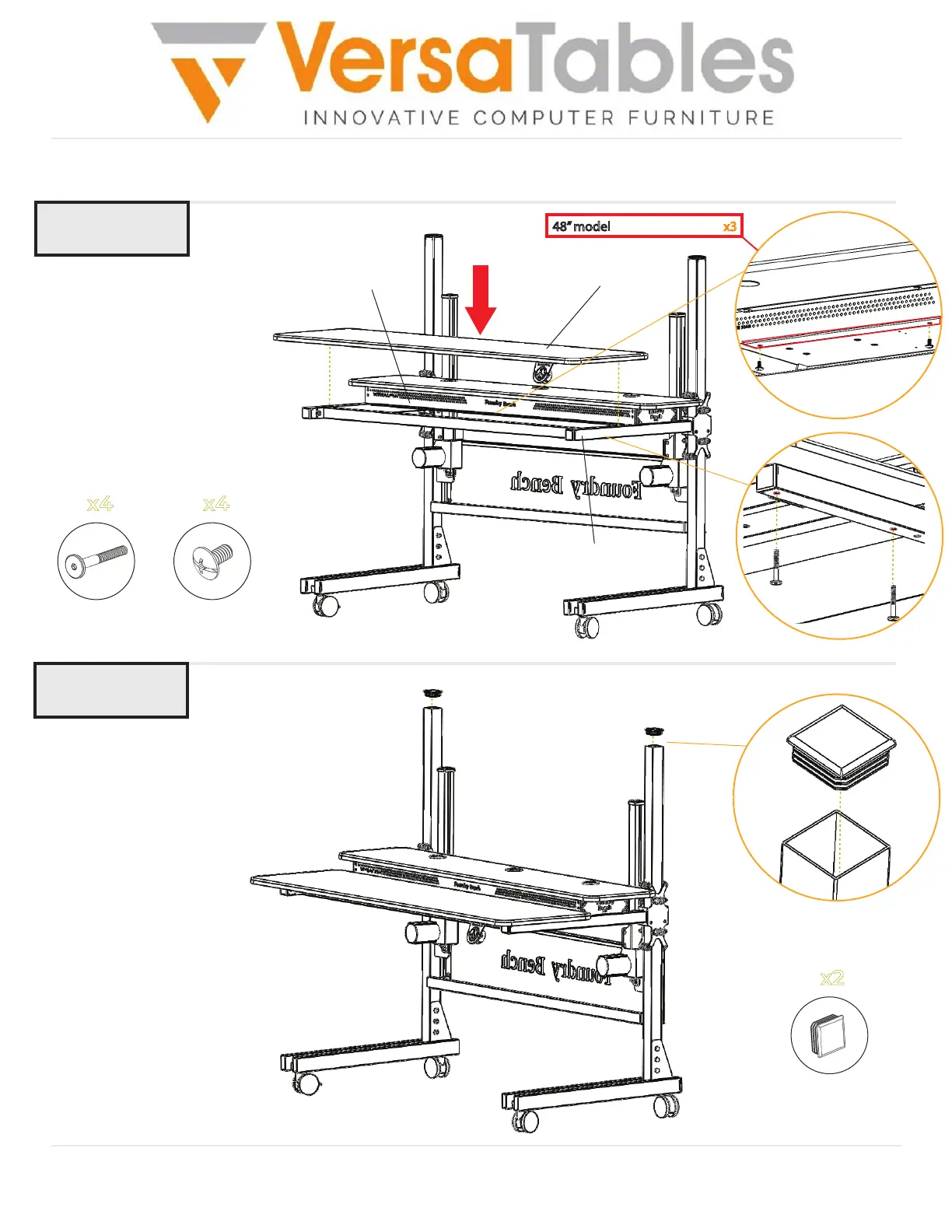
Step 11
Step 12
Attach the Bottom Surface to
the Moving Beams using (4)
50mm Furniture Bolts as
shown.
Then, use (4) 1/4-20 x 1/2”
Truss Head Screws to fasten
the Bottom Surface onto the
Front Panel as shown.
Bottom Surface
Moving Beam
1.75 x 1.75
End Cap
x2
50mm
Furniture Bolt
x4
x4
1/4-20 x 1/2
Truss Head Screw
Front Panel
48” model - Truss Head Screw x3
Insert (2) 1.75” x 1.75” End Caps
at the top of the Leg Uprights
as shown.
Bottom Surface
End Caps


 To Next Page
 Loading...