Door Setup HD-98 Door Operator with OST
22 Vertical Express
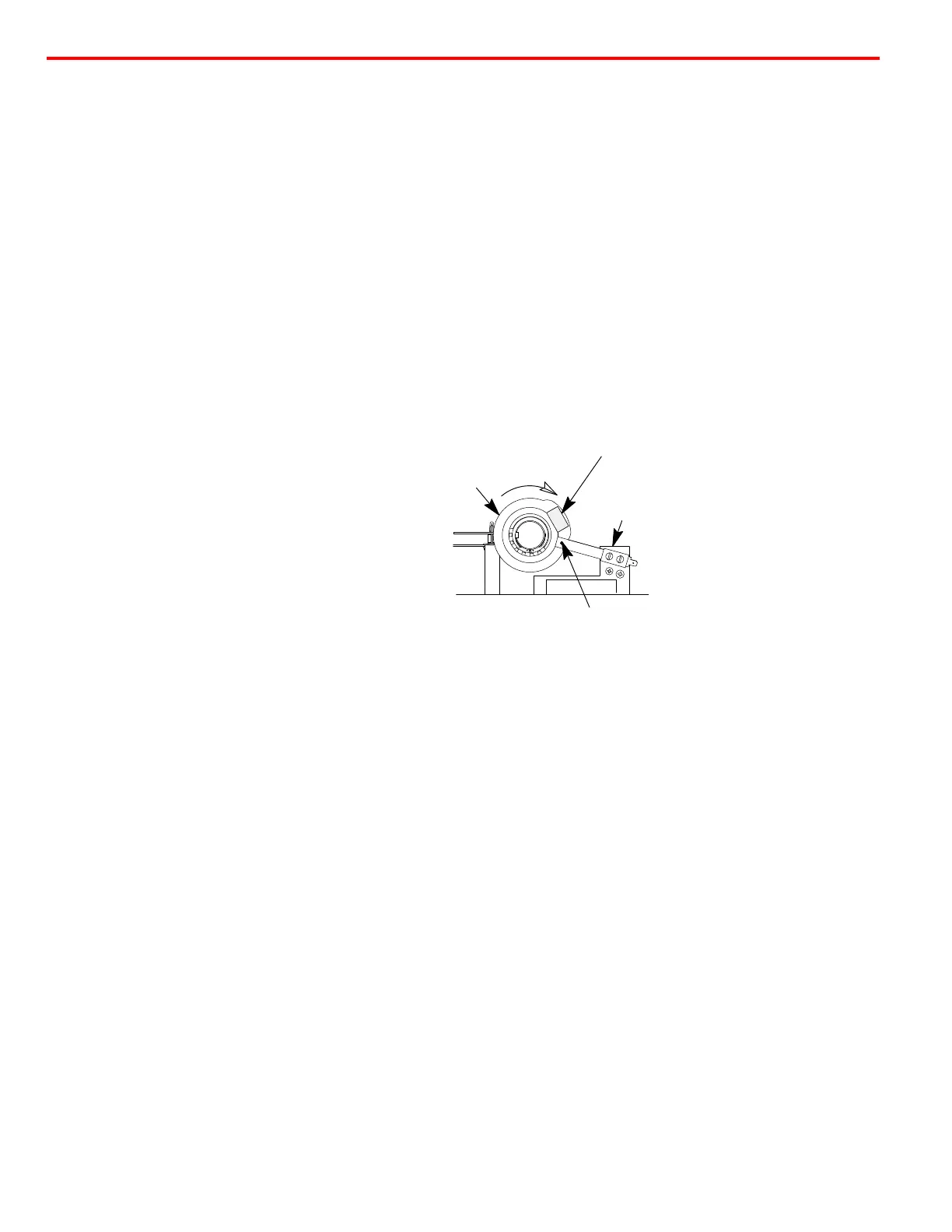
Setting the Gate Switch
1. Position the doors 1 1/2" (38mm) from Fully Closed.
2. Rotate the disk in the CLOSE direction until the shorting bar just touches the two leaf contacts.
See Figure 10.
3. Locate a tab on the locking ring that lines up with a notch in the contact disk.
4. Rotate the drive wheel until the doors are Fully Closed and ensure that the shorting bar has not
run past the leaf contacts.
5. Open and close the doors to verify that the gate switch shorting bar enters the leaf contacts at
1 1/2" (38mm) from Fully Closed.
Note: Verify that the shorting bar remains between the leaf contacts in the Fully Closed Position.
Be sure that the gate switch leaf contacts do not rub on the thin portion of the plastic disk
during normal operation.
Figure 10 - Gate Switch
Final Security Recheck all bolts, cap screws, cam hex screws, and belt tensions for proper tightness
Gate Switch
Gate
Switch
Cam
Closed
Leaf Contacts
Shorting Bar


 To Next Page