5
vertilux.com
© 2021. Vertilux, Ltd. All Rights Reserved. Last revised: June 2021.
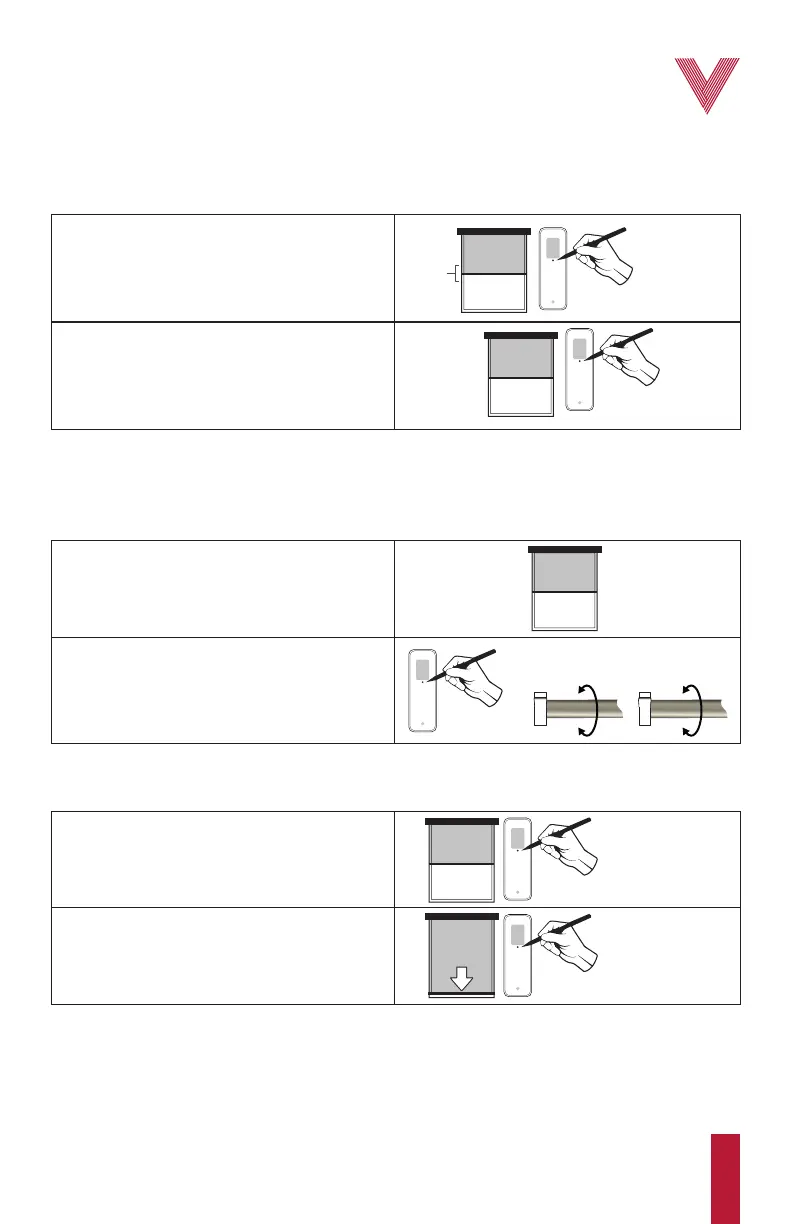
Setting the intermediate limit (optional)
Up to 1 optional intermediate limit can be programmed between the upper and lower limit.
Press and hold the up or down button for 2 s if you want the motor to reach the upper or lower
limit without any stop at the intermediate limit.
The upper limit cannot be erased once it has been set.
Erasing the intermediate limit
Readjusting the lower or an intermediate limit
1. Move the shade to the limit you want to erase.
2. Press and hold the programming button located
on the back of the remote for approximately 7 s
until the motor “jogs” twice. The limit has been
erased.
1. Move the shade to the limit you want to readjust.
Press and hold the programming button located
on the back of the remote until the motor “jogs”.
2. Move the shade to the new desired position and
press stop. Then press and hold the programming
button located on the back of the remote until the
motor “jogs”. The limit has been readjusted.
1. Move the shade approximately 4" from the
desired intermediate limit position and stop it.
Press and hold the programming button located
on the back of the remote until the motor “jogs”
(Openning Program).
2. Move the shade up or down and stop it at the
desired intermediate limit position and then press
and hold the programming button until the motor
“jogs” again (Closing Program). The intermediate
limit is now set.
INTERMEDIATE
LIMIT
PROGRAMMING
BUTTON
PROGRAMMING
BUTTON
PROGRAMMING
BUTTON
PROGRAMMING
BUTTON
~4”
PROGRAMMING
BUTTON



 To Next Page