Changing to tilt or jog mode
Tilt or jog mode initiates a short motor movement when pressing the up or down buttons.
When this mode has been programmed, the up or down button must be pressed for 3 s to make
the motor move continually to its upper or lower limits, otherwise when you press the up and
down button the motor will do short movements. Repeat the same procedure if you want to erase
the tilt or jog mode.
Adding an additional remote control or
“cloning” a channel
A previously programmed remote control can be used in order to add a new remote control or
operating channel. Also, you can copy one channel to another in the same remote control using
this procedure.
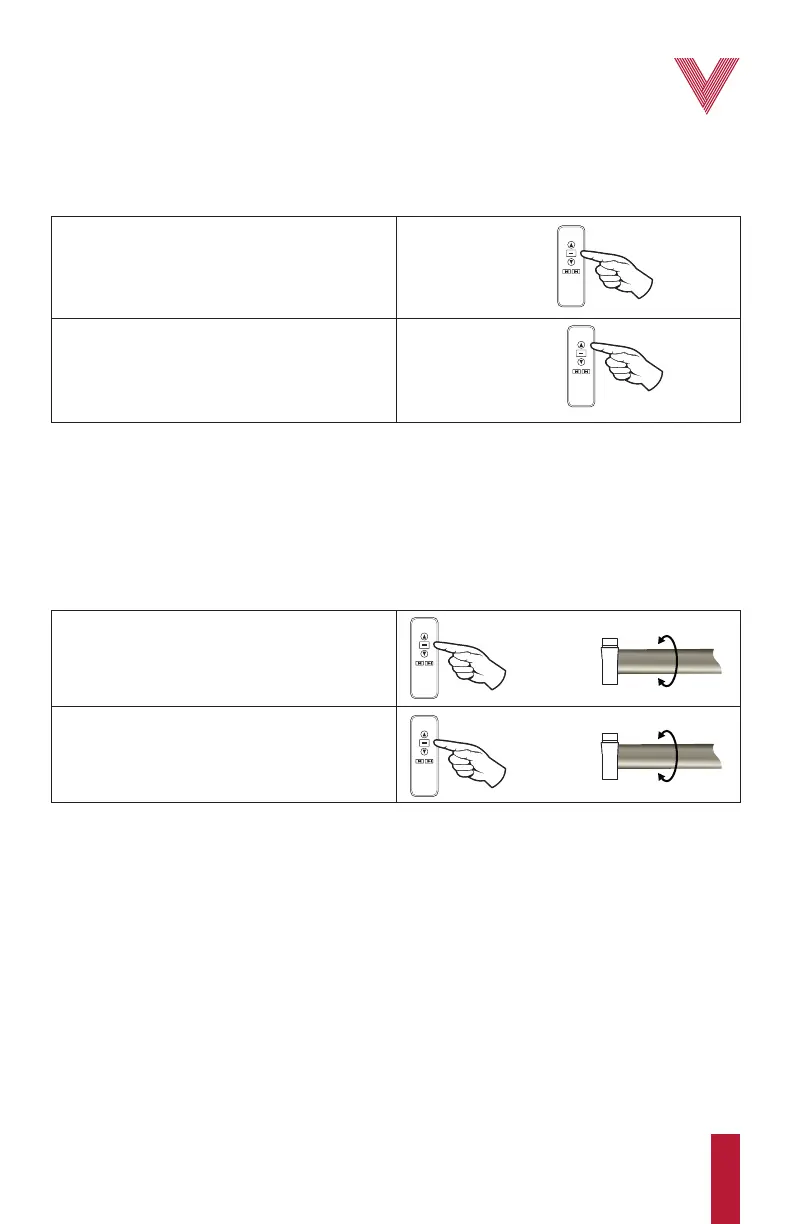
2. Release the stop button and press it again for
about 2 s. The motor will “jog” again.
The tilt or jog mode has been programmed.
1. Press and hold the stop button for about 5 s
until the motor “jogs”.
STOP
BUTTON
STOP
BUTTON
1. Using the previously programmed Vertilux
remote, select the desired channel using the
channel selector button, then press and hold the
stop button for about 5 s until the motor “jogs”.
2. Using the new remote, select the desired
channel using the channel selector button, and
then press the up button until the motor “jogs”.
Vertilux shades are now paired with the new
remote or channel.
STOP
BUTTON
UP
BUTTON
PREVIOUSLY
PROGRAMMED
REMOTE CONTROL
NEW REMOTE
CONTROL
OR CHANNEL
6
vertilux.com
© 2021. Vertilux, Ltd. All Rights Reserved. Last revised: June 2021.



 To Next Page