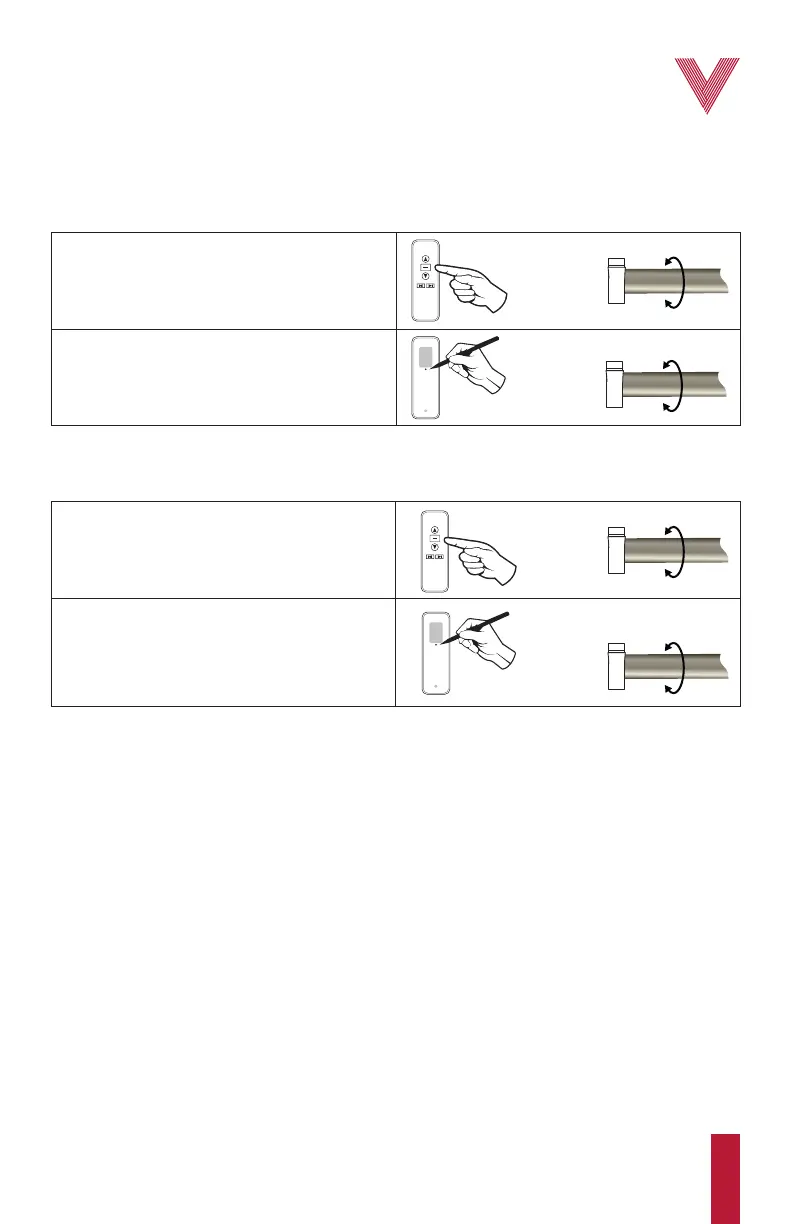
2. Press and hold the programming button for
about 2 s until the motor “jogs”. The selected
channel has been deleted. Motors previously
linked to this channel are not linked anymore.
1. Select the desired channel using the
channel selector button, and press and hold the
stop button for about 5 s until the motor “jogs”.
Resetting the motor to factory default
7
vertilux.com
© 2021. Vertilux, Ltd. All Rights Reserved. Last revised: June 2021.
Deleting a single motor or channel
This is a convenient feature when there has been a programming mistake and it is required to
delete the programming from a single channel. Also if you want to delete a programmed motor in
a single channel, turn off the power supply of all motors previously programmed in this channel
except the one you want to delete and follow this procedure.
PROGRAMMING
BUTTON
STOP
BUTTON
1. Press the stop button for approximately 5 s
until the motor “jogs”.
2. Press and hold the programming button for
about 7 s. The motor will “jog”, and in a few
seconds the motor will “jog” two more times.
The motor is now unlinked from the remote
control.
PROGRAMMING
BUTTON
STOP
BUTTON



 To Next Page