8.2.1 Replacing the Filters
WARNING! Risk of contact with high-speed rotating fan blades. Can cause serious injury or death. Open all
local and remote electric power-supply disconnect switches, verify with a voltmeter that power is off, and
verify that all fan blades have stopped rotating before working in the unit cabinet or on the fan assembly. If
control voltage is applied, the fan motor can restart without warning after a power failure. Do not operate the
unit with any or all cabinet panels removed.
1. Enter the unit through the service access door, and locate the supply-side air filters in front of the heat
exchanger.
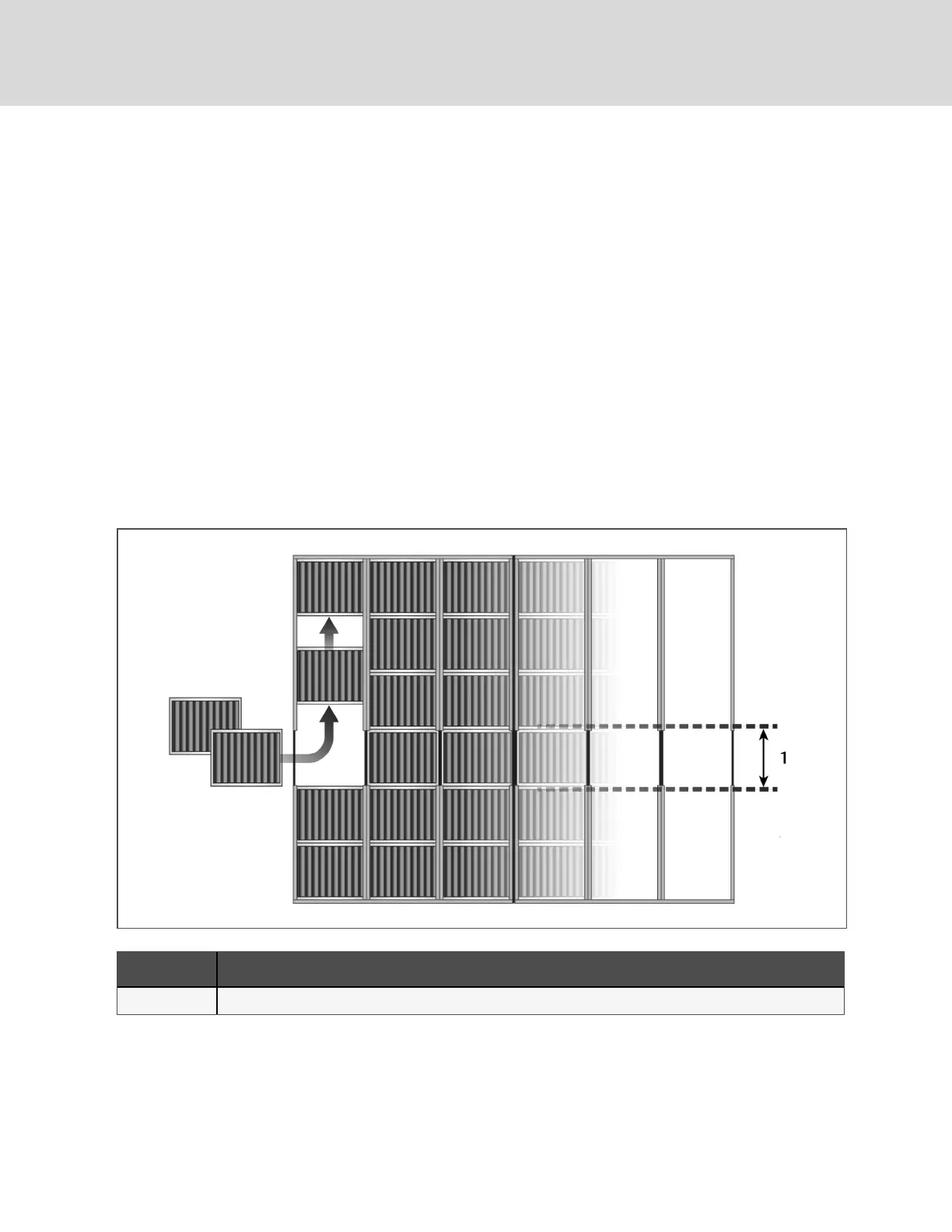
2. Using the slot on the filter rack, shown in the following figure, remove all 30 filters:
3. Referring Figure 8.2 below, install the new air filters in each column as follows:
• At the slot, insert the bottom two filters.
• Add filters, and slide them upward until the column is filled.
• The last filter is installed in the slot in the column.
Figure 8.2 Supply Fan Air Filters in the Rack
Item Description
1 Slot in filter rack
Vertiv | DSE Packaged Solution Installer/User Guide
36



 To Next Page