This document describes the VEVOR Coin Sorter, Model 1550, a device designed for sorting coins.
Function Description
The VEVOR Coin Sorter is a machine that sorts coins. It allows users to put coins into a hopper, and the machine then sorts them into different channels. It also provides a report function to check the counting results for each channel. The machine supports the use of coin tube attachments, enabling users to wrap sorted coins with standard paper rolling wrappers.
Important Technical Specifications
- Ambient Temperature: 0℃~40℃
- Ambient Humidity: 30~80%
- Hopper Capacity: Max. 1500 units
- Each Coin Drawer Capacity: 50~300 units
- Batch Preset Number Display: 3 Digits LED
- Counting Number Display: 4 Digits LED
- Power Source: AC110V/60HZ
- Power Consumption: ≤ 15W
- Dimensions: 430395330mm
- Gross Weight: 5.33kg
- Counting Speed: Max. 300 units/min
Usage Features
The coin sorter is designed for straightforward operation:
- Setup: Ensure the machine is placed on a level surface before turning it on.
- Batch Setting: Users can set an expected batch number for each channel, ranging from 0 to 999. This is done by pressing the "SET" key to select the channel, and then using the "BAT," "+," and "-" keys to adjust the batch number.
- If a channel's batch is set to 0, the machine will not stop for that channel even if the drawer is full, unless the "START/STOP" key is pressed or no coin drops through the channel within 20 seconds.
- Pressing and holding the "-" key for 7 seconds will set all channels to batch 0.
- Batch settings are automatically memorized.
- Starting Count: Place coins into the hopper and press the "START/STOP" key to begin counting. Pressing "START/STOP" again will stop the counting process.
- Checking Report: In standby mode, pressing the "REPORT" key repeatedly allows users to check the counting results for each channel. Pressing the "C" key exits this report checking procedure.
- Coin Tube Attachments: The machine is compatible with coin tube attachments, allowing for easy wrapping of sorted coins with standard paper rolling wrappers. The operation with attachments is the same as without.
Maintenance Features
Regular maintenance is crucial for the machine's longevity and performance. Always turn off the machine and unplug the power before performing any maintenance.
- Foreign Object Removal: Foreign objects falling into the hopper can cause jamming or damage. If a foreign object falls in, open the back cover and carefully remove it.
- Coin Jamming Removal: If coins jam, use a finger to push up the jammed coin from below, allowing it to fall out from the gap between the channels.
- Error Messages and Troubleshooting:
- EA (Optical Sensor Blocked): This indicates the optical sensor is blocked, often by dust. To resolve this:
- Stop the machine and remove the back cover.
- Manually turn the carry tray.
- Locate the glass on the top left corner (visible with outer light).
- Clean the dust from the glass.
- If EA frequently appears due to a dusty environment, a more thorough cleaning of the inner parts is needed:
- Switch off the machine and cut power.
- Remove 3 bolts from the bottom of the crust and remove the crust.
- Clean dust from the inner parts.
- Reassemble.
* E1...E8 (Count Sensor Blocked): These errors indicate a blocked count sensor, corresponding to coin diameter from short to long range.
* E9 (Running Sensor Blocked): This indicates the running sensor is blocked.
* If cleaning the inner parts and sensors does not resolve the issue, the machine may require professional repair.
Safety Precautions
To ensure safety and prevent injury or damage, users must adhere to the following precautions:
- Read the instruction manual carefully before use.
- Do not operate the machine in wet or damp conditions to avoid electrical shock.
- Use only the specified type and rating when replacing fuses to prevent fire hazards.
- Ensure the machine's voltage matches the domestic mains supply.
- Turn off and unplug the power before maintenance.
- Do not start the machine with the back cover open.
- Keep fingers out of the hopper or channels during operation.
- Unplug the machine when not in use for extended periods.
- Contact a distributor or sales agent for any doubts or further advice.
- Do not disassemble the product to reduce the risk of electric shock; refer service and repair work to qualified personnel. Incorrect re-assembly can cause electric shock.
- Use only the provided power cable. Damaged cables must be replaced by the manufacturer or qualified persons.
- Do not use the unit if the power cord is damaged or the plug socket contact is loose.
- Avoid placing heavy objects on the cord or bending it excessively.
- This equipment is not suitable for use in locations where children are likely to be present.
- The power cord must be connected to a socket-outlet with an earthing connection.

 Need help?
 General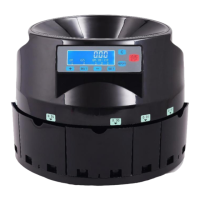

 To Next Page