12
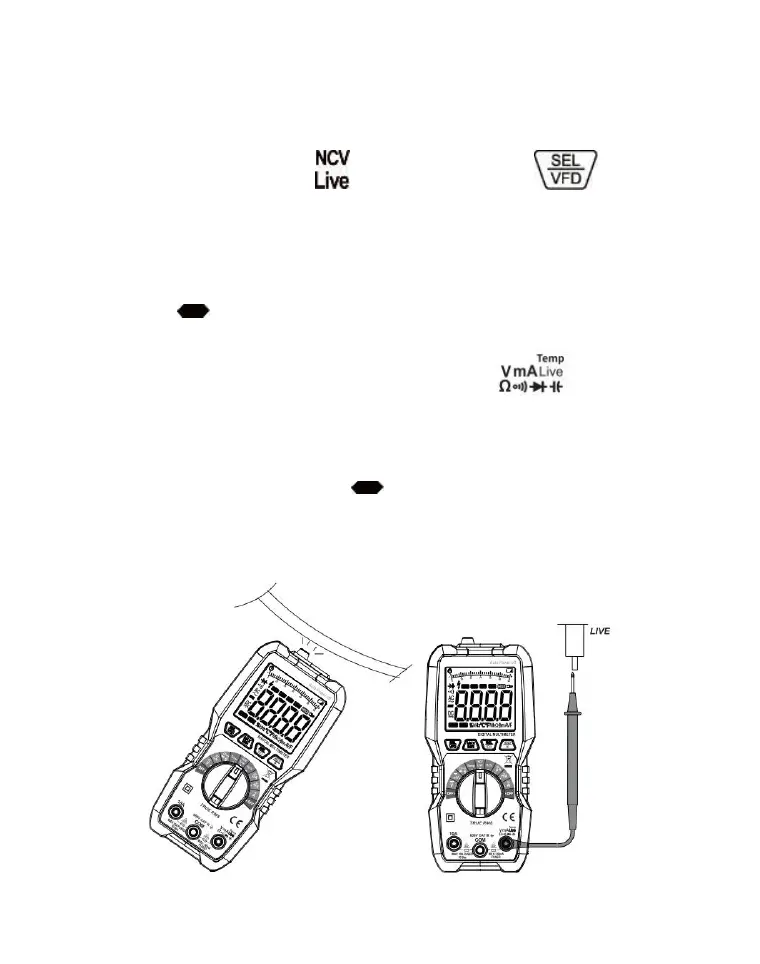
Non-contact electricity verification (NCV) / Live wire
detection (Live)
1. Turn the knob switch to the " " position and press the key to
switch NCV or Live function.
2. Under the NCV function, place the NCV sensing area close to the wire to be
measured. When the AC voltage is detected, the buzzer will make an intermittent
sound, which varies with the intensity of the induced voltage. Meanwhile, the
number of " " is displayed on the display screen. The more the number, the
stronger the induced signal.
3. Under the Live function, insert the red probe into the " " jack, and the
black probe is not connected. Connect the red probe to the cable to be measured.
When the detected electric AC voltage is greater than about 36V, the buzzer will
emit intermittent sound, which varies with the intensity of the induced
voltage. Meanwhile, the number of " " is displayed on the display screen.
The more the number, the stronger the induced signal.
Note:NCV mode can also connect the probe in Live mode to judge the live
wire, but the sensitivity will be higher than that in Live mode.
NCV Live


 To Next Page