21
1. Turn off the power supply of the instrument.
2. Disconnect the probe from the measured circuit.
3. Loosen the screws fixing the battery cover with a screwdriver and remove the
battery cover.
4. Remove the battery and replace it with a new one. Pay attention to the positive
and negative polarity of the battery.
5. Install the battery cover and tighten the screws.
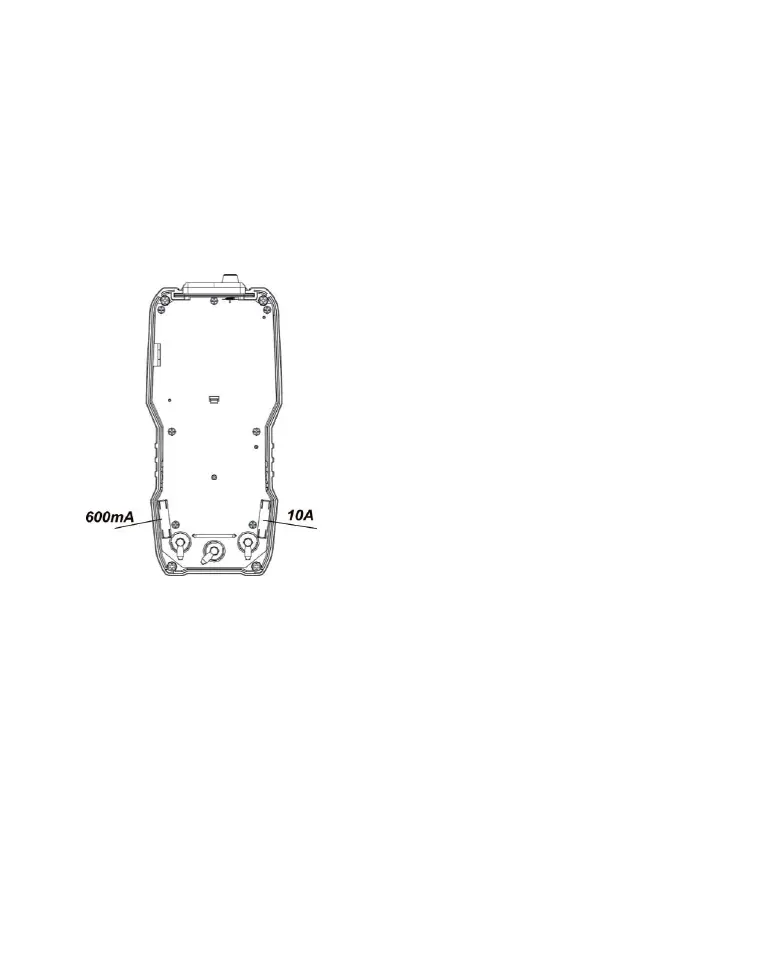
Please replace the battery as the following steps:
1. Turn off the power supply of the instrument.
2. Disconnect the probe from the measured circuit and remove the protective
leather case.
3. Loosen the screws, fix the battery cover with a screwdriver, and remove the
battery cover.
4. Remove the damaged fuse tube and replace it with a new one.
5. Install the back cover, tighten the screws, and install the leather cover.
Attention:
600mA fuse tube:600mA/250V;
10A fuse tube:10A/250V;


 To Next Page