2/2
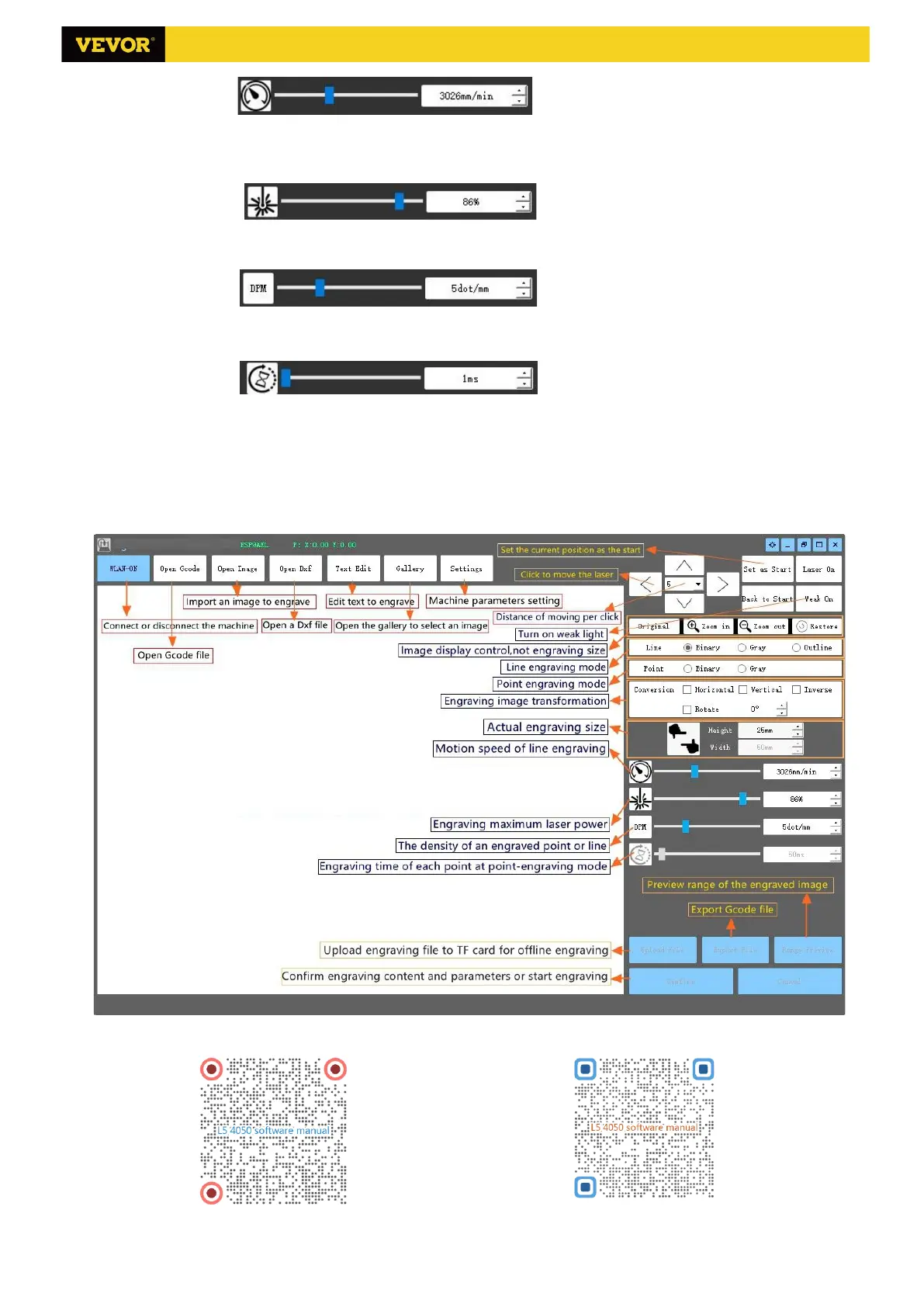
(2) Maximum laser power: Set the maximum laser power, which is the laser power when the maximum gray level
(i.e. all black) in the dot matrix gray mode and line scan gray mode and the laser power in the Binary (black and
white) engraving mode. The unit is the percentage of the installed laser full power.
(3) Engraving point distance: set the precision of dot matrix engraving or line scanning engraving, and the number
of lines or points per millimeter.
(4) Time of dot engraving: Set the engraving time of each dot. The unit is millisecond. According to the power of
the laser module, we generally recommend to set about 1ms to 5ms.
6. Preview the engraving range and start engraving
Click Range preview to confirm the position and range of engraving. Click Start and wait for the engraving to be
completed.
7. Introduction of software interface function
To learn more about the hardware and software features of VG-L5, Please scan the QR code of hardware manual
and software manual at the end of the paper.
Scan to browse software manual Scan to browse hardware manual
Powered by VEVOR 2020



 To Next Page