6
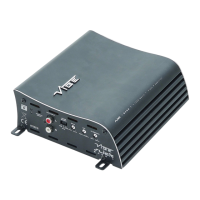
1. Rear gain control
This control is used to match the input signal of the source to the rear channels of the
amplier. See the setup section for more details.
2. Rear low level input / output
For connection to any source (head unit) with a low level output to the rear channels of
the amplier. This is your RCA output from the source (headunit). Additionally, if using
high level input this RCA lead provides an output can be used to connect an additional
amplier or audio device.
3. Rear crossover mode select switch
This control is used to select the crossover mode of the rear channels of the amplier.
FULL is for full range output, HPF is used to limit the amount of low frequency information
passed to the speakers and is xed at 80Hz.
4. Front crossover mode select switch
This control is used to select the crossover mode of the rear channels of the amplier.
FULL is for full range output, HPF is used to limit the amount of low frequency information
passed to the speakers and is xed at 80Hz.
5. Front low level input / output
For connection to any source (head unit) with a low level output to the rear channels of
the amplier. This is your RCA output from the source (headunit). Additionally, if using
high level input this RCA lead provides an output can be used to connect an additional
amplier or audio device.
6. Rear gain control
This control is used to match the input signal of the source to the rear channels of the
amplier. See the setup section for more details.
7. Power / protect LED
If the amplier is operating normally, the GREEN LED will illuminate.
If the amplier is in protection mode the RED LED will illuminate.
8. Fuse
Replace with only the same value ATC fuse : 20A
9. Power / speaker terminals
Used to connect DC power and speaker input / output cables to the amplier. See the
wiring conguration section for more details
Terminals And Connections


 To Next Page
 Loading...