8
INSTRUCTIONS FOR USE OWNERS MANUAL
BLUETOOTH CONNECTIVITY
Your Vibrapower HIIT has built in
Bluetooth and a speaker. You can use
this to play music while you work out
without the need for headphones.
Bluetooth mode is activated the moment
you turn on the Vibrapower HIIT, you will
hear “Bluetooth activated”
• Make sure Bluetooth is activated on
the smart device you wish to connect
to the Vibrapower HIIT.
• On your smart device, search for
Bluetooth devices; the Vibrapower
HIIT will show up as “Wishing”.
• Tap or select “Wishing” to connect,
within a few moments you should
hear “Bluetooth connected”.
You can then choose the music you wish
to play through your Vibrapower HIIT
using your smart device. Control the
volume through your smart device.
When turning Bluetooth off on your
smart device, you will hear “Bluetooth
disconnected” from your Vibrapower
HIIT.
Note: Bluetooth connection is available
using most Bluetooth enabled smart
devices. Not all devices are compatible.
PROGRAMS
The machine can be used in various
modes as described below.
MANUAL MODE
Before starting, select the time length of
the program (Maximum time is 20
minutes). Press TIME UP or TIME DOWN
on the remote or +/- on the display to
select the desired workout time in
minutes and then press on the remote
or POWER on the display.
The Vibrapower HIIT will start to oscillate
at speed “01”. To increase or decrease
the speed, simply press SPEED UP or
SPEED DOWN according to your
abilities.
To stop the machine at any time, press
or the POWER button on the display,
and the machine will return to ready
mode.
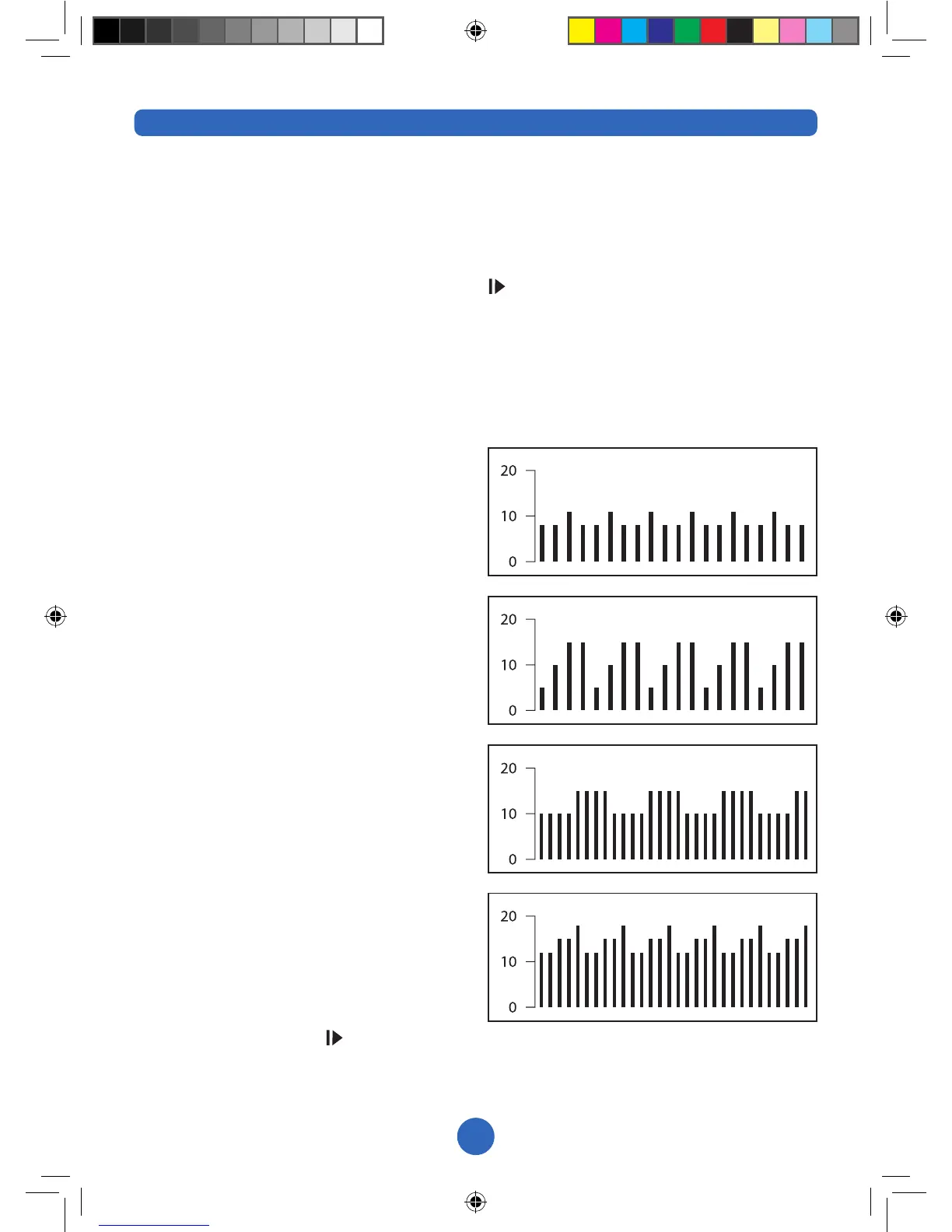
PROGRAM MODE
There are four different HIIT programs
automatically set in the unit.
P3
P2
P1
P4


 To Next Page