EasyManua.ls Logo

Vicovation Vico-Opia 2 Premium - Page 6

Vicovation Vico-Opia 2 Premium
57 pages
Print Icon
To Next Page IconTo Next Page
To Previous Page IconTo Previous Page
Loading...
Camera
and
Cord
Installation
Installation
Steps
1
.
In
order
to
keep
the
device
functioning
properly,
please
use
the
VicoVation
power
cable
that
comes
with
the
package
at
all
times.
2.
Plug
the
power
cable
into
the
D/C
outlet
then
connect
the
USB
side
with
Vico-Opia2
insert
into
the
power
port.
3.
Attach
and
adjust
the
mount
on
the
windshield
in
the
proper
position.
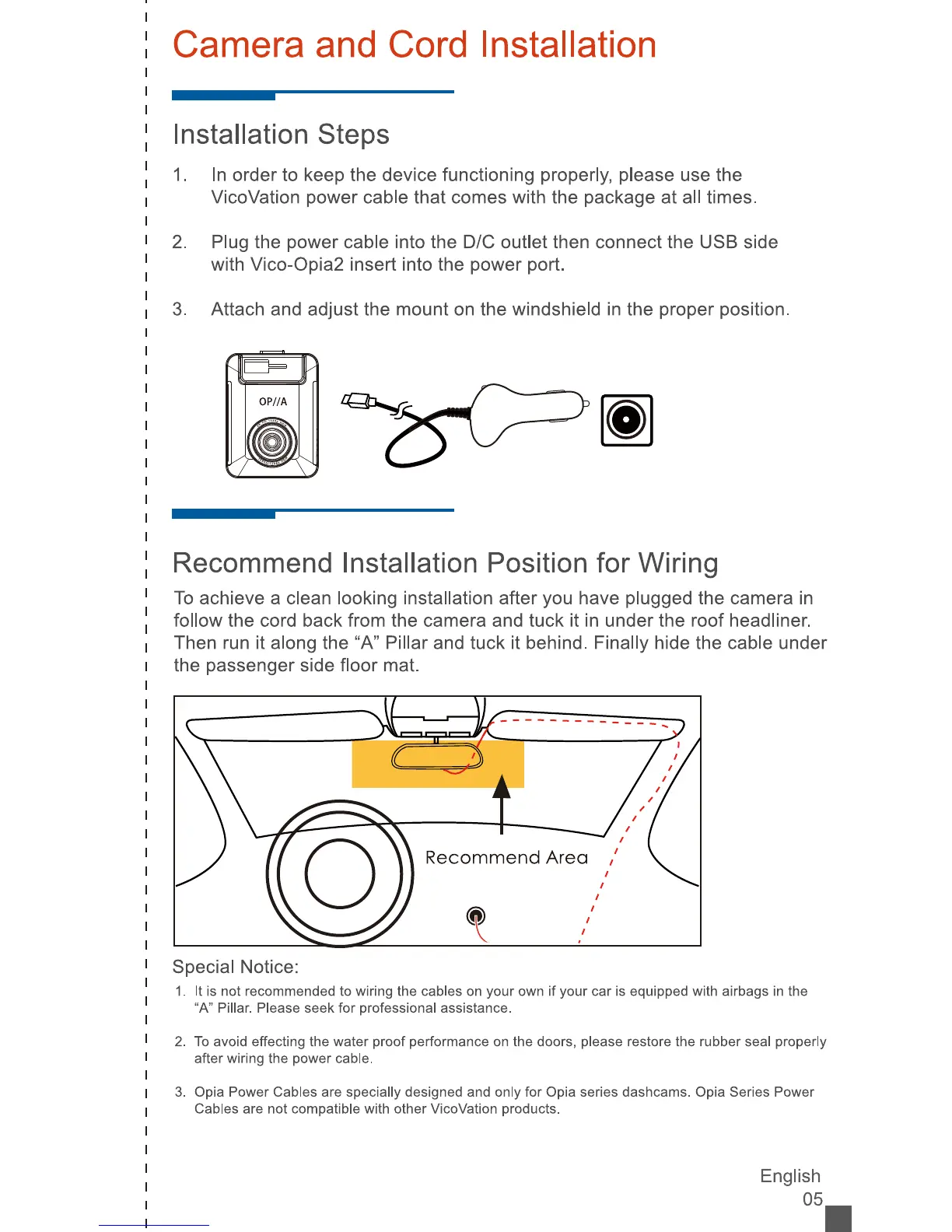
Recommend
Installation Position
for
Wiring
To
achieve
a
clean
looking
installation
after
you
have
plugged
the
camera
in
follow
the
cord
back
from
the
camera
and
tuck
it
in
under
the
roof
headliner.
Then
run
it
along
the
"A"
Pillar
and
tuck
it
behind.
Finally
hide
the
cable
under
the
passenger
side
floor
mat.
Recommend
Area
Special
Notice:
1
.
It
is
not
recommended
to
wiring
the
cables
on
your
own
if
your
car
is
equipped
with
airbags
in
the
"A"
Pillar.
Please
seek
for
professional
assistance.
2.
To
avoid
effecting
the
water
proof
performance
on
the
doors,
please
restore
the
rubber
seal
properly
after
wiring
the
power
cable.
3.
Opia
Power
Cables
are
specially
designed
and
only
for
Opia
series
dashcams.
Opia
Series
Power
Cables
are
not
compatible
with
other
VicoVation
products.
English
05_

Related product manuals