EasyManua.ls Logo

Vicovation Vico-Opia 2 Premium - Page 7

Vicovation Vico-Opia 2 Premium
57 pages
Print Icon
To Next Page IconTo Next Page
To Previous Page IconTo Previous Page
Loading...
Camera
and
Cord
Installation
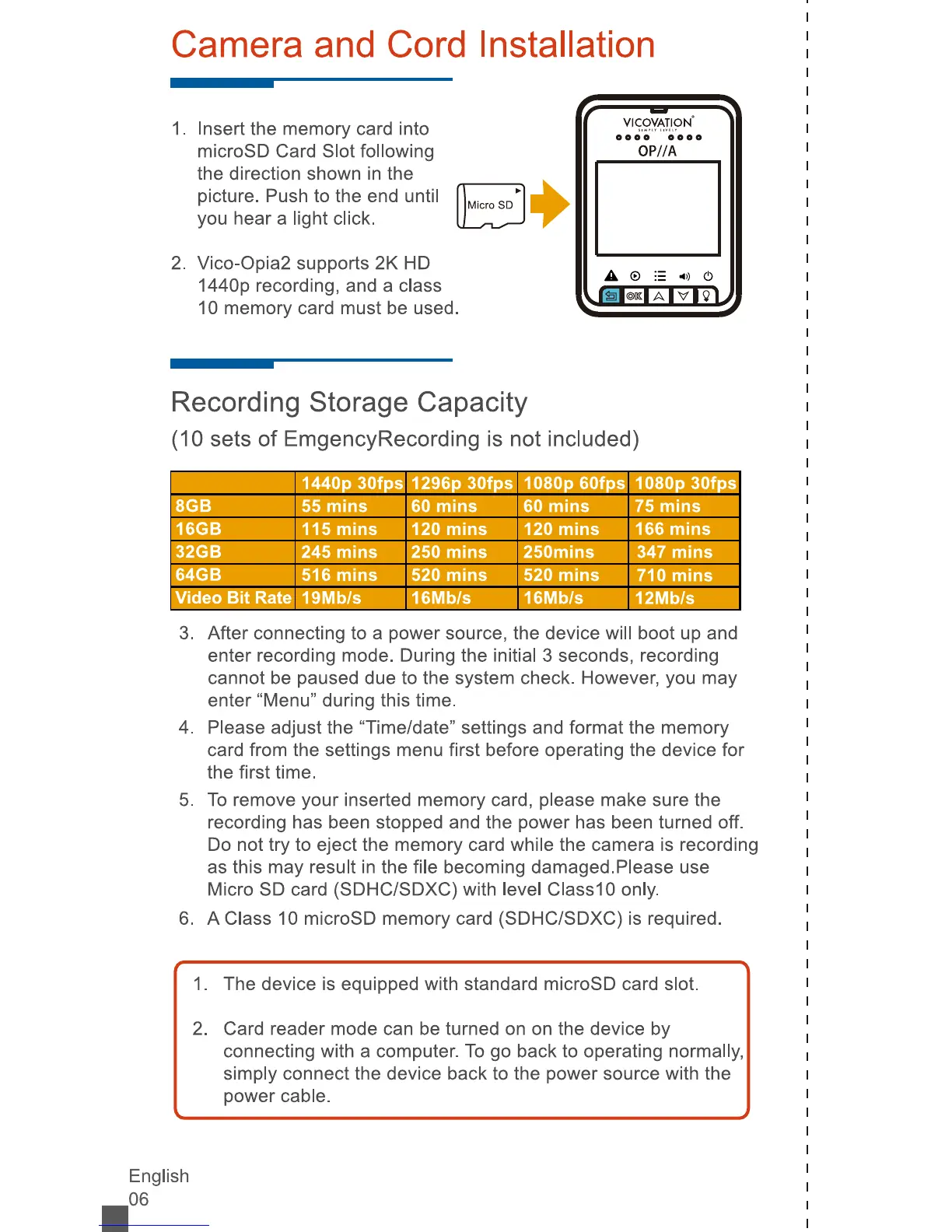
Insert
the
memory
card
into
microSD
Card
Slot
following
the
direction
shown
in
the
picture.
Push
to
the
end
until
you
hear
a
light
click.
Vico-Opia2
supports
2K
HD
1440p
recording,
and
a
class
10
memory
card
must
be
used.
OP//A
Recording
Storage
Capacity
(10
sets
of
EmgencyRecording
is
not
included)
8GB
1440p
30fps
55
mins
1
296p
30fps
60
mins
1080p
60fps
60
mins
1080p
30fps
75
mins
16GB
115
mins
120
mins
120
mins
166
mins
32GB
245
mins
250
mins
250mins
347
mins
64GB
Video
Bit
Rate
516
mins
19Mb/s
520
mins
16Mb/s
520
mins
16Mb/s
710
mins
12Mb/s
3.
After
connecting
to
a
power
source,
the
device
will
boot
up
and
enter
recording
mode.
During
the
initial
3
seconds,
recording
cannot
be
paused
due
to
the
system
check.
However,
you
may
enter
"Menu"
during
this
time.
4.
Please
adjust
the
"Time/date"
settings
and
format
the
memory
card
from
the
settings
menu
first
before
operating
the
device
for
the
first
time.
5.
To
remove
your
inserted
memory
card,
please
make
sure
the
recording
has
been
stopped
and
the
power
has
been
turned
off.
Do
not
try
to
eject
the
memory
card
while
the
camera
is
recording
as
this
may
result
in
the
file
becoming
damaged.
Please
use
Micro
SD
card
(SDHC/SDXC)
with
level
ClasslO
only.
6.
A
Class
10
microSD
memory
card
(SDHC/SDXC)
is
required.
1
.
The
device
is
equipped
with
standard
microSD
card
slot.
2.
Card
reader
mode
can
be
turned
on
on
the
device
by
connecting
with
a
computer.
To
go
back
to
operating
normally,
simply
connect
the
device
back
to
the
power
source
with
the
power
cable.
English
.06

Related product manuals