7. PROGRAMMING
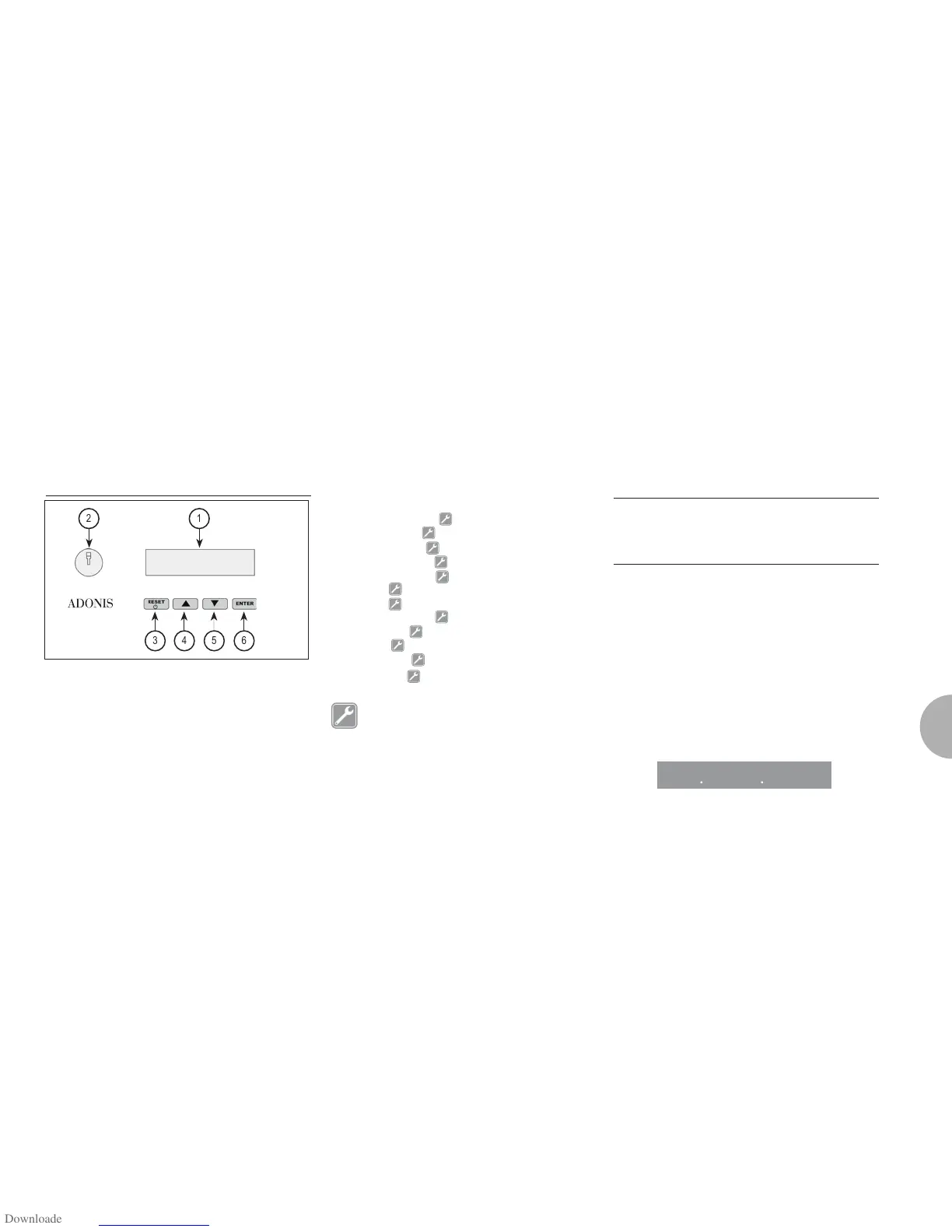
7.1 KEY
0 LCD Display.
1 Technician/waiter key lock.
2
RESET Key: to turn the machine on and
off and to exit menu.
3CURSORI Key: to scroll the menu and
4 to increase and
decrease values.
5ENTER Key: to access the menu.
LIST OF PROGRAMMABLE FUNCTIONS
AUTO.CLEAN.CYCLE
DOSE PROGRAM.
DELIVERY COUNT
ON-OFF PROGRAM.
CUP-WARMER PRO.
DATE/TIME
GRINDING
HISTORICAL ALARM
MAINTENANCE
LANGUAGE
TEMPERATURE
LIGHT ADJUST
Operation to be carried out EXCLUSIVELY by
a Qualified Technician. Adjustment by NON
qualified technicians can invalidate the guar-
antee.
7.2 PROGRAMMING
To access the programming units, proceed as follows:
E
NOTE
The procedure can be carried out with the machine
on.
• Insert the key marked U (see chapter “USE”) in the
provided keyhole.
AUTOMATIC CLEANING CYCLE
(function also available with T visualization key)
• Press the key to access program; the display
will read:
AUT O. C L EA N. CYC L E
2 1
3 4 5 6

 To Next Page
 Loading...