PRODUCT OVERVIEW
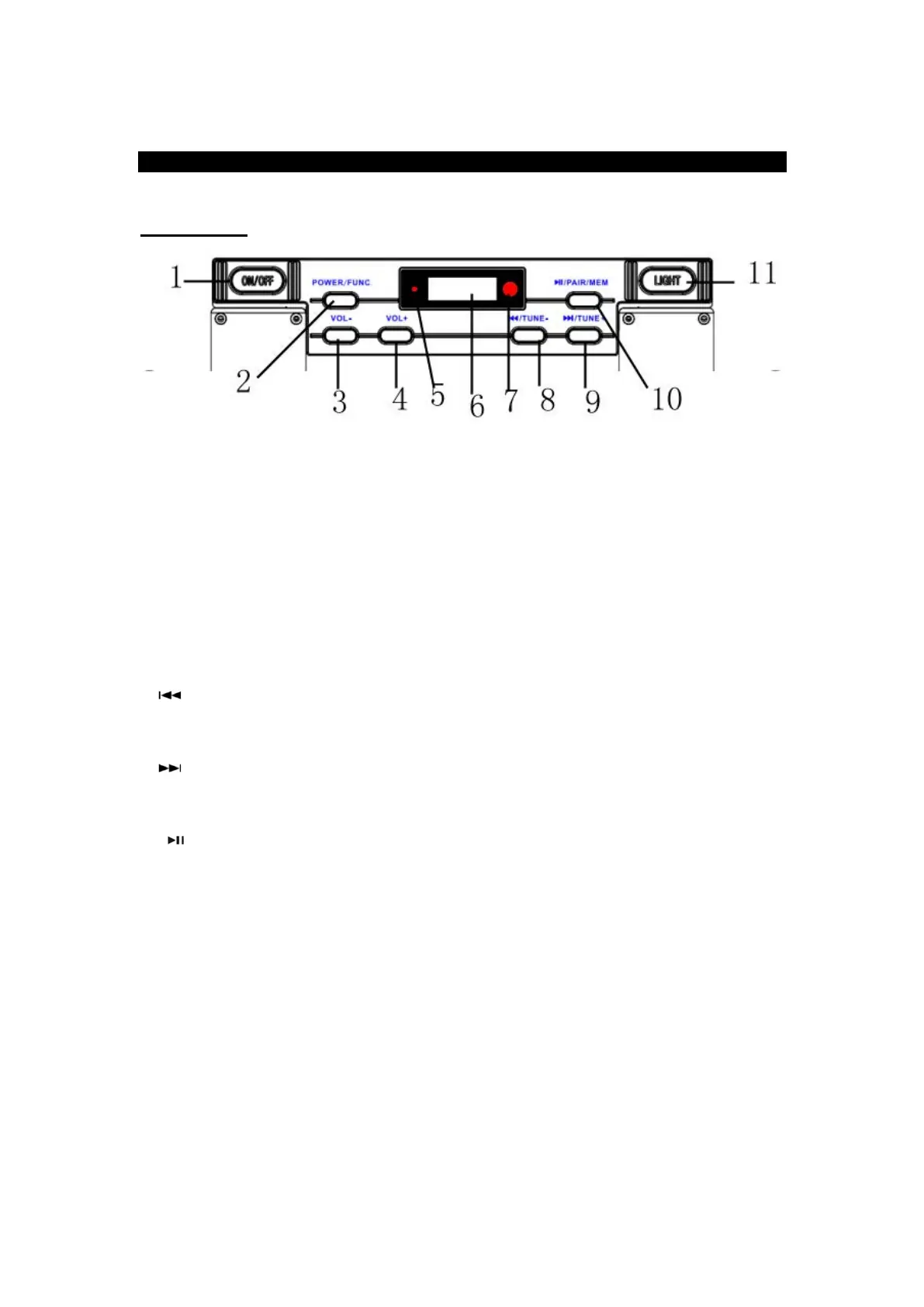
FRONT VIEW:
1. ON/OFF: Turn the unit’s power on or off.
2. Power/Func: Long press to enter Standby Mode. Short press to select between the
different functions such as the FM Tuner, AUX IN, Bluetooth, and Phonograph.
3. VOL-: Reduce Volume, press the button repeatedly or press once and hold down until
you reach the desired volume level.
4. VOL+ : Increase Volume, press the button repeatedly or press once and hold down
until you reach the desired volume level.
5. LED
6. LCD DISPLAY
7. RM: Remote sensor
8. PREVIOUS TRACK/ TUNE - : In Bluetooth mode, press to skip to the previous
track. / In Radio mode, press to manually tune to a desired station or press and hold this
button to auto search a station.
9. NEXT TRACK/ TUNE +: In Bluetooth mode, press to skip to the next track. In
Radio mode, press to manually tune to a desired station or press and hold this button to
auto search a station.
10. / PAIR / MEM: Pause/play the music. In Bluetooth mode, long press to disconnect
Bluetooth device. In FM radio mode, press to add a station to the Memory.
11. LIGHT: Press to turn on / off the light.


 To Next Page