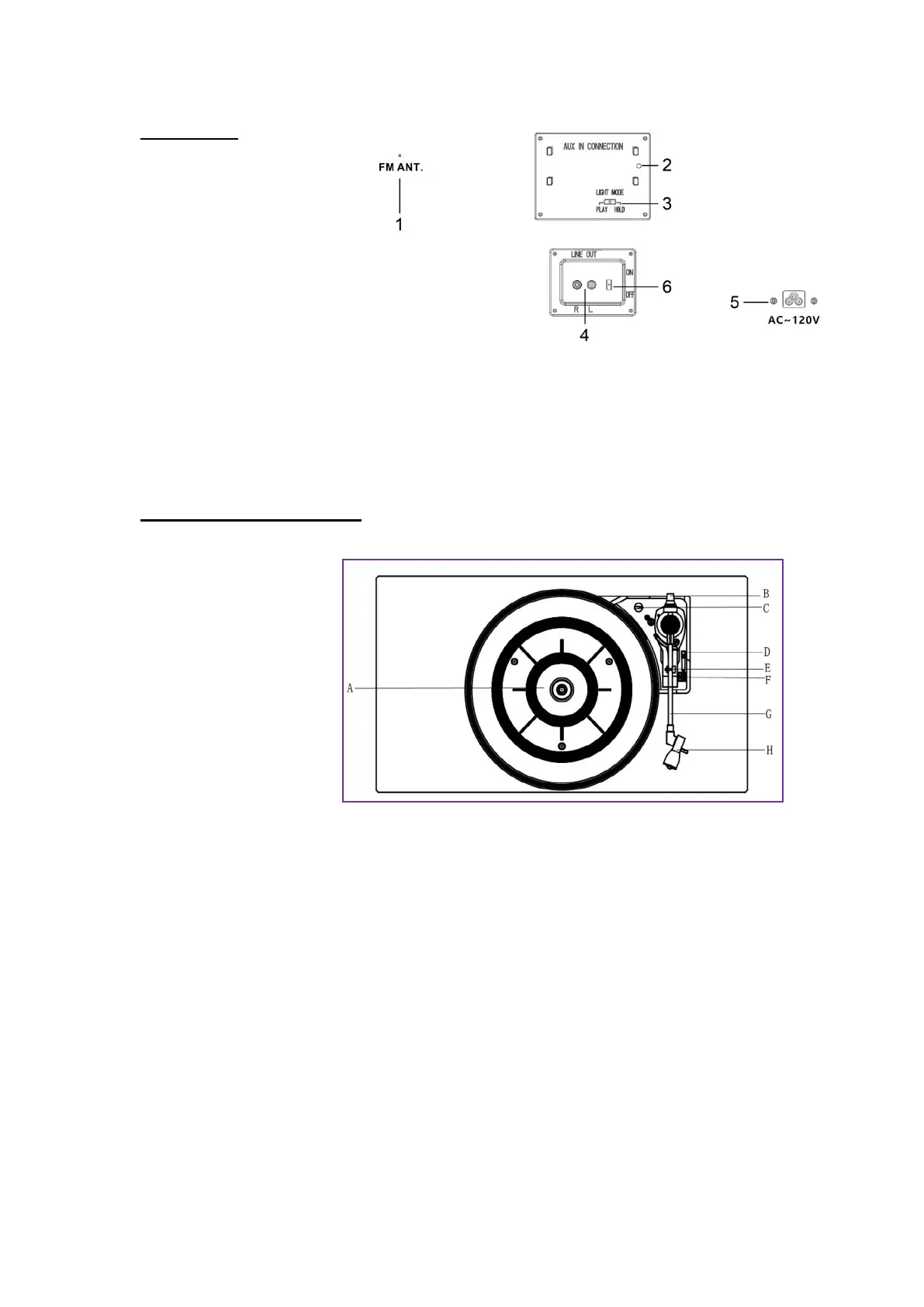
REAR VIEW:
1. FM ANT
:
While tuned to a
station in FM mode, extend
the wire and re-position to
adjust for best reception.
2. AUX IN jack: Connect an
external source.
3. Light Mode Switch: Single
light mode or mixed light mode for LED Tubes.
4. Line out Socket: Plug the included RCA cable into this socket.
5. AC Power Socket: Plug the AC power cord into this socket and plug into a power
outlet.
6. LINE OUT ON/OFF switch
PARTS OF THE TURNTABLE
A. Turntable.
B. Counter weight
C. Safety Screw (for
transport) Before using
the unit, turn the screw
clockwise using a coin or
screwdriver.
Important:
When you transport the
unit, turn the screw
counterclockwise to
secure the turntable.
D. Cue-lever. Use this lever to lift the tone arm.
E. Tone Arm holder.
F. Speed Selector.
G. Tone Arm. Before use, completely loosen the twist-tie on the tone arm and lift the
tone arm up.
H. STYLUS.


 To Next Page