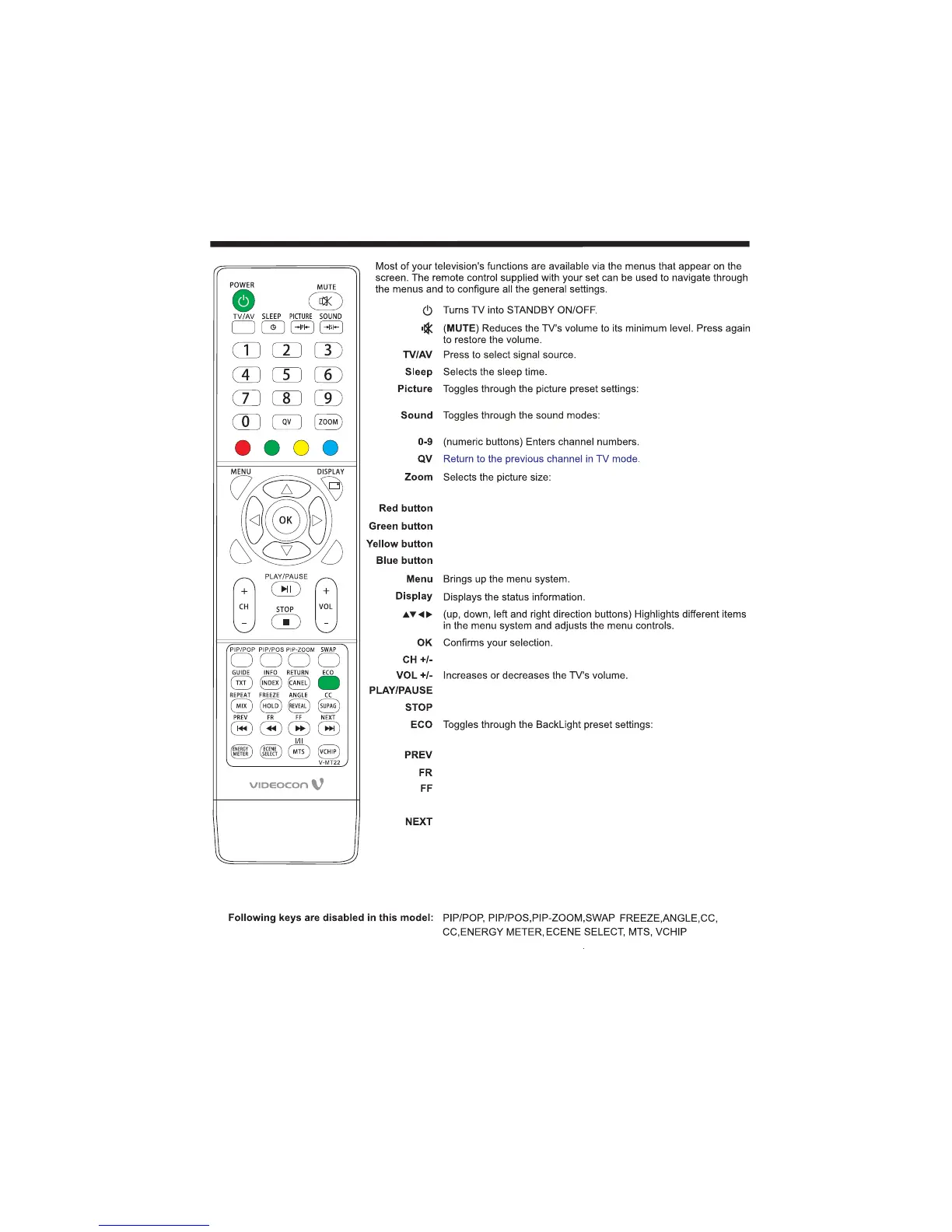
REMOTE CONTROLLER
-16-
Standard, Mild, User,
Dynamic.
Standare Music Movie, , ,
Sports User.,
Auto, 4:3, 16:9, Zoom, Panorama.
Press CH+ or CH- to go to the next or previous channel.
In USB mode, used as Play/Pause key.
In USB mode, used as Stop key.
In USB mode, used as Previous key.
In USB mode, used as reverse key.
In USB mode, used as forword key.
In USB mode, used as Next key.
Favorite program hotkey .
Favorite program hotkey .
Favorite program hotkey .
Favorite program hotkey .
RETURN
REPEAT
Under USB channel, switch to play mode.
Under different channels, optional scaling mode is different.
High, Mid, Low.
OFF, Audio Only,
,
Use this key to return to main multimedia menu while
playing a track/item.
Under HDMI channel, when "HDMI CEC" function set as"open", PLAY/PAUSE STOP PREV NEXT
FF FR will play function accordingly.
、 、 、 、
GUIDE
、
When playing the multimedia file, press [GUIDE] key. The task bar
will show for guiding the Multimedia. Under HDMI channel, when
"HDMI CEC" function set as"open" used as "ROOT MENU" key.,



 To Next Page