20
Ventilation
Select with
MIN
50
Code 1
MAX
300
:
Del.con. 150
165
B
C
DEF
Standard ventilation
C10B
A
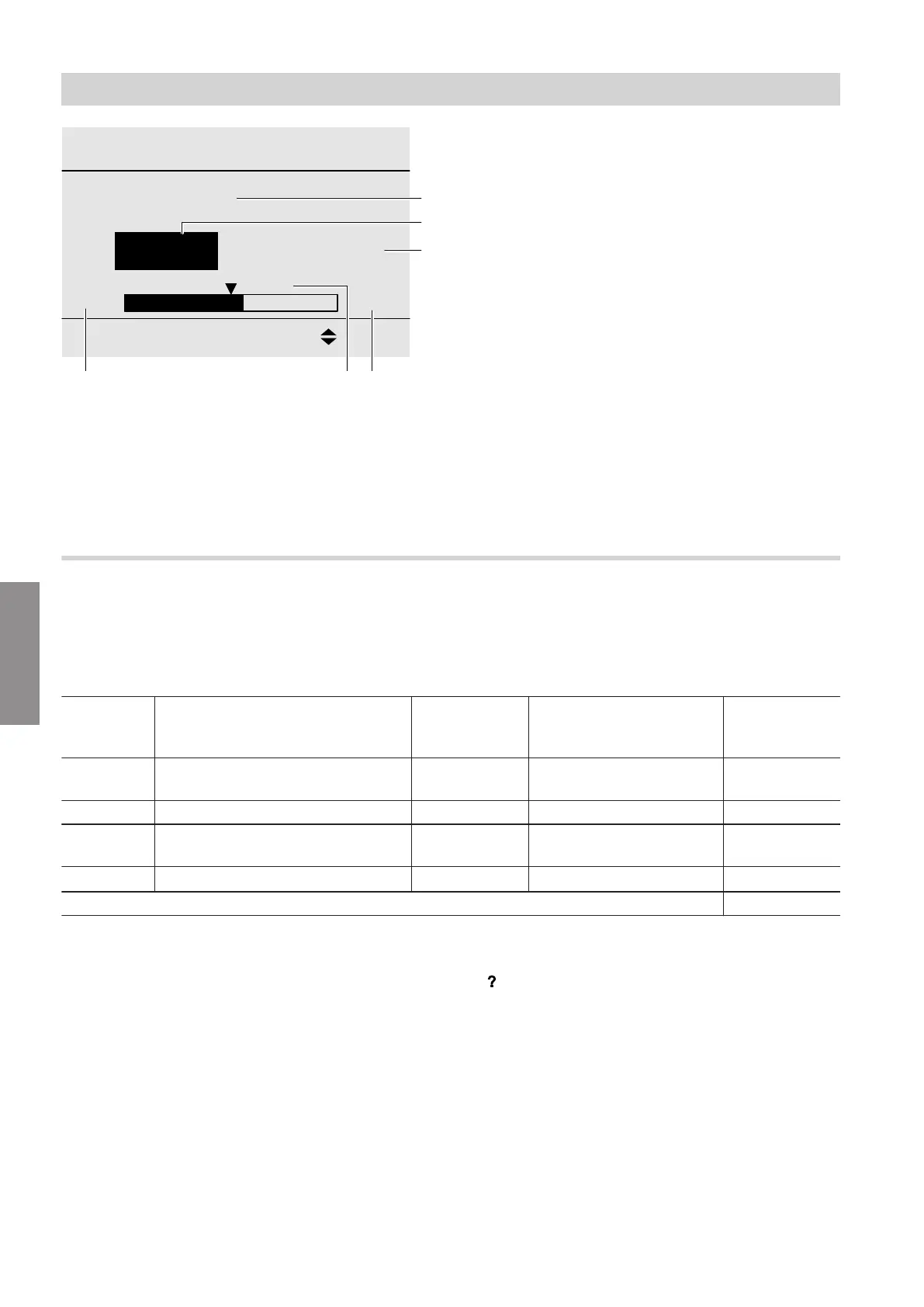
Fig. 8
A
Parameter description
B
Parameter code
C
Current set value
D
Upper limit of the setting range
E
Identification of the delivered condition
F
Lower limit of the setting range
Note
■
The limits of setting range
D
,
F
and delivered con-
dition
E
in Fig. 8 often depend on the type of venti-
lation unit. The values are displayed for almost all
parameters in the ventilation programming unit, type
LB1. Consequently, values
D
,
E
and
F
are not lis-
ted in the following parameter descriptions.
■
Delivered conditions: See chapter "Reports" on
page 56.
Bit field
Bit fields are used to specify the combination of sev-
eral functions or system components with 1 parame-
ter. For any combination, precisely 1 setting results.
The setting of the parameter can be determined in
accordance with the following table:
Setting example
Bit Settings for parameter "Preheat-
ing coil C101"
Bit signifi-
cance
Setting combination
0: Not selected
1: Selected
Total
Bit 1 Factory-fitted electric preheating
coil
1 1 1
... ... ... 0 0
Bit 5 Additional electric preheating coil
(accessories)
16 1 16
Bit N ...
2
N
–
1
0 0
Parameter setting "17"
Setting assistant
With the setting assistant, Bit 0 to Bit N can be selec-
ted from a list (multiple selections are possible). The
setting of a parameter results automatically from the
selected combination.
Note
Assignment of bits to system components or functions:
See the description of the relevant parameter.
1. Service menu and "Parameter level 1" are ena-
bled:
Select parameter with bit field: E.g. "Preheating
coil C101".
2. OK
3.
4. Select the required bits with OK.
5. "Adopt with OK"
Parameter settings
Setting parameters
5816558
Parameter











 To Next Page