13
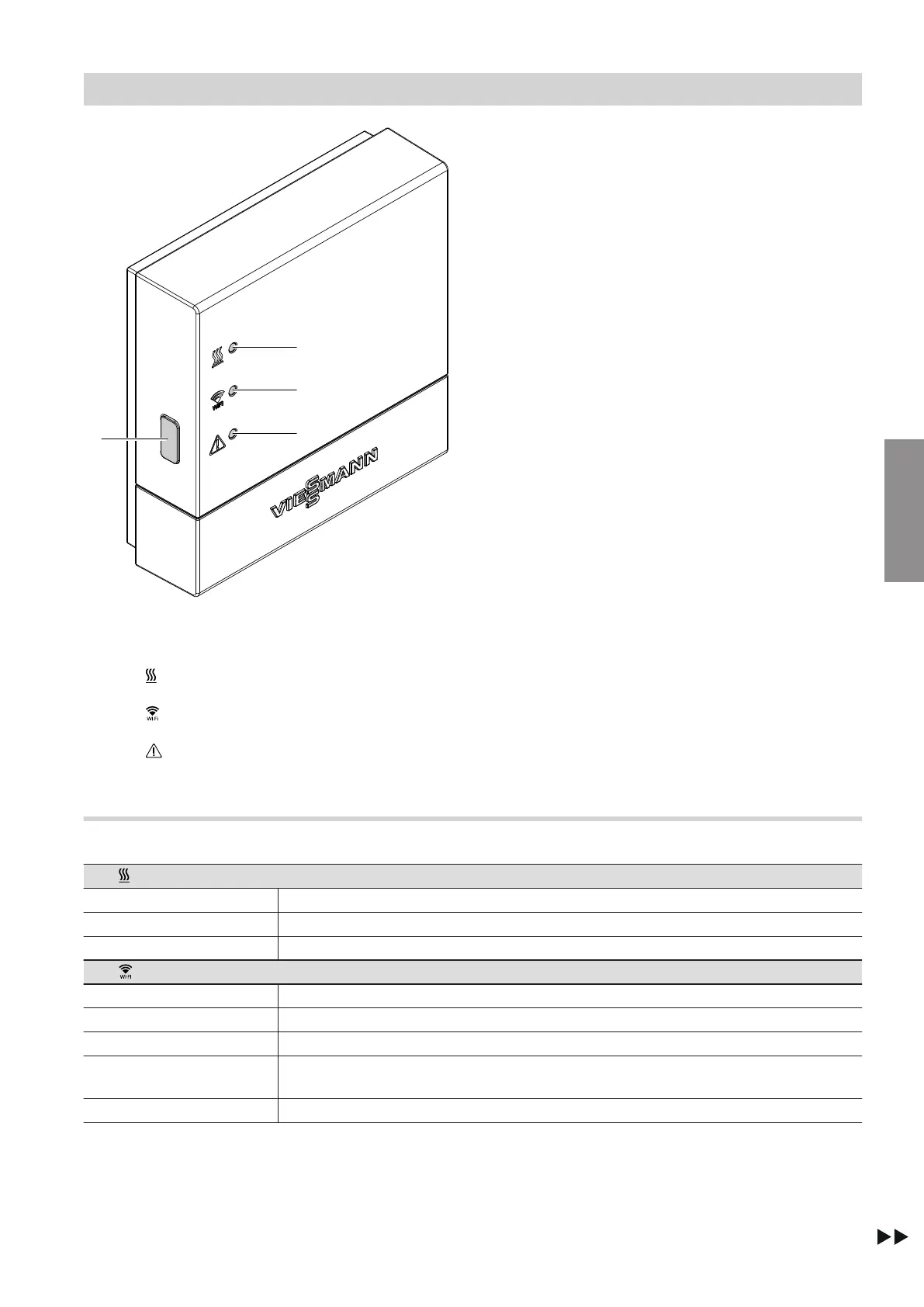
Fig. 4
A
Reset button
1
LED indicates status of communication with heat
source.
2
LED indicates status of communication with
WLAN and Viessmann server.
3
LED indicates system functions (access point
mode, offline mode, update, fault).
Interpreting the LED indicators
LED – Communication with the heat source
Flashes yellow. Connection between Vitoconnect 100 and heat source being established
Illuminates green. Connection between Vitoconnect 100 and heat source successfully established
Flashes red. No connection to the heat source, see page 16.
LED – Communication with the Viessmann server
Flashes yellow. Connection between Vitoconnect 100 and WLAN router being established
Illuminates yellow. Connection between Vitoconnect 100 and WLAN router successfully established
Flashes green. Connection between Vitoconnect 100 and Viessmann server being established
Illuminates green. Connection between Vitoconnect 100 and Viessmann server successfully establish-
ed
Flashes red. No connection to the internet, see page 16.
Commissioning
Display and controls
5785 665 GB
Commissioning


 To Next Page