11
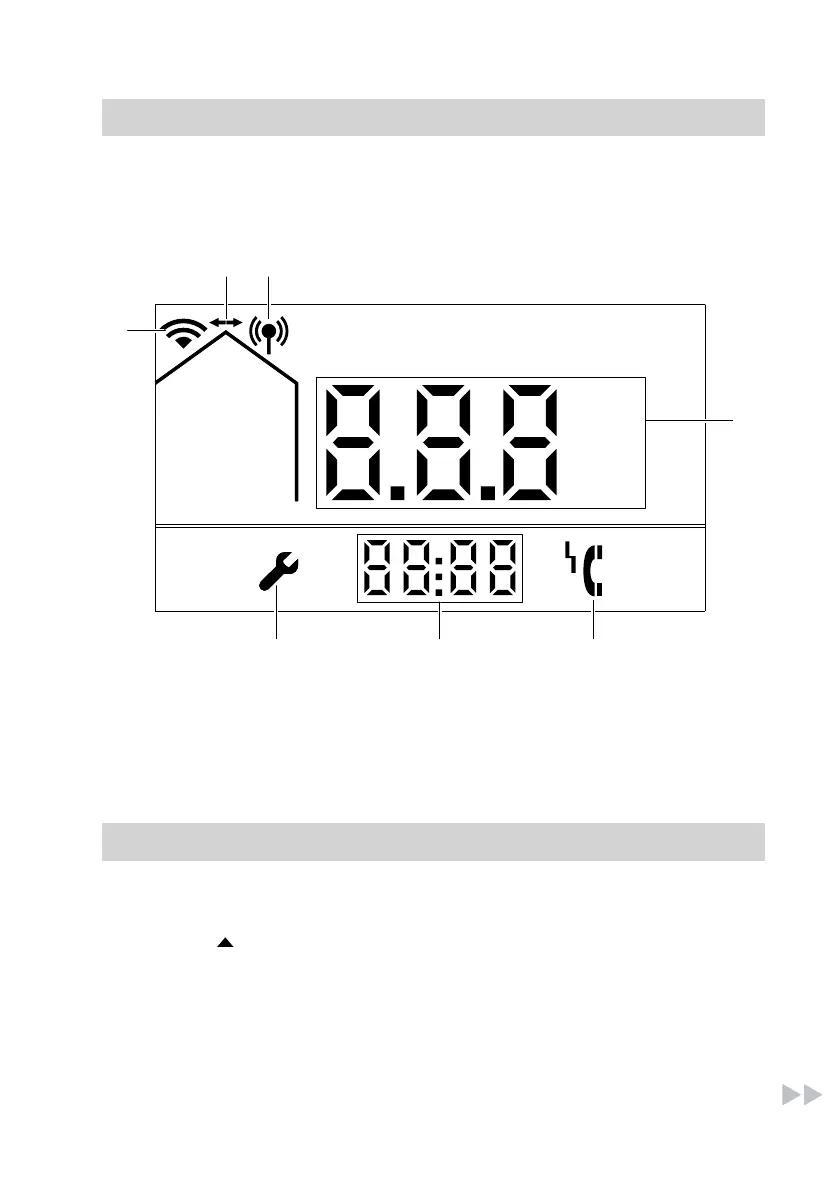
These symbols are not always dis-
played, but appear subject to operating
conditions.
A
WiFi enabled
B
WiFi data exchange
C
Access point mode active
D
Main display
E
Fault indicator
F
Additional display
G
Service setting is active.
Connecting the control unit to the WiFi
Activating the WiFi module via key combination
Press MODE, and OK simultane-
ously and hold for at least 5 seconds
until "On" or "OFF" appears on the
display. Release the buttons and the
change will be accepted.
If the WiFi module has been switched
on for the first time, it is in access point
mode so that it can be configured via
the associated Viessmann app. See
chapter "Connecting the heating sys-
tem to WiFi and the Viessmann server".
Symbols on display in connection with WiFi module
5838175



 To Next Page