6
OPERATION
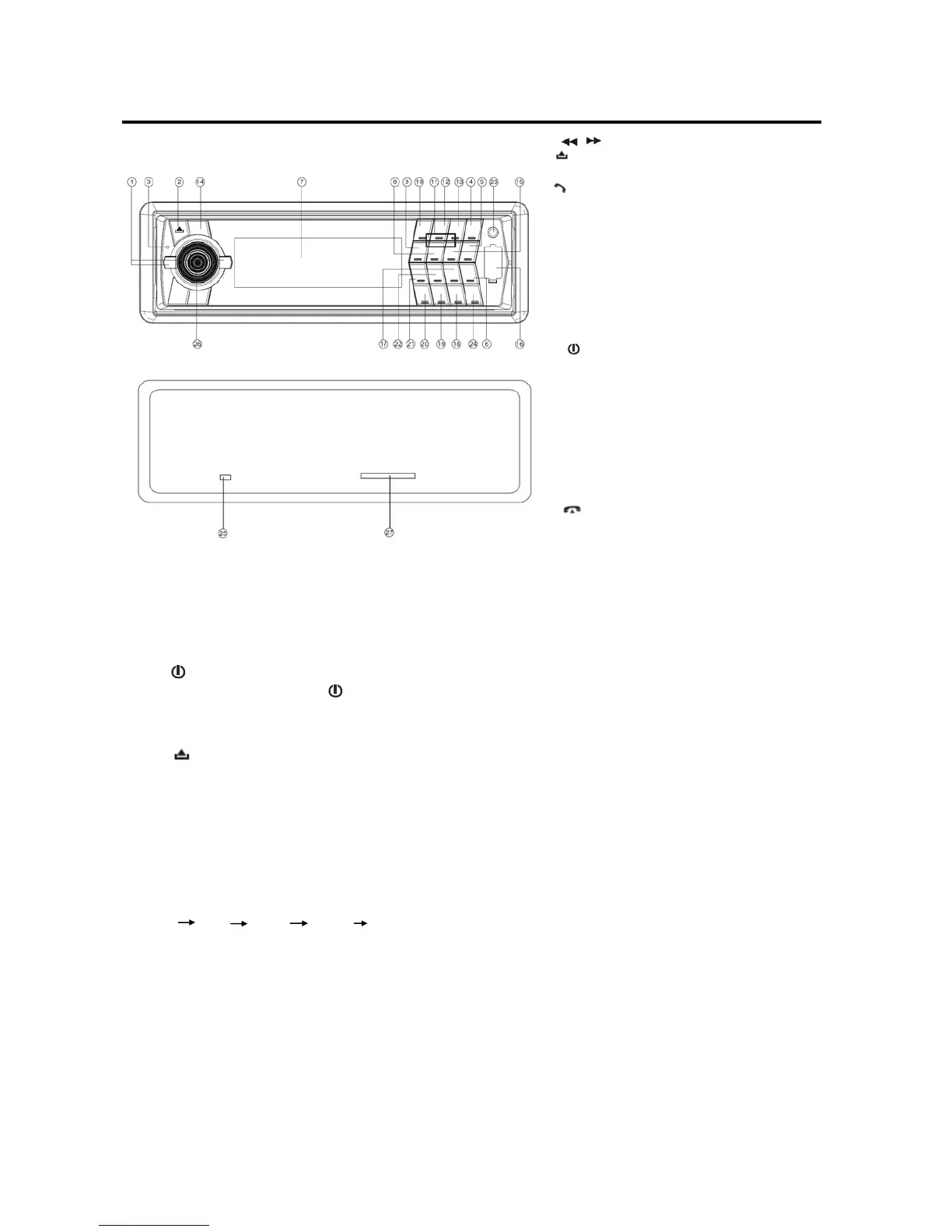
LOCATION OF KEYS
BASIC OPERATION
SWITCHING ON/OFF THE UNIT
Press
button (14) to turn on the unit, When
the unit is on, press and hold
button (14) to
turn the unit off.
FACEPLATE RELEASE
Press
button (2) to fold down the removable
faceplate.
SOUND ADJUSTMENT
Shortly press SEL/MENU button (26) to enter
AUDIO SETTING mode, use SEL/MENU button
(26) to select the desired adjustment mode. The
adjustment mode will change in the following
order:
VOL BAS TRE BAL FAD
(Volume) (Bass) (Treble) (Balance) (Fader)
Shortly press the volume knob (26) to adjust the
sound quality up or down.
SYSTEM SETTING
Press and hold SEL/MENU button (26) on the
front panel to enter SYSTEM SETTING mode.
Then shortly press SEL/MENU button (26) to
select the item you want to change, and use the
volume knob (26) to change the corresponding
setting.
1) BEEP ON/OFF
Use the volume knob (26) to set Beep
sound on or off.
2) P-VOL
Use the volume knob (26) to select the volume
level when the unit turns on.
3) AREA EUR/USA
Use the volume knob (26) to set EUR or USA
area frequency spacing
4) HOUR 24H/12H
Use the volume knob (26) to set 24Hours or
12Hours format
5) PCLK ON/OFF
Use the volume knob (26) to set clock on or off
when power off, when set PCLK ON, clock will
appear with backlight on when power off.
MUTE
Shortly press MUTE button (14) will mute the
sound instantly, press it again will resume the
sound.
LOUDNESS
Press LOUD button (24) for several seconds to
switch loudness function on, and “LOUD” will
appear on the LCD.
1. / (tune/seek/track down/up button)
2. (release button)
3.Mic
4.
(pick up)
5.PAIR/MOD
6.T-MENU
7.LCD
8.5 DIR-
9.4 SHF
10.1 PAU
11.1-6 preset buttons
12.2 SCN
13.3 RPT
14.
/MUTE
15.6 DIR+
16.USB interface
17. 9 PTY
18. # SCAN/CON
19. 0 DISP
20. */+ AS/PS/Navi-SCH
21. 7 AF/MON
22. 8 EQ/TA
23. AUX IN jack
24.
(hang up)/BND/LOUD/CLR
25. Reset button
26. SEL/MENU (when pressed)
Volume knob (when rotated)
27. SD/MMC interface


 To Next Page