20
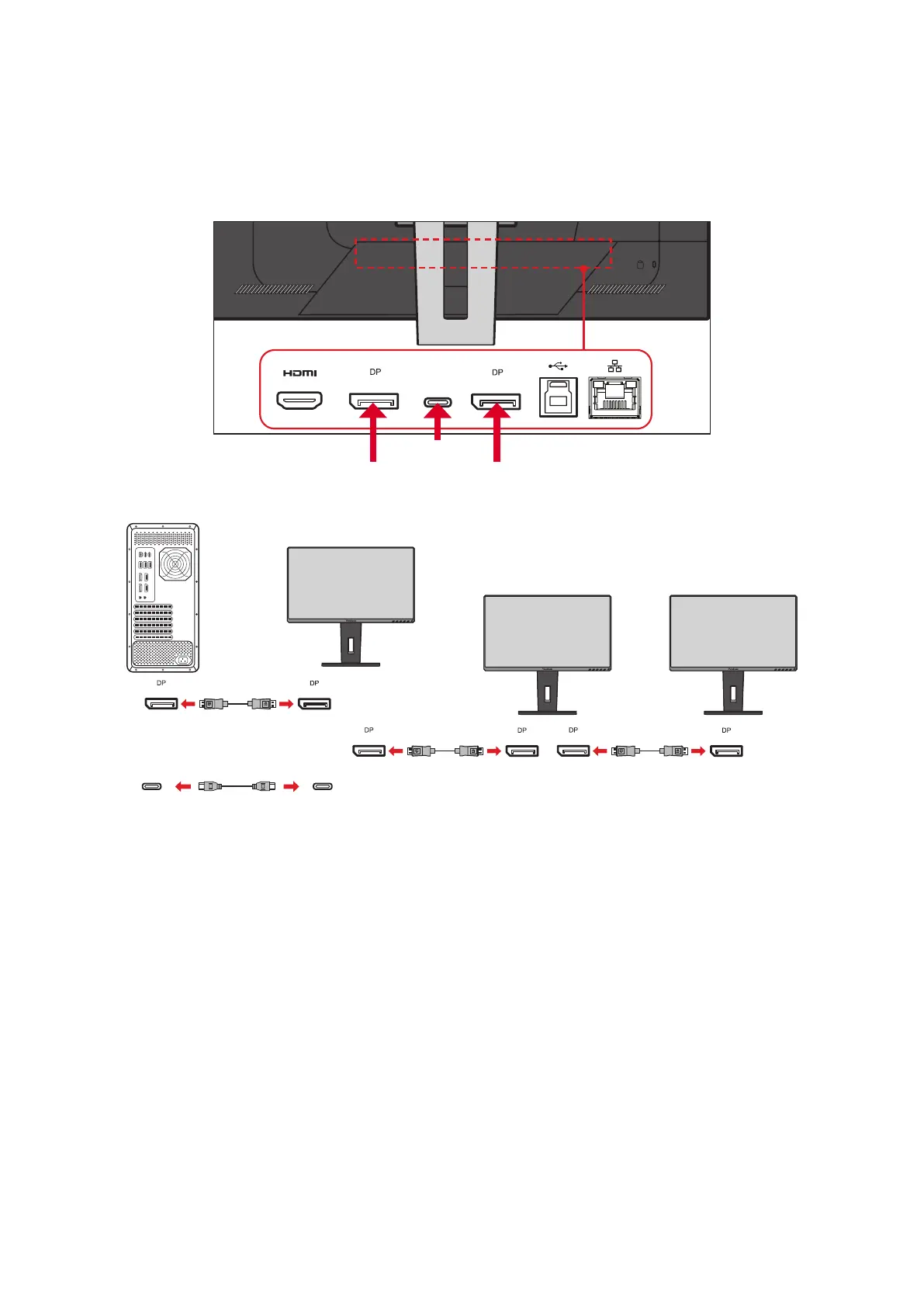
3. Repeat Step 2 as needed with up to four (4) monitors.
NOTE: Your graphics card compability and monitor resoluon will determine
the number of monitors. For example, you can connect four (4) VG2456
(1920 x 1080), two (2) VG2756-2K (2560 x 1440), or two (2) VG2456 and
one (1) VG2756-2K.
in
out
Type-C
DisplayPort
In
DisplayPort
Out
Type-C
Out
In
Out
In
Out
In
Type-C Type-C
or
NOTE:
• DisplayPort 1.2 MST must be turned on in the Setup Menu in the OSD
Menu to enable daisy chaining.
• If High Data Speed is selected, it will priorize high speed data transfer
and Ethernet. MST will only support 2560 x 1440 @30Hz (maximum).
• If High Resoluon is selected, MST can support 2560 x 1440 @60Hz, but
data transfer and Ethernet speed will be limited to USB 2.0 standards due
to bandwidth limitaon.
• If the input source changes to HDMI, DisplayPort 1.2 MST will turn o
automacally.




 To Next Page