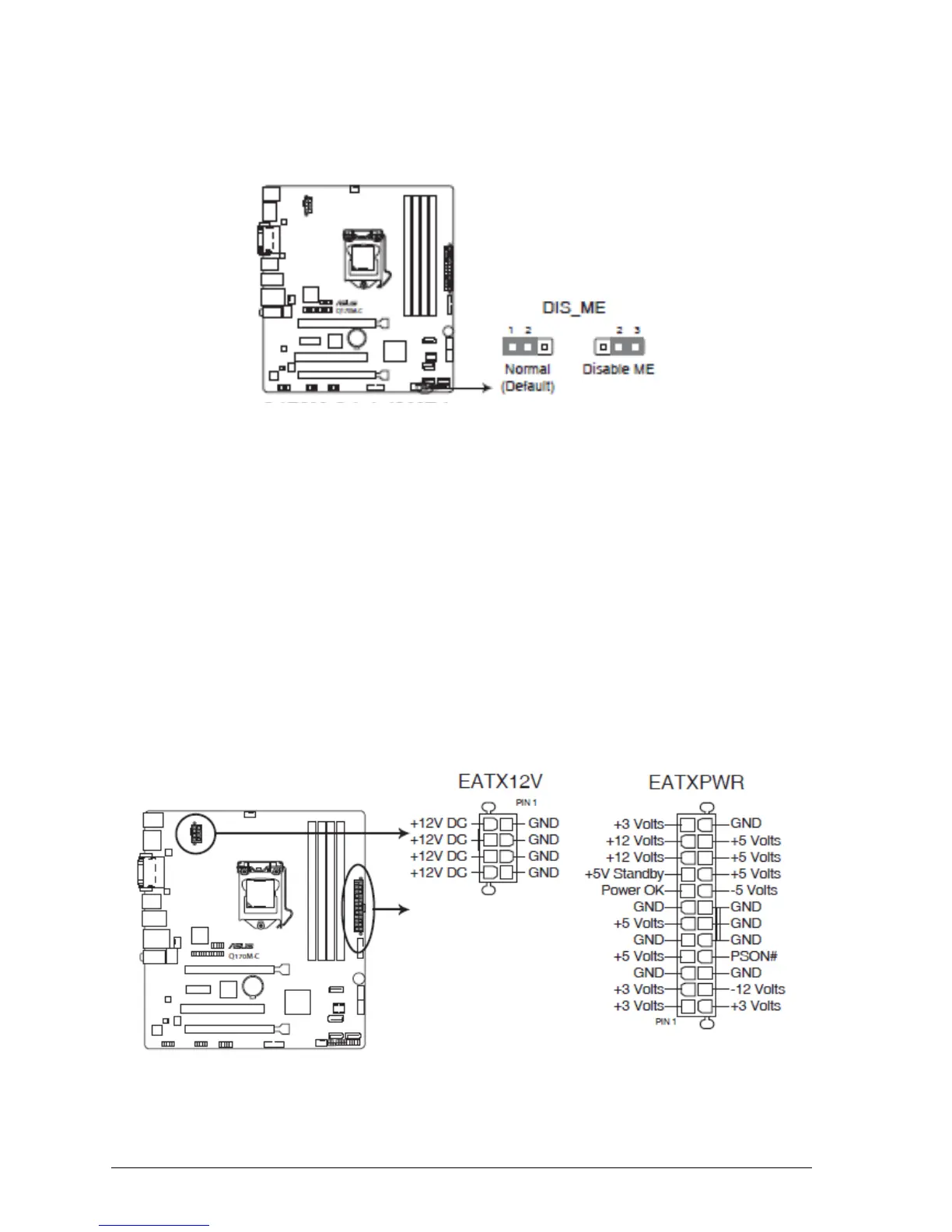
Intel® ME jumper (3-pin DIS_ME)
This jumper allows you to enable or disable the Intel® ME function. Set this jumper to pins 1-2 to enable
(default) the Intel® ME function and to pins 2-3 to disable it.
Figure 9: Intel® ME Jumper
Motherboard Connectors
There are connectors on the motherboard for the Power supply, HD audio, fans, front
panel audio, front panel USB and front panel connectors. The location and/or details of
these connections are shown below.
ATX power connectors (24-pin EATXPWR, 8-pin ATX12V)
These connectors are for ATX power supply plugs. The power supply plugs are designed to fit these
connectors in only one orientation. Find the proper orientation and push down firmly until the connectors
completely fit.
This connector allows you to connect an ATX 12V 24-pin power supply. To connect the ATX 24-pin power
supply, make sure the plug of the power supply is inserted in the proper orientation and the pins are
aligned. Then push down the power supply firmly into the connector.
Figure 10: ATX Power Connectors



 To Next Page