Page 5For technical questions, please call 1-888-866-5797.Item 57085
SAFETYOPERATIONMAINTENANCE SETUP
Setup - Before Use:
Read the ENTIRE IMPORTANT SAFETY INSTRUCTIONS section at the beginning of this
manual including all text under subheadings therein before setup or use of this product.
Note: For additional information regarding the parts listed in the
following pages, refer to Parts List and Diagram on page 10.
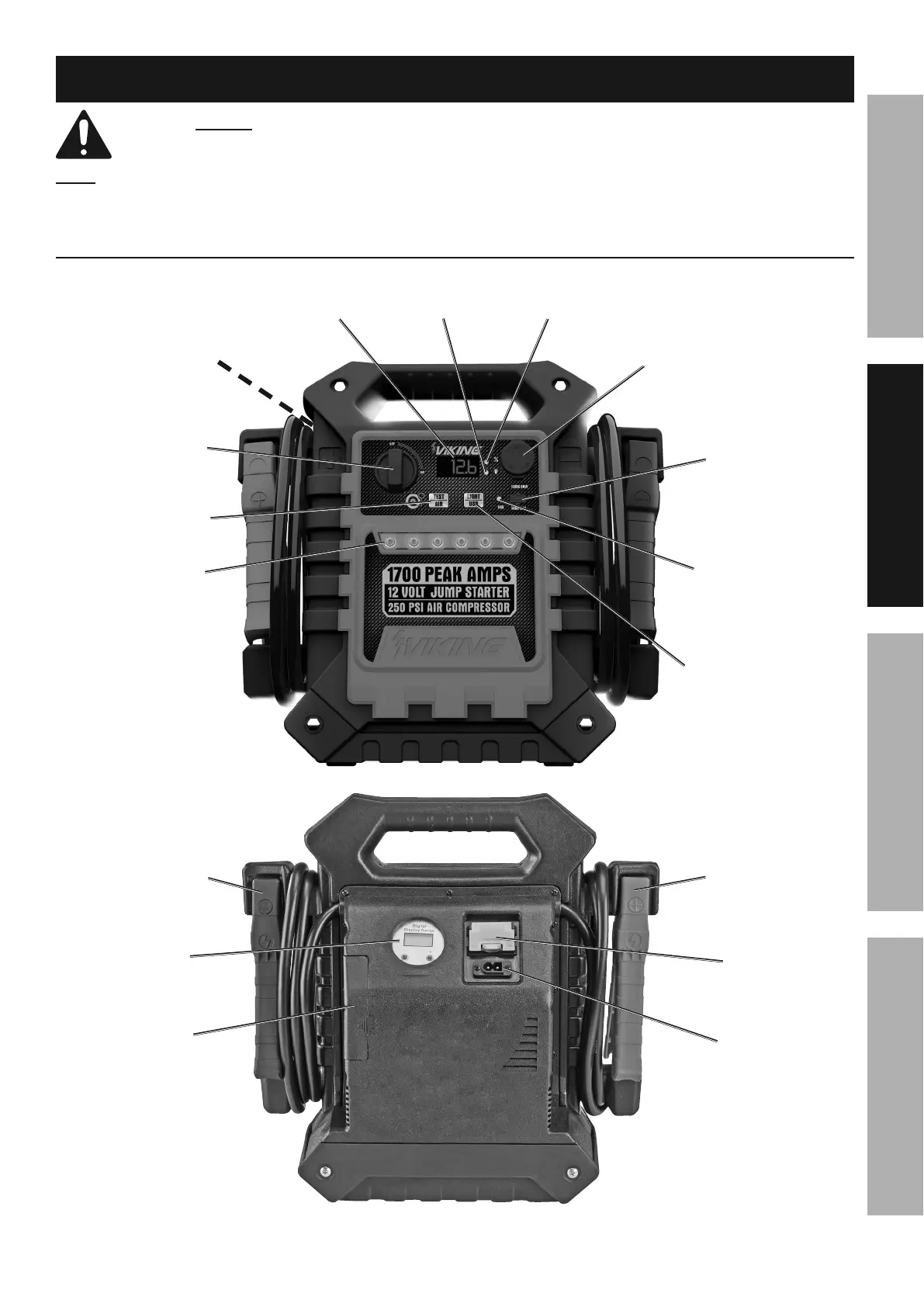
Functions
12VDC
Outlet
Clamp
Power
Switch
Work
Light
Display
Test/Air
Button
USB
Port
USB
Indicator
Light/USB
Button
Compressor
Switch
Air
Pressure
Gauge
Positive Battery
Clamp / Cable
Negative Battery
Clamp / Cable
Air Hose
Compartment
120 VAC
Charging
Input Plug
Charging
Port
(on back)
Voltage
Indicator
Charge
Indicator


 To Next Page