Step 1.
From another extension or phone line, call into the PBX/KSU analog extension (or phone line) con-
nected to terminals 4 & 5, LINE OUT TO PHONES.
Step 2. Answer the call using the phone (or device) connected to terminals 8 & 9, DOORBOX 1.
Step 3.
From the remote phone enter Q followed by the six digit security code (factory set to 845464, see
Programming section D).
Step 4. A double beep will indicate that you have accessed the programming mode.
Step 5. You can now Touch Tone program the features listed in Programming section B..
Step 6. When finished programming, hang up both phones.
4. Accessing the Programming Mode Remotely (When Q5 mode has been programmed)
A. Accessing the Programming Mode
Programming
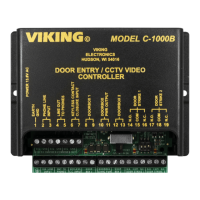
1. Accessing the Programming Mode Locally (Security Code Bypass Mode)
Step 1. Disconnect the PHONE LINE INPUT.
Step 2. Slide the TALK BATTERY switch to the ON position.
Step 3. Move DIP switch 2 from OFF to ON (see Programming section E).
Step 4. Come off-hook with a phone connected to terminals 4 & 5, LINE OUT TO PHONES.
Step 5. A double beep will indicate that you have accessed the programming mode.
Step 6. You can now Touch Tone program the features listed in Programming section B.
Step 7. When finished programming, hang up and move DIP switch 2 to the OFF position.
Step 8 Slide the TALK BATTERY switch back to the OFF position.
Step 9. Reconnect the phone line to the PHONE LINE INPUT.
2. Accessing the Programming Mode Remotely
Step 1. Call into the C-1000B from a Touch Tone phone.
Step 2. Answer the call using the phone (device) connected to terminals 4 & 5, LINE OUT TO PHONES.
Step 3.
From either phone enter Q followed by the security code (factory set to 845464, see Programming
section D).
Step 4. A double beep will indicate that you have accessed the programming mode.
Step 5. You can now Touch Tone program the features listed in Programming section B.
Step 6. When finished, hang up both phones to exit the programming mode.
Follow sections 1 or 2 to program a new C-1000B or any C-1000B that has not been previously programmed into the
Analog PBX/KSU Station Mode (Q5). If the Analog PBX/KSU Station Mode has been programmed, follow sections
3 or 4 to access programming. Note: If you are not sure how the C-1000B was previously programmed and have
difficulty accessing the programming mode by following sections 1 or 2, follow sections 3 or 4 in case the C-1000B is
currently in the Analog PABX/KSU Station Mode (
Q
5).
Note: To access programming in this fashion, there must be a PBX/KSU analog extension (or phone line)
connected to terminals 4 & 5, LINE OUT TO PHONES and the TALK BATTERY switch must be set to OFF.
Note: Programming from a cell-phone may not be suitable in areas with weak coverage.
3. Accessing the Programming Mode Locally (When Q5 mode has been programmed)
Step 1. Connect a PBX/KSU analog extension (or phone line) to terminals 4 & 5, LINE OUT TO PHONES.
Step 2. Slide the TALK BATTERY switch to the OFF position.
Step 3. Move DIP switch 2 from OFF to ON (see Programming section E).
Step 4. Come off-hook with a phone connected to terminals 8 & 9 DOORBOX 1.
Step 5.
PBX/KSU dial tone will be heard along with a double beep from the C-1000B to indicate that you
have accessed the programming mode.
Step 6.
You can now Touch Tone program the features listed in Programming section B (ignore busy sig-
nals, reorder tones or intercept messages heard while programming).
Step 7. When finished programming, hang up and move DIP switch 2 to the OFF position.
IMPORTANT: Only use Sections 3 or 4 when the C-1000B has previously been programmed
into the “Analog PBX/KSU Station Mode” (
Q
5)
7


 To Next Page