9
HOW TO OPERATE
BEFORE OPERATION REVIEW
1. Load the dishes properly.
2. After pushing the baskets back inside the unit, manually rotate the upper and lower spray arms to be sure they turn
freely
3. Make sure there is rinse aid in the dispenser. Add rinse aid if needed.
4. Add proper amount of detergent. Close the detergent compartment cover.
5. Press the POWER button on the left side of the control panel.
6. Select the desired wash program and option(s). A red light appears in or above the selected cycle/option.
7. Press start. The start symbol will flash to indicate the unit is ready.
8. Close the door tightly until you hear a click. Otherwise, the dishwasher will not start.
WHICH CYCLE / OPTION TO SELECT
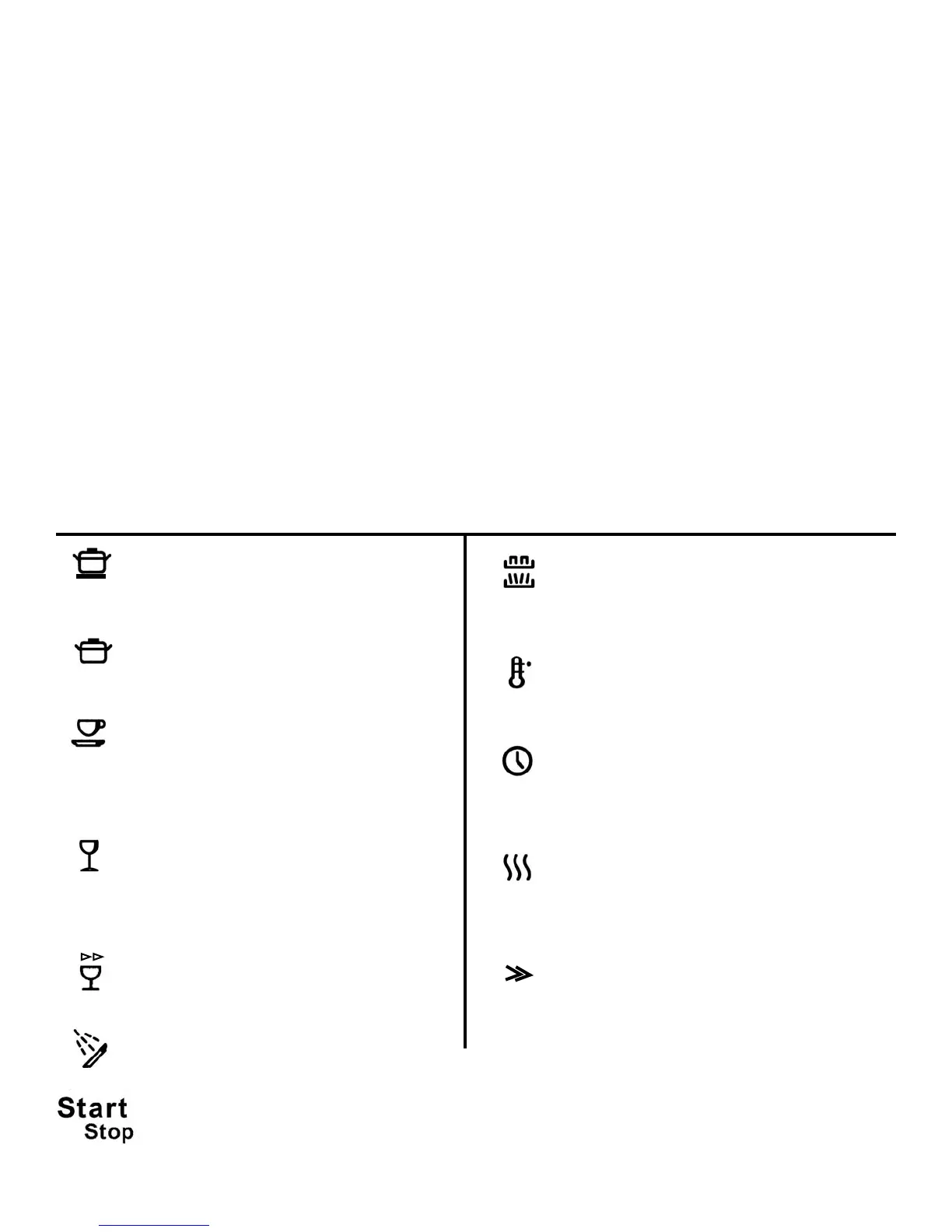
((RReeffeerr ttoo CCoonnttrrooll PPaanneell -- pp.. 33))
For heaviest soiled loads, such as pots and pans,
casserole dishes, etc. This cycle uses high water
temperature.
For heavily soiled items
For normally soiled loads, such as plates,
glasses, bowls, and lightly soiled pans, use
normal wash with normal temperature and
normal drying. To save water and energy, use
normal wash with economy temperature and
economy drying.
For lightly soiled loads that are washed
immediately after use. Fine china and crystal
can be washed in this program by using low
temperature setting.
For very lightly soiled dishes.
To rinse dishes that you plan to wash later that
day.
Allows you to choose to wash only the top rack,
bottom rack, or both racks. The corresponding
symbol lights the rack(s) you have selected.
(DFUD142 only)
Selects a normal or economy water temperature
for the wash program. Indicator light glows
when on the normal setting and remains off
when on economy setting.
Lets you delay running the dishwasher for five
hours. After making your selections, press Delay
then press start and close the door. The
dishwasher will start five hours later.
Activates normal drying. Press once to activate.
For economy drying, press again to deactivate
normal drying.
Washing time is reduced and wash temperatures
are lowered. (Not available for use with Quick
Wash or Rinse/Hold cycles). (DFUD142 only)
After you have selected the wash cycle and options, press Start. The start symbol will flash. This merely means
the machine is ready. Close the door securely to start the dishwasher.
Wash Cycles
Options
Top/Bottom
Rack
Normal
Temp
Normal
Drying
Delay
Light
China
Rinse/Hold
Quick
Normal
Pots/Pans
ENERGY SAVING TIPS
1. Only start a wash when the machine is completely full.
2. Make sure that for normal day-to-day washing the low temp setting is selected.
3. Select the cycle without the Extra Dry option.
4. If you plan to wash dishes right away, there is no need to prewash. Simply scrape, load, and wash.
5. Use the Pots/Pans and Heavy programs only for heavily soiled dishes.
Express
Heavy



 To Next Page