VIKING TECHNICAL SUPPORT 1.800.908.0884
34
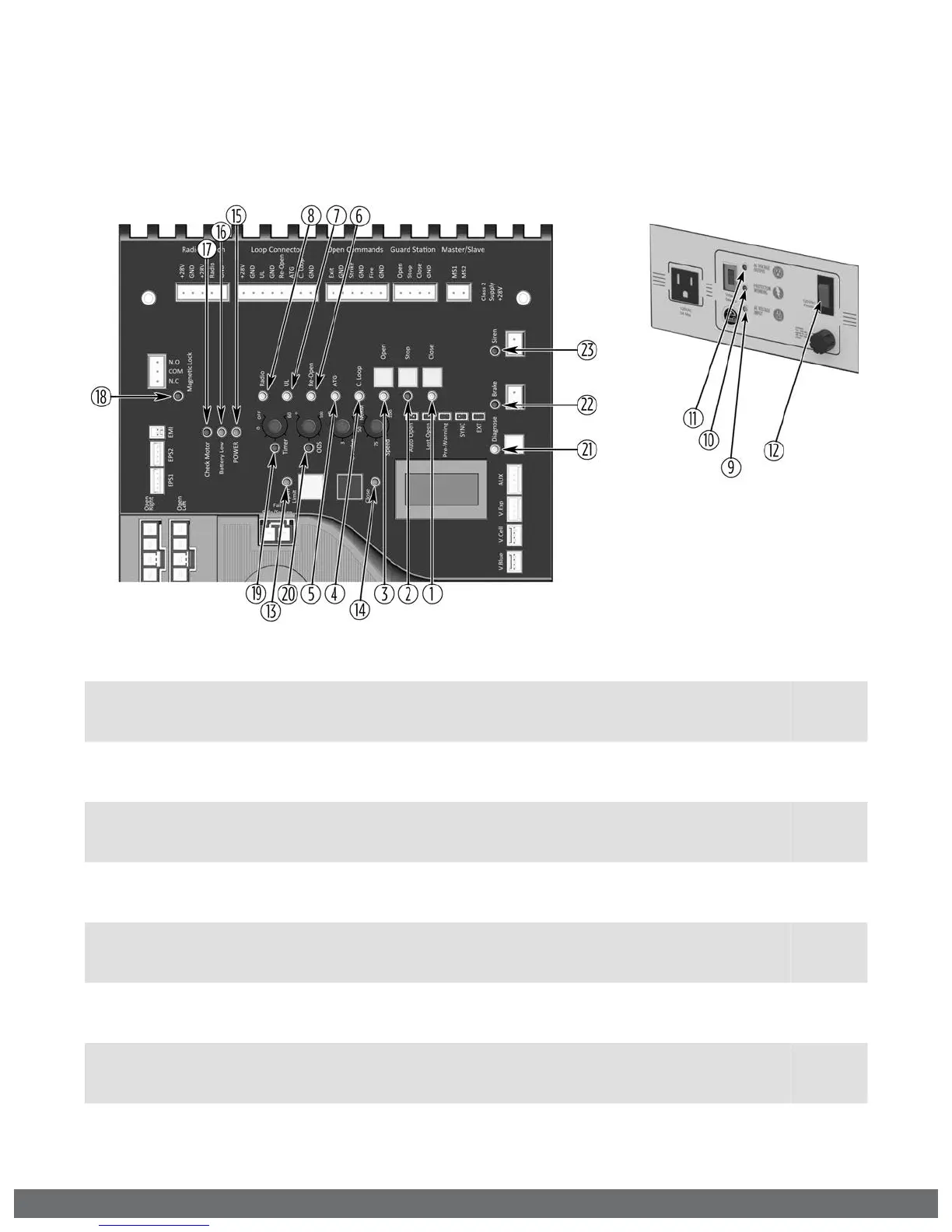
LED References
In addition to the LCD Display, the control board LEDs monitor the various circuits of the
control board. Use the table below to identify the corresponding “TS Ref#” and refer to
page 36-39 for further troubleshooting.
# LED Status Meaning
Page 39
TS Ref#(s)
1 “Open” OFF Normal Condition.
SOLID Control board is receiving an input for a device connected to any of the
following input terminals: Exit, Fire, Strike or Open (pages 29, 40).
9, 10
2 “STOP” OFF Normal Condition.
SOLID Control Board is receiving an input from a device connected to the
Stop terminal (pages 29, 40).
9, 10
3 “Close” OFF Normal Condition.
SOLID Control Board is receiving an input from a device connected to the
Close terminal (pages 29, 40).
9, 10
4 “C Loop” OFF Normal Condition.
SOLID Control Board is receiving an input from a device connected to the
C Loop terminal (pages 29, 40).
9, 10
5 “ATG” OFF Normal Condition.
SOLID Control Board is receiving an input from a device connected to the ATG
terminal (pages 29, 40).
9, 10
6 “Re-Open” OFF Normal Condition.
SOLID Control Board is receiving an input from a device connected to the Re-
Open terminal (pages 27, 32, 40).
9, 10
7 “UL” OFF Normal Condition.
SOLID Control Board is receiving an input from a device connected to the UL
terminal (pages 12-13, 40).
9, 10
8 “Radio” OFF Normal Condition.
SOLID Control Board is receiving an input from a device connected to the
Radio terminal (pages 28, 40).
9, 10
TROUBLESHOOTING


 To Next Page