Need help?
Do you have a question about the VINGLI CD0BN4D and is the answer not in the manual?
Visual identification and quantity count for all physical components of the desk.
Visual identification and quantity count for all fasteners and hardware.
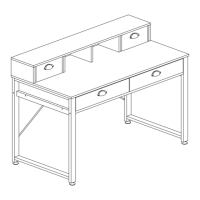
A comprehensive diagram illustrating the complete assembly of the computer desk.
Attach the four adjustable foot pads to the desk legs.
Connect the bottom board to the side legs using specified bolts.
Connect drawer support boards to the main structure using bolts.
Securely attach boards using bolts and cam locks for stability.
Connect the main leg structures to the assembled base using bolts.
Mount the desktop onto the main frame using bolts and cam locks.
Fasten the desktop to the legs using bolts for structural integrity.
Install supporting components to the desk structure using bolts.
Assemble the hutch components, including shelves and support boards.
Mount the assembled hutch onto the desktop using bolts and cams.
Secure the hutch top board to the hutch structure with bolts and cams.
Construct drawers, attach handles, and insert drawer bottoms.
Assemble the second set of drawers following similar procedures.
Align and insert the assembled drawers into their respective slots.
Important safety precautions and usage guidelines for assembly and maintenance.
 General
| Brand | VINGLI |
|---|---|
| Model | CD0BN4D |
| Category | Indoor Furnishing |
| Language | English |

 To Next Page