Vector 750i encoded pantographic manual head
22
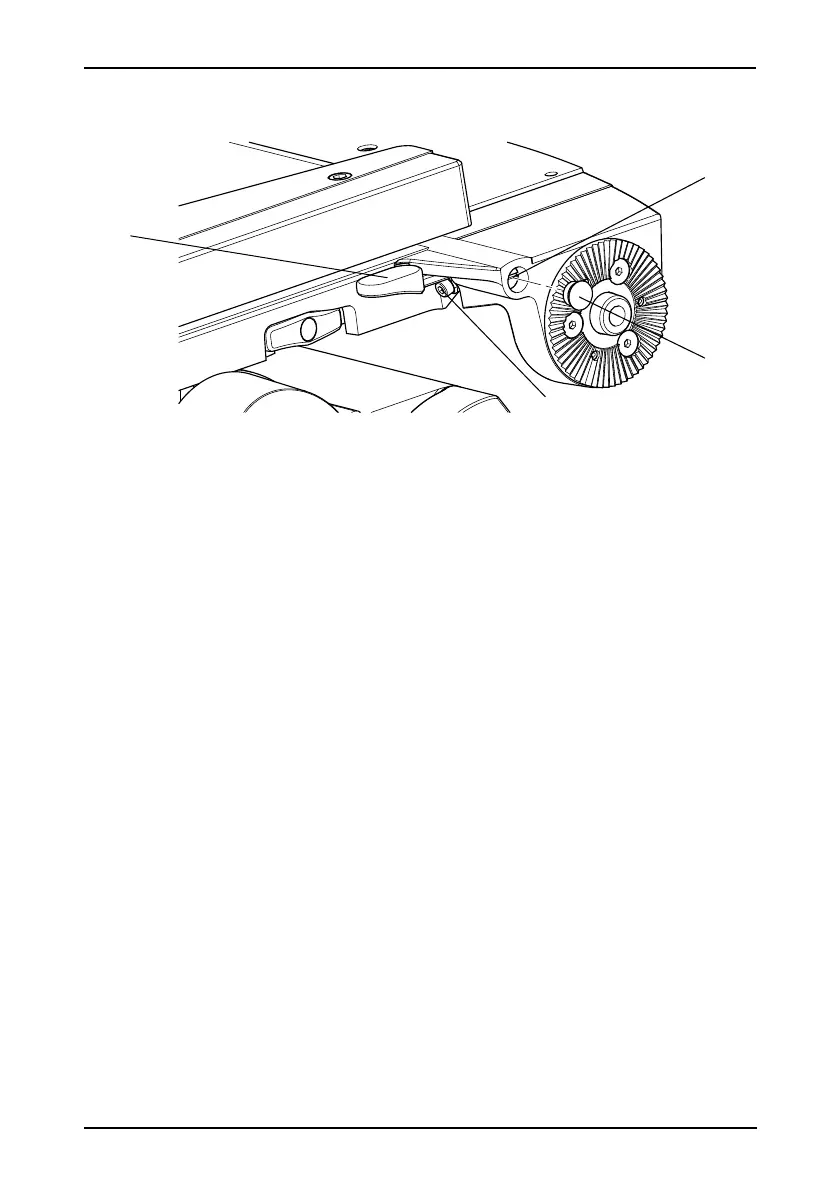
Platform slide clamp adjustment
The platform slide clamp [18] (Fig. 10) should be set so that, in the up or clamped position it
prevents the platform slide from being moved, while in the down or released position it allows
free adjustment of the slide.
To adjust the clamp, proceed as follows:
On the left-hand side of the platform, carefully remove the plastic cap [18.2] to reveal
the slotted shaft [18.1].
Pull the slide clamp lever [18] fully upwards.
Slacken the clamp screw [18.3].
Turn the slotted shaft [18.1] fully clockwise to apply the clamp.
Tighten the clamp screw [18.3].
Move the lever over its full range and ensure that, in the clamped position, it prevents
the slide from being moved, while in the released position it allows free adjustment of
the slide. Readjust if necessary.
Replace the plastic cap [18.2] over the slotted shaft [18.1].
Fig. 10 Adjusting the slide clamp









 To Next Page