10
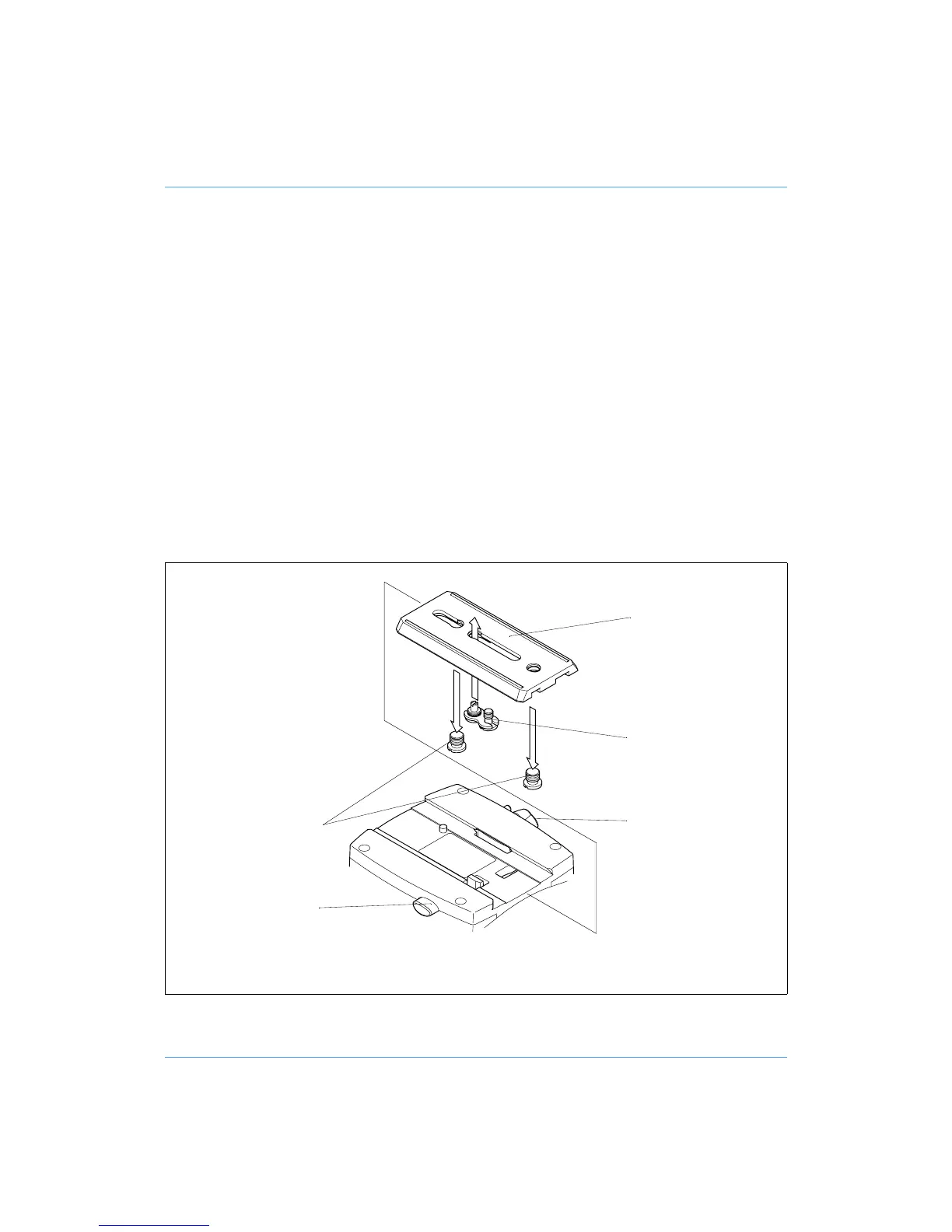
Mounting the camera (VHS adaptor)
The optional VHS adaptor (21) consists of a VHS pin and a 1/4 in. BSW camera mounting screw
connected by a plastic link.
To mount the camera using the VHS adaptor, proceed as follows:
Remove the slide plate (9) from the head by releasing the slide plate clamp (10), pressing
the slide lock release (8) and pulling the plate out to the rear.
Remove the two 3/8 in. BSW camera mounting screws (15) from the slide plate.
Position the VHS adaptor (21) in the longer slot in the slide plate, with the pin facing for-
wards. Screw the pin securely into the slide plate.
Secure the slide plate to the camera with the 1/4 in. BSW camera mounting screw, ensuring
the pin engages in the hole in the camera.
Set the platform level and apply both the pan and tilt brakes.
Push the slide plate and camera into the track in the platform, ensuring the slide lock re-
lease (8) snaps into position.
Balance the head (see Balancing the head).
Mounting the camera (VHS adaptor)
(9)
(21)
(10)
(15)
(8)










 To Next Page