Product Overview Product Overview
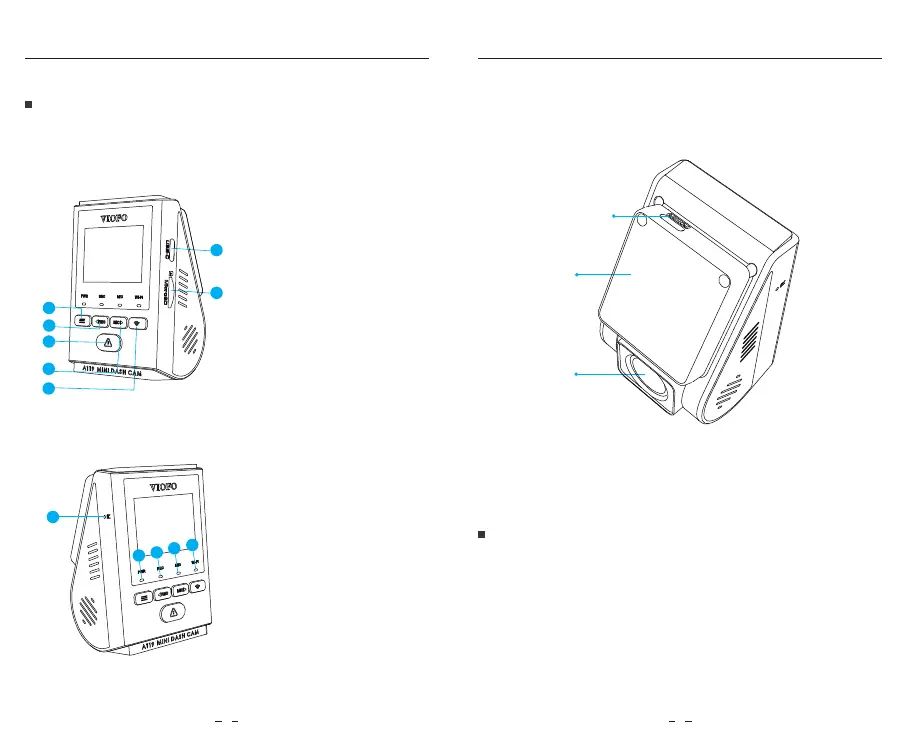
Product Diagram
Inserting / Removing the Memory Card
Inserting the memory card
3 4
Push the memory card into the card slot until you hear a click,
with the card label facing the forward (away from the screen).
1
-
Menu / Power On|Off
2
-
Menu Up / Recording Start / Stop
3
-
Menu Confirm / Video Protect /
Playback
4
-
Menu Down /
Microphone Enable / Disable
5
-
Wi-Fi On|Off
6
-
Power in / MicroSD Card Reader Mode
7
-
Memory Card Slot
1
-
Reset Button
2
-
Power Status Indicator
3
-
Recording Status Indicator
4
-
Microphone Status Indicator
5
-
Wi-Fi Status Indicator
USB Power Port
Mount
Lens
1
1
2
3
4
5
6
7
5
2
3
4



 To Next Page