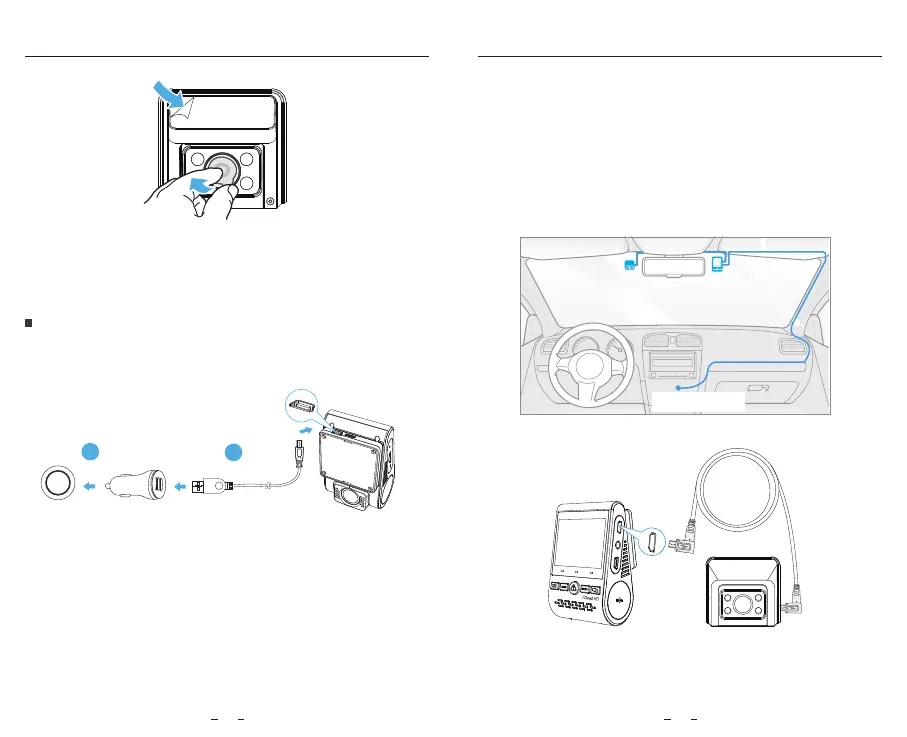
Cable Connection
3) Peel the protection film o the sticky pad and camera lens.
4) Fix the interior camera on the selected location.
Installation
1) Connecting to Power
2) Connecting with Interior Camera
Power o the product and connect the interior camera cable to the
front camera (main unit).
Cable routing should be as shown in the following two diagrams. Use
the cable clips to help fix the two cables conveniently and safely.
Plug the USB power adapter into your vehicle’s 12V / 24V female
power socket. Insert the 4M USB cable’s male port into the camera's
mount USB port.
Note:
Both GPS mount and non-GPS mount can be used for power.
Installation
11 12
2
1
Interior Camera Front Camera
Connect to car
cigarette lighter socket
Best mounting location
VIO FO
USB
AV
Rear
REC
Wi-Fi
MIC
Rear



 To Next Page