REMOTE CONTROL
Insert Batteries Into the Remote Control
1. Remove tile battery cover.
2. Inserting tile 2 AAA 1.SV batteries making sure tile
polarity (4 or -) of the batteries matches the polarity
marks inside tile unit.
3. Mount tile battery cover.
Replace with new batteries when tile TV set begins
to show the following symptoms:
Operation is unsteady or erratic. Sometimes tile TV
set does not function with Remote Control Unit.
Remark:
l) Alkaline Battery Recommended.
2) Remove batteries when they are exhausted or if the
remote eontrnl is not to be used for long time.
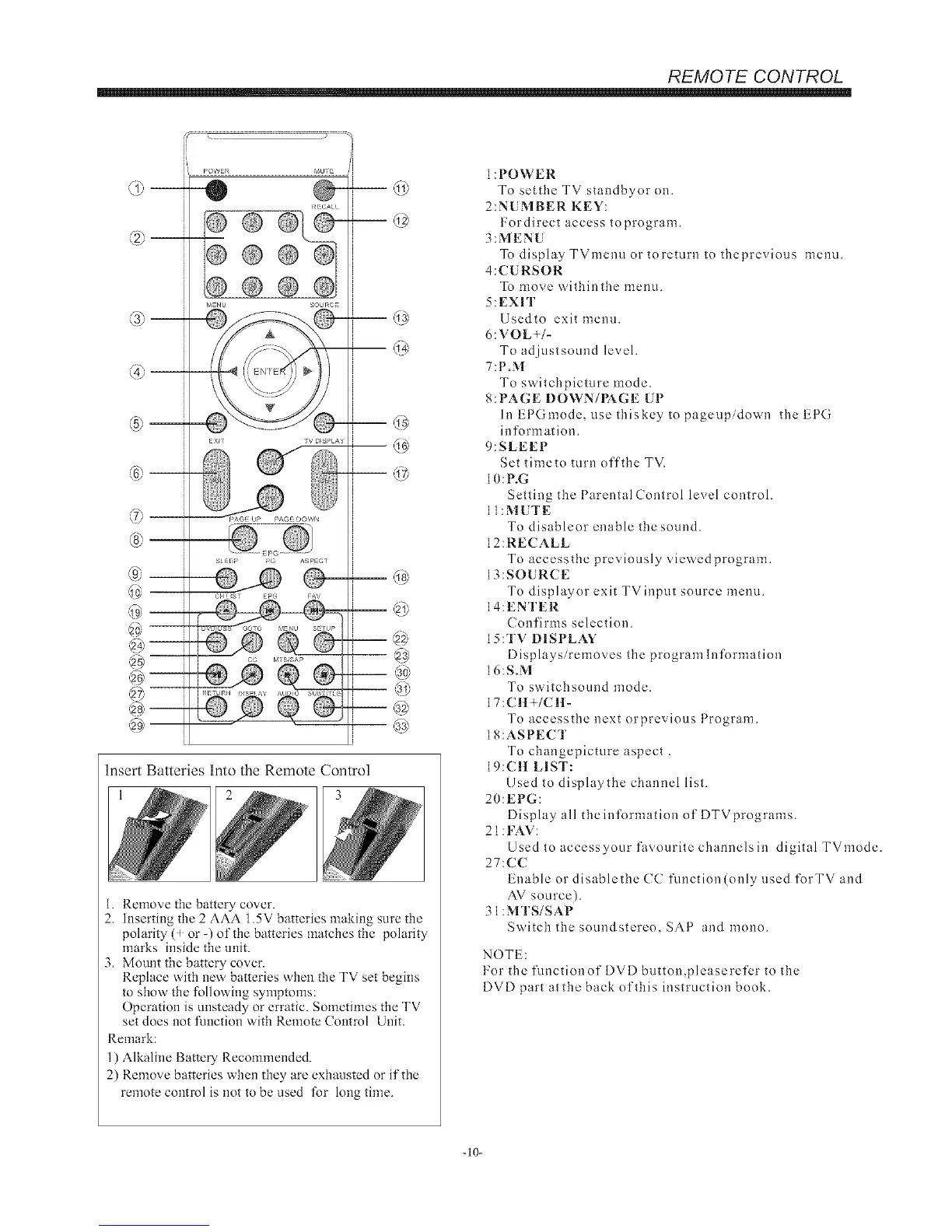
1:POWER
To setthe TV standbyor on.
2:NUMBER KEY:
Fordirect access toprogram.
3:MENU
To displayTVmenuortoreturntotheprevious menu.
4:CURSOR
To move withinthe menu.
5:EXIT
Usedto exit menu.
6:VOL+/-
To adjustsound level.
7:P.M
To switchpicture mode.
8: PAGE DOWN/PAGE UP
hlEPGmode, usethiskeytopageupidown theEPG
information.
9:SLEEP
Set timeto turn off the TV.
10:P.G
Setting the Parental Control level control.
ll:MUTE
To disableor enable the sound.
12:RECALL
To accessthe previously viewedprogram.
13:SOURCE
To displayor exit TVinput source menu.
14:ENTER
Confirms selection.
IS:TV DISPLAY
Displays/removes the programlnformation
16:S.M
To switchsound mode.
17:CH+/CH-
To accessthe next orprevious Program.
18:ASPECT
To changepicture aspect .
19:CH LIST:
Used to displaythe channel list.
20:EPG:
Display all theinformation of DTVprograms.
21 :FAV:
Used to accessyour favourite channels in digital TVmode.
27:CC
Enable or disablethe CC function(only used forTV and
AV source).
31:MTS/SAP
Switch the sound stereo, SAP and mono.
NOTE:
For the functionof DVD button,pleaserefer to the
DVD part atthe back of this instruction book.
-10-


 To Next Page