DVD OPERATION
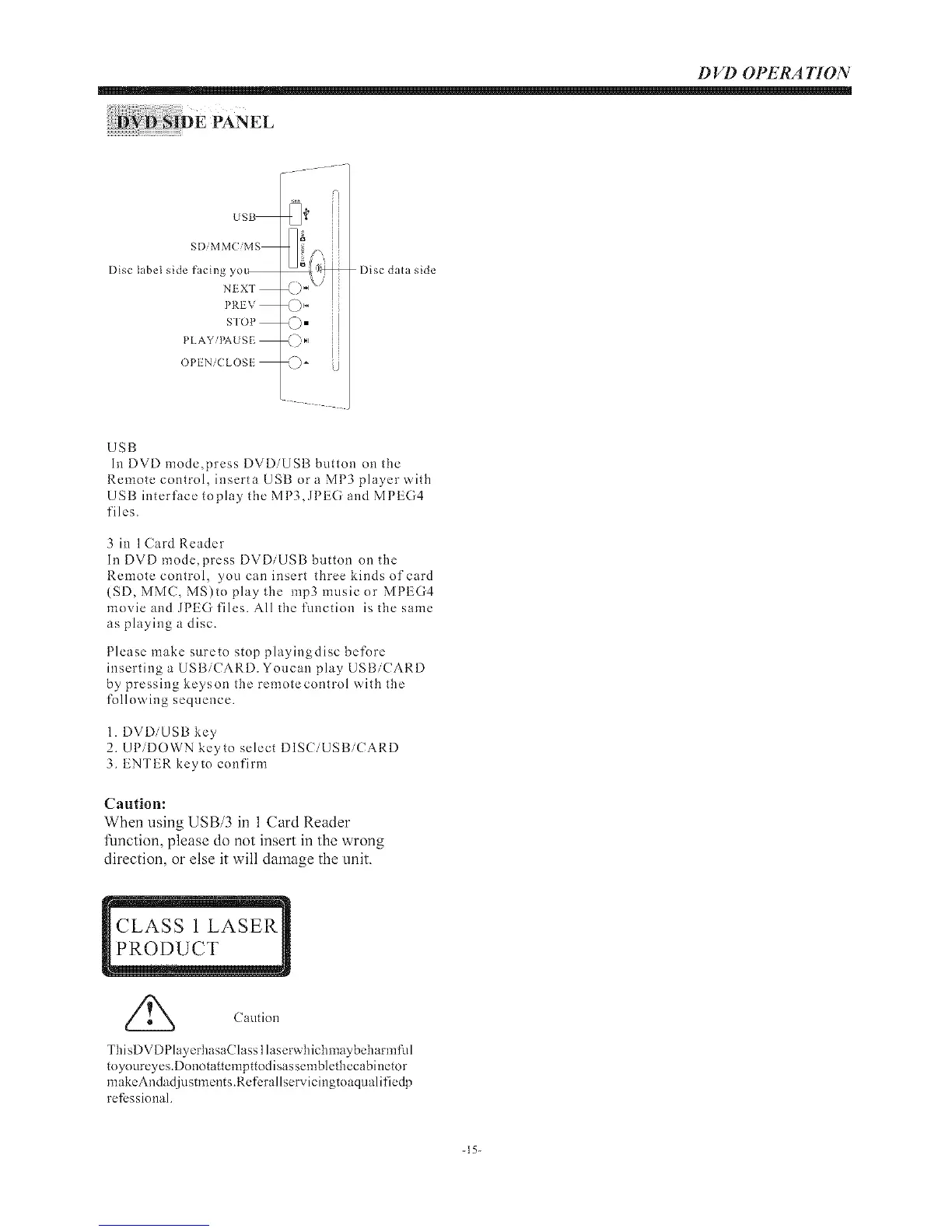
US_
SDiMMCiMS
Disc label side facing yo_
NEXT
PREV
S'IOP
PLAYiI<'\USE
OPI'Ni( LOSF
<;,. iJ
Disc data side
USB
Ii1 DVD mode,press DVDiUSB button on the
Remote control, inserta USB or a MP3 player with
USB interface toplay the MP3,JPEG and MPEG4
files.
3 in 1Card Reader
In DVD mode,press DVDiUSB button on tile
Remote control, you can insert three kinds of card
{SD, MMC, MS)to play the mp3musicor MPEG4
movie and JPEG files. All the function isthesame
as playing a disc.
Please make sureto stop playingdisc before
inserting a USBiCARD. Youcan play USBiCARD
by pressing keyson the remotecontrol with the
following sequence.
1. DVDiUSB key
2. UP/DOWN keyto select DISCiUSBiCARD
3. ENTER keyto confirm
Caution:
When using USB/3 in 1 Card Reader
Amction, please do not insert in the wrong
direction, or else it will damage the unit.
Caution
ThisDVDPlayerhasaClass 1la serwhichnlaybeharnltid
toyoureyes.Donotattempttodisassemblethecabinetor
makeAndadjustments.Refcrallservicingtoaqualifiedp
refcssional.
-15-


 To Next Page