14
Section 10:
Display Mode and Gameplus Switching
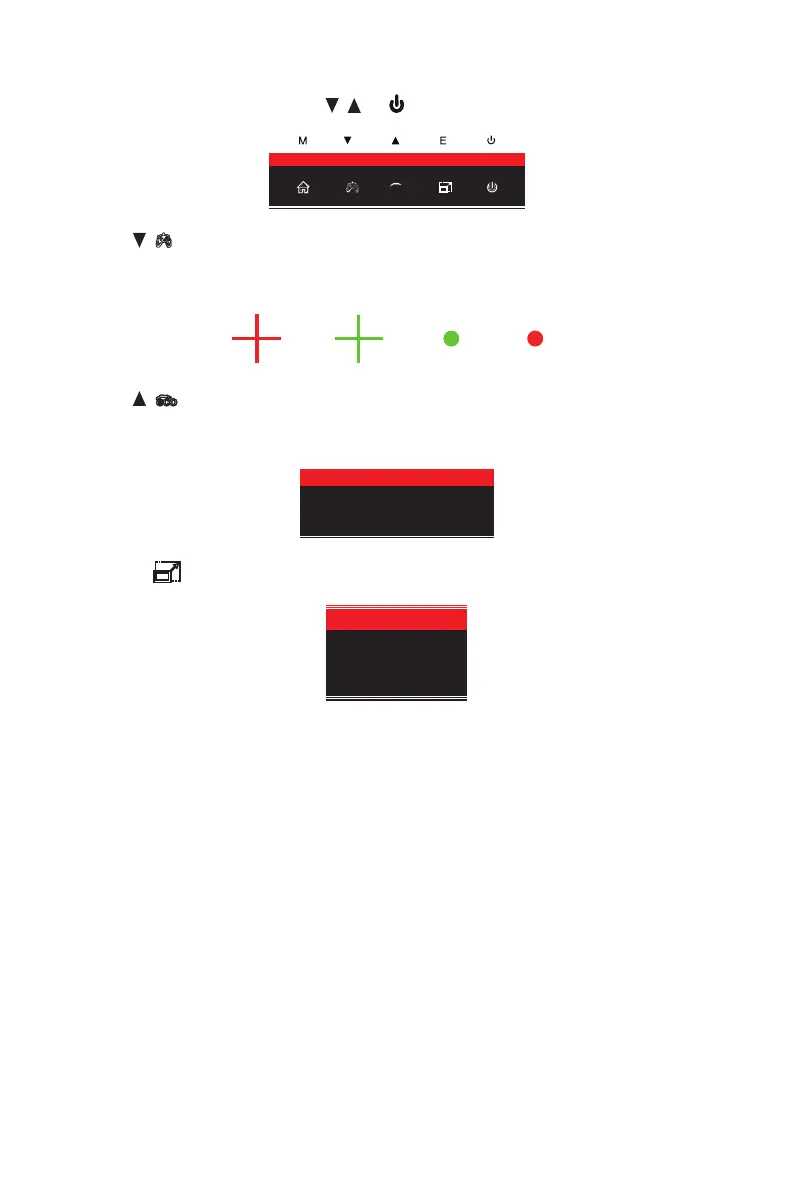
1. Press any one of the buttons (M, , , E, ) to activate the navigation window.
eco
2. Press ( ) to switch Gameplus modes. According to the needs of your game, choose
the corresponding game icon. These game icons are primarily designed to optimize your
aim during shooting games, though they can be used for other scenarios.
3. Press (
eco
) button to switch ECO modes. These modes (Standard, Photo, Movie, Game,
FPS, and RTS) can be used to optimize settings according to your activity. Standard mode
is suitable for most activities.
Standard
4. Press E ( ) button to switch HDMI 4K or HDMI 5K resolution under HDMI signals input.
HDMI 4K
HDMI 5K
Section 11: Troubleshooting
11.1 – General Problems
The screen is blank
• Press the power button to turn the monitor on.
• Conrm the brightness and contrast settings are set normally.
• Check if the indicator light is ashing. If so, there is no signal from your video source.
• If your source is a notebook or laptop, make sure it’s powered on and set to mirror or
extension mode.
The image is out of focus
• Make sure the video cable is inserted properly at both ends.


 To Next Page