8
Section 5: Stand Installation
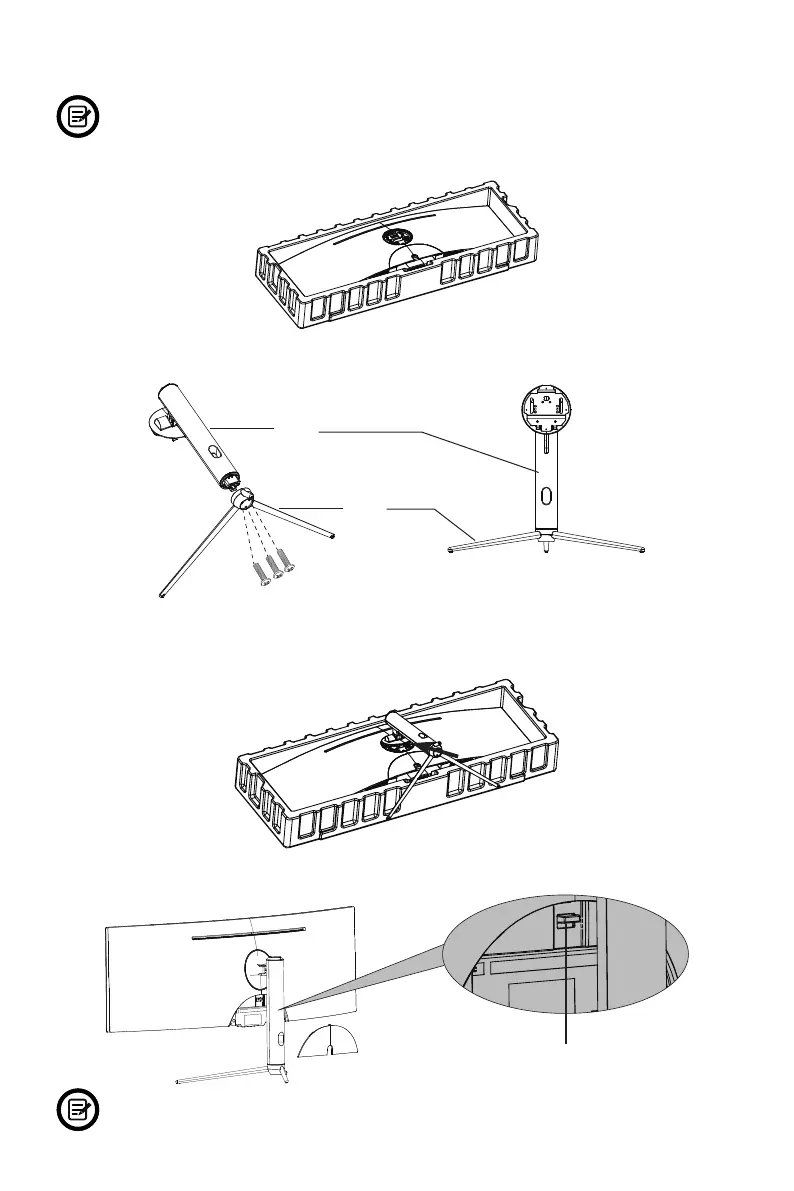
Keep the foam underneath the monitor before attaching the stand.
1. Open the package, take out the product with foam still attached, and gently place it on a
desktop or table.
2. Take out the two main parts of the stand. Then use the included screwdriver and the NO.1
screws to fasten base to the stem.
NO. 1 Screws (15 mm x3)
Base
Stem
3. Align the stand stem’s bracket with the opening on the back of the monitor and carefully
insert bracket. The pieces should click into place.
4. Before removing the stand, remove the port cover from the back of monitor. Switch the
button down to remove the monitor from the bracket.
Button
To avoid damage, do not touch the screen when moving the monitor.


 To Next Page