EasyManua.ls Logo

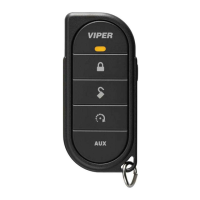
Viper 5704V - Basic Commands: Direct Access; Arming, Panic, and Disarming the System

Viper 5704V
92 pages
Print Icon
To Next Page IconTo Next Page
To Previous Page IconTo Previous Page
Loading...
Arm
(01
Press
and release
D
The
alarm arms, doors
lock
(if connected), and
the
siren
chirps and parking
lights flash
once.
The
~-1
1%
text and beeps
play
to confirm and
the
System
Status
Icons
update.
If
Valet
mode*
is
On,
the
doors
lock
and the
u~
0
111//11
:1~
text and tone
play.
Exit
Valet
mode to
arm
the
a
Ia
rm
normally.
If
a trigger zone fault
is
detected the
siren
chirps once again and the
Trigger
Zone
Fault
report**
plays.
To
Arm
and
Panic
rl5l
Press
and
hold
D
The
alarm
Arms {or
Locks
in
Valet}
and, after 2 seconds, sounds
the siren and flashes
the parking
lights.
The
t!i~
rlillllil
~
text and
siren tones
play
to confirm.
Press
the
~or
3 button to stop
the
output.
Disarm
~
Press
and release
()
The
alarm
disarms, doors unlock
(if connected}, and the siren chirps
and parking
lights flash twice.
The
g-
text and beeps
play
to
confirm and
the
system
status
icons update.
If
Valet
mode*
is
On,
the
doors
unlock
and the
;t:j
~
fll!ll
ti1~;
text and tone play.
More
than 2 siren chirps and remote beeps indicate a trigger has oc-
curred.
The
:~
-
~
text
is
replaced
by
the
Alarm
report.**
©
2012
Directed.
All
rights
reserved.
9

Table of Contents

Related product manuals