VARIPOOL
19
5. SETTINGS & OPERATION
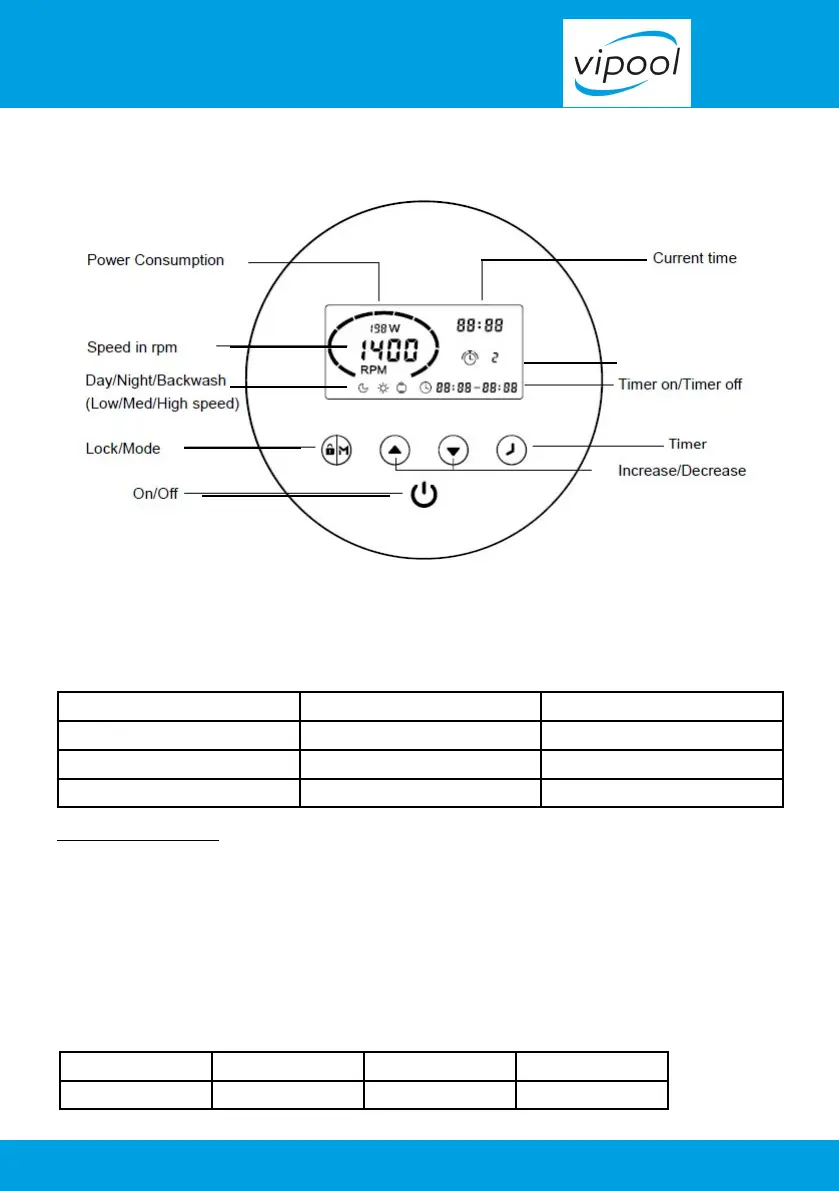
5.1 Control panel
5.2 Selection mode
The frequency inverter has 3 modes(speed ranges).You can either run your pump at a constant
speed choosing from “M” or set up to 4 timers for daily operation, each with an individual
speed.
Mode Speed range Default speed
Night (Low) V1 1200 ~ 2900 rpm 2000 rpm
Day (Medium) V2 1200 ~ 2900 rpm 2400 rpm
Backwash (High) V3 1200 ~ 2900 rpm 2900 rpm
Switch on the device
1- Press 3 seconds the button (padlock/M) to unlock the keyboard.
2-Press the button (On) to start.
On startup, the pump will be on the factory set boot speed at 2900 round/mn during one
minute.
3- After one minute, to change from one speed to another, press M. At the release of the button,
next speed starts (in a loop).
V3 V2 V1 V3
washing day night washing


 To Next Page