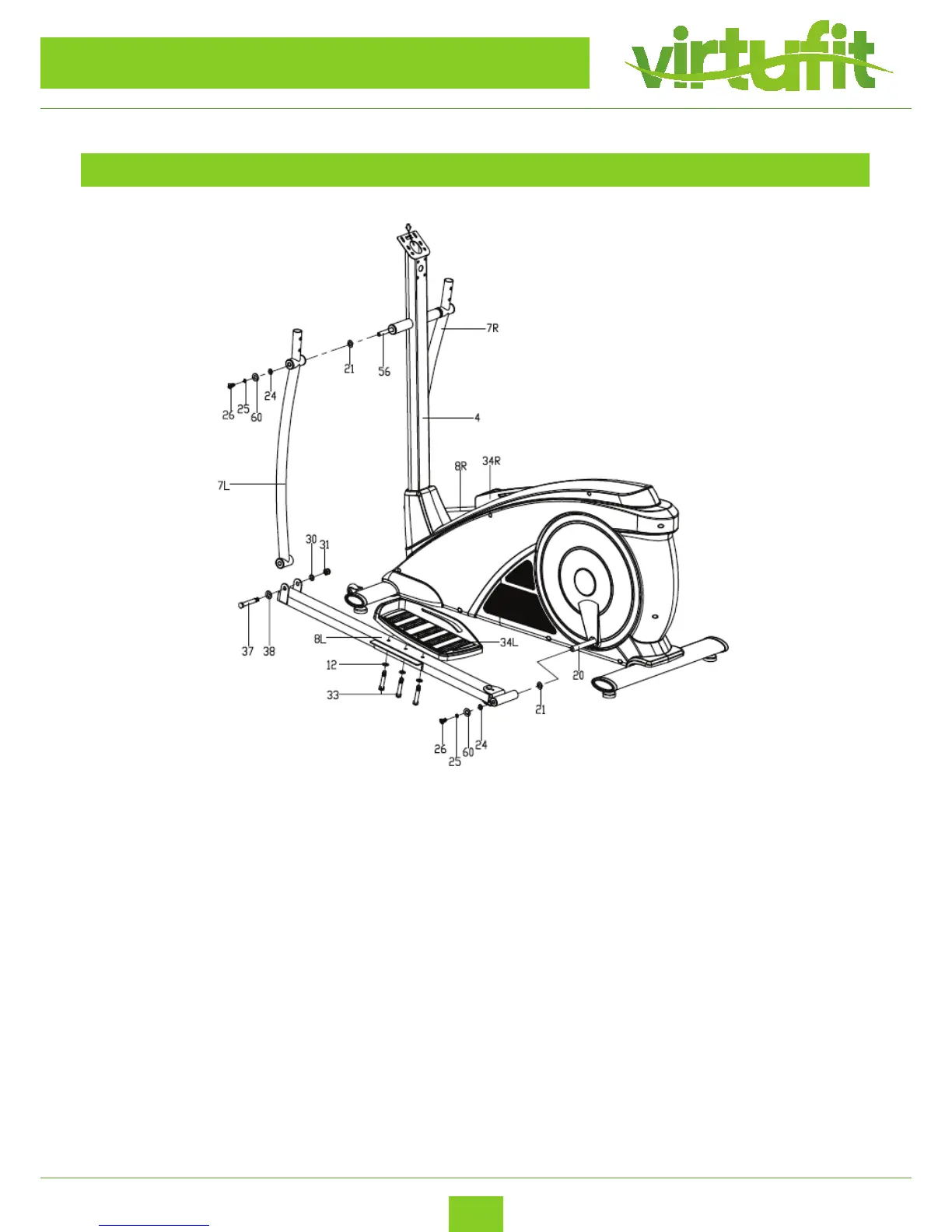
– Insert the Long axle (56) to the Handlebar post (4), then attach the Swing tube (7L/R) on the
Long axle (56) with the Hex socket screws (26), Spring washers (25), Flat washer (60),D-shape
washers (24) and Wave washers (21). Attention: Don’t lock them tightly now;
–
– Fix the Pedal support (8L/R) on the Crank (20) with Hex socket screw (26), Spring washer (25),
Flat washer (60),D-shape washer (24) and Wave washer (21). Attention: Don’t lock them tightly
now;
–
– Connect the Swing tube (7L/R) and Pedal support (8L/R) together with the Screws (37), Flat
washers (38), Flat washers (30) and Nylon nuts (31). Then recheck and lock the above mentioned
Hex screws (26), Screws (37) and Nylon nuts (31) tightly;
–
– Lock the Pedal (34L/R) on the Pedal support (8L/R) tightly with the Hex screws (33), Flat
washers (12) as shown.
STEP 3
ASSEMBLY INSTRUCTIONS


 To Next Page