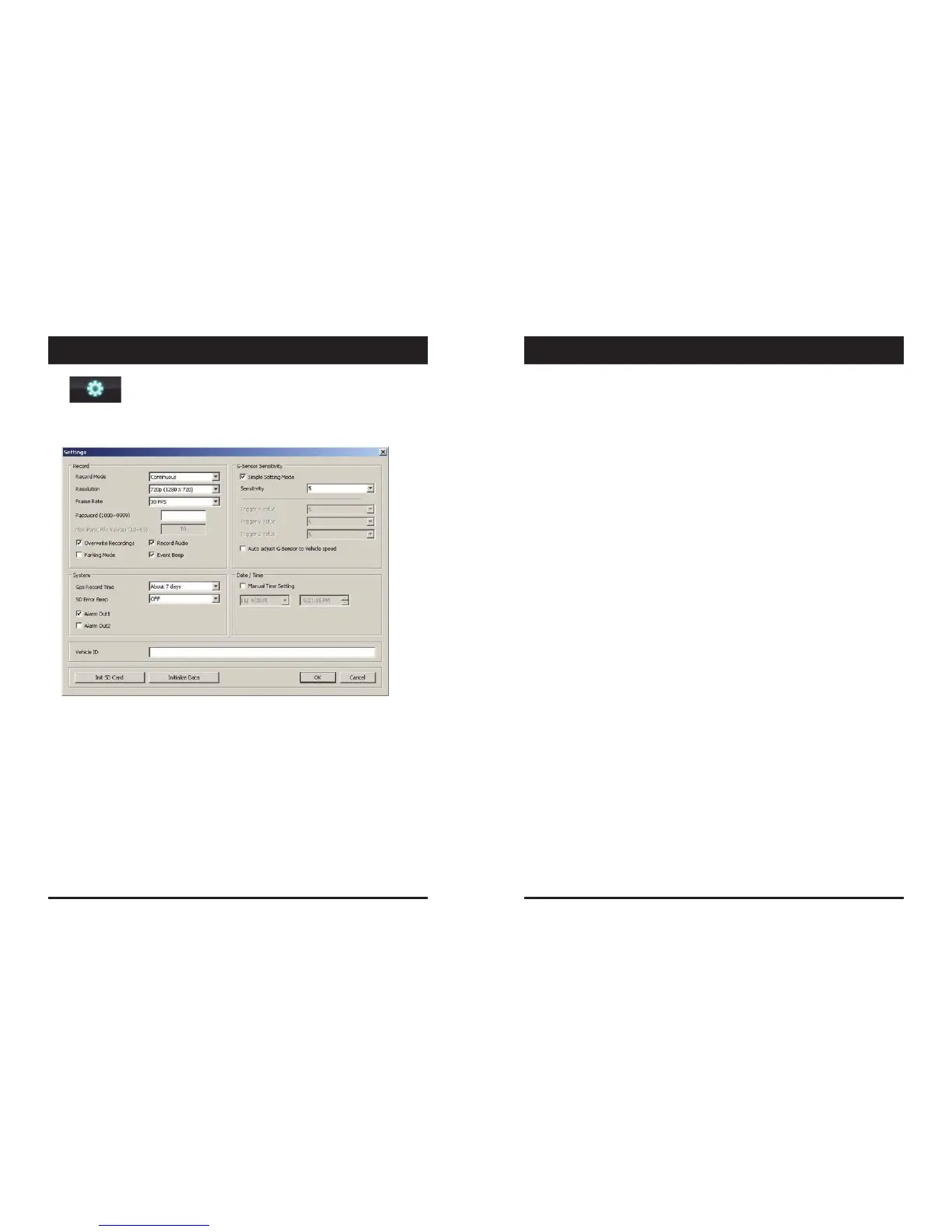
Thisoptionallowsyoutoadjustthesettingsontherecorder.Clicktheabove
icontobringupthescreenbelow.
RecordMode
Event(AutomaticallystartsrecordingbyG‐sensororPanicbutton.)
Continuous(AlwaysrecordingwhenpoweredbyDC12/24V.)
Resolution
VGA(640x480),720P(1280x720),1080pHD(1920x1080).
FrameRate
Adjusttheframeratefrom30fps,15fps,10fps,1fps
Password
Enter4numbersfrom1000to9999asapassword
OverwriteRecordings
ThisfunctionallowstheunittooverwriteoldfilesontheSDCard
automatically.Youcanoverwritethecontinuous,panicorG‐Sensor
recordedfiles.
RecordAudio
ParkingMode
SetRecordModeasContinuousandthenyoucanchecktheParkingModebox.
IfG‐Sensorvaluedoesnotchangefor5minutes,therecordframeratewillbe
automaticallychangeto1FPS.Whenavehiclestartstomovethentheparking
modewillswitchoffautomaticallyandstartthecontinuousrecording
immediately
EventBeep
Turnontheeventbeeptomaketheunit‘beep’whentheG‐sensorhasbeen
triggeredorthePanicbuttonhasbeenpressed.
G‐SensorSensitivity
Theshocksensorsensitivitycanbesetto‘SimplesettingMode’or‘Custom’.Set
toeasyallowsyoutosetthesensitivityto9(High),5(Medium)or1(Low).
Incustomset,youcanset3differentshocksensorvaluesindividually.
AutoadjustG‐SensortoVehiclespeed
Onceitchecked,VT1000willautomaticallydecreasetheG‐Sensorsensitivityat
highervehiclespeedstocompensateforthenaturallyaddedG‐forcesthatare
experiencedduetovelocity.
GPSRecordTime
Selectthetotallogfilesize.
About2days(80MB)
About7days(280MB)
SDErrorBeep
TurnontheSDErrorbeeptomaketheunit‘beep’whentheSDErroroccurred.
AlarmOut1
Highvoltage5VoutwhenG‐sensororPanictriggered.(LowtoHigh2seconds)
AlarmOut2
Highvoltage5VoutwhenSDerroroccurred.(LowtoHigh2seconds)
Date/Time
AutomaticallysynchronizewithGPStime.Howeverthismanualtimesettingis
alsoavailabletousetheunitattheinsideofbuilding.
VehicleID
SetavehicleIDfortheunit.
Init SDCard (InitializeSDCard)
AllvideoandGPSdatawillbedeletedandcreatenecessaryfoldersandcopy
necessaryfilesintotheSDcard.
InitializeData
ClickthisoptiontodeleteallrecordedfilesontheSDcard.Pleasebackupalldata
filesyouwishtokeepbeforedoingthis.
15 16
SETTINGSSETTINGS



 To Next Page