3-4 Operating the PTX-PRO PTX-PRO User and Technical Manual
3.5 Configuring the PTX-PRO With a PC
When you connect your PTX-PRO to a PC, you can create channel plans, and up-to-9 custom
presets. If you need more than 9 presets, create as many preset configurations as you want and
save them to a file, then load the configuration file when you need the saved presets.
CAUTION
Do not make configuration changes to your PTX-PRO while it is
connected to a radio system that is actively transmitting because it will
interrupt broadcast operations. Do not place the PTX-PRO in transmit
mode when using the MRC Radio Configurator. Also, the PTX-PRO
must be powered up before you run the MRC Radio Configurator.
For information about installing the MRC Radio Configurator, see Section 2.5, Installing
Configurator Software on page 2-8.
3.5.1 Connecting the PTX-PRO to the MRC Radio Configurator
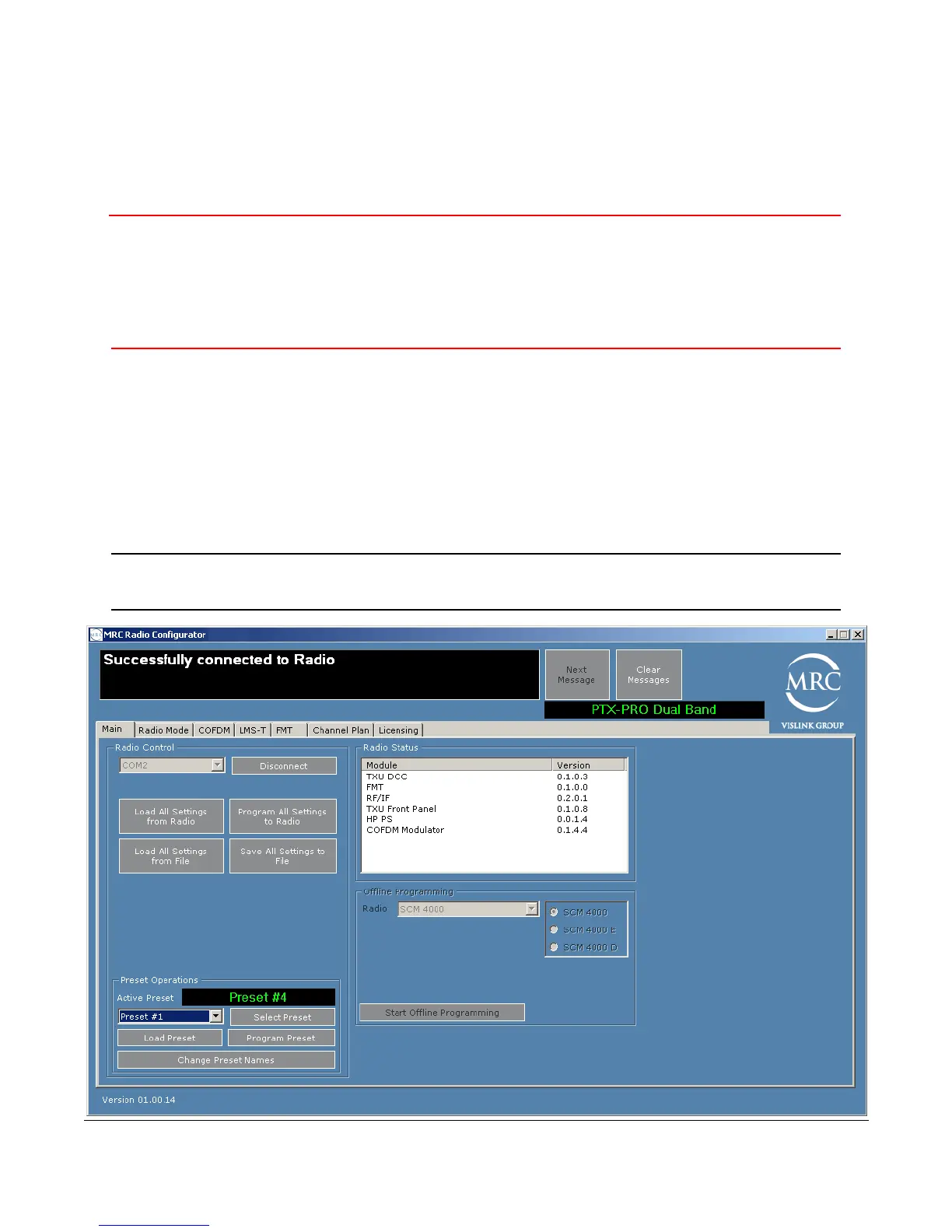
On the Main tab of the MRC Radio Configurator, choose the COM port to which the PTX-PRO
is connected, and click Connect. The following figure shows that the MRC Radio Configurator
has connected to the PTX-PRO.
Tip
Before you program the PTX-PRO with the MRC Radio Configurator, click
Load All Settings to populate the parameters as a template.



 To Next Page