PTX-PRO Specifications A-7PTX-PRO User and Technical Manual
A.5.1 Wayside Data
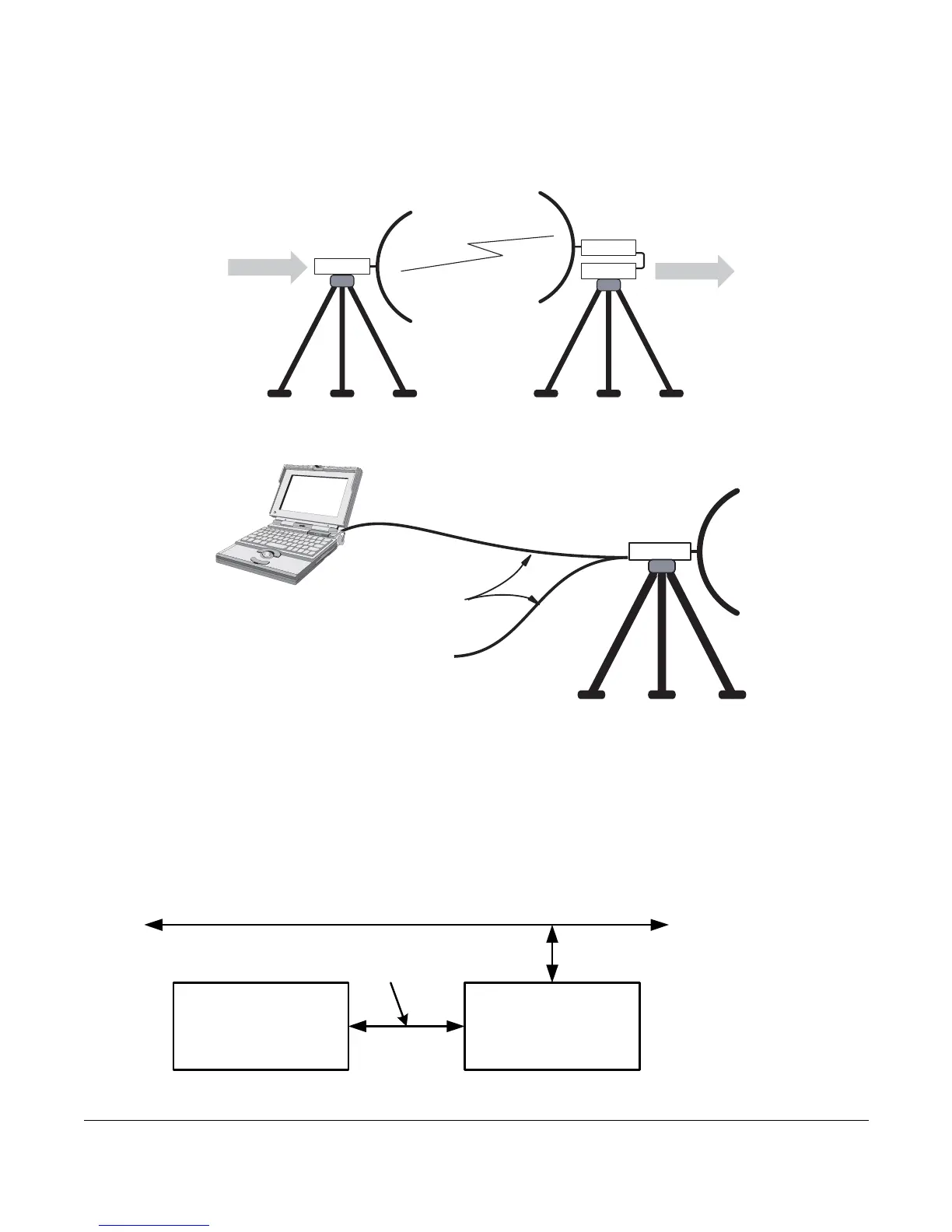
The Wayside channel is a simplex data channel receiving data at the PTX-PRO from a
transmitter system. The PTX-PRO outputs data using connections to the serial port through a
Multipurpose Data Cable.
Connect the Wayside channel to the serial port using a Serial/Wayside Multipurpose Data Cable
as shown in the following figure.
The cable connects to the RS-232 connector on the PTX-PRO and has connections for both the
Wayside channel and the PC required for use with the MRC Radio Configurator software.
A.5.2 Networking
You can connect the RS-232 connector on the PTX-PRO to a network to monitor and program
the PTX-PRO from a remote location. To connect the PTX-PRO to a network, you will need the
following items.
TX
RX
WAYSIDE
WAYSIDE
TX or RX
RS-232 Wayside
Data Channel
Signal (i.e.,
GPS Data)
Multipurpose
Data Cable
RS-232
Serial
Connection to
PC or Laptop
PTX-PRO TX
System
UDS-10 Device
Server (or
Equivalent)
Interface
Cable
Ethernet LAN



 To Next Page