A-6 PTX-PRO Specifications PTX-PRO User and Technical Manual
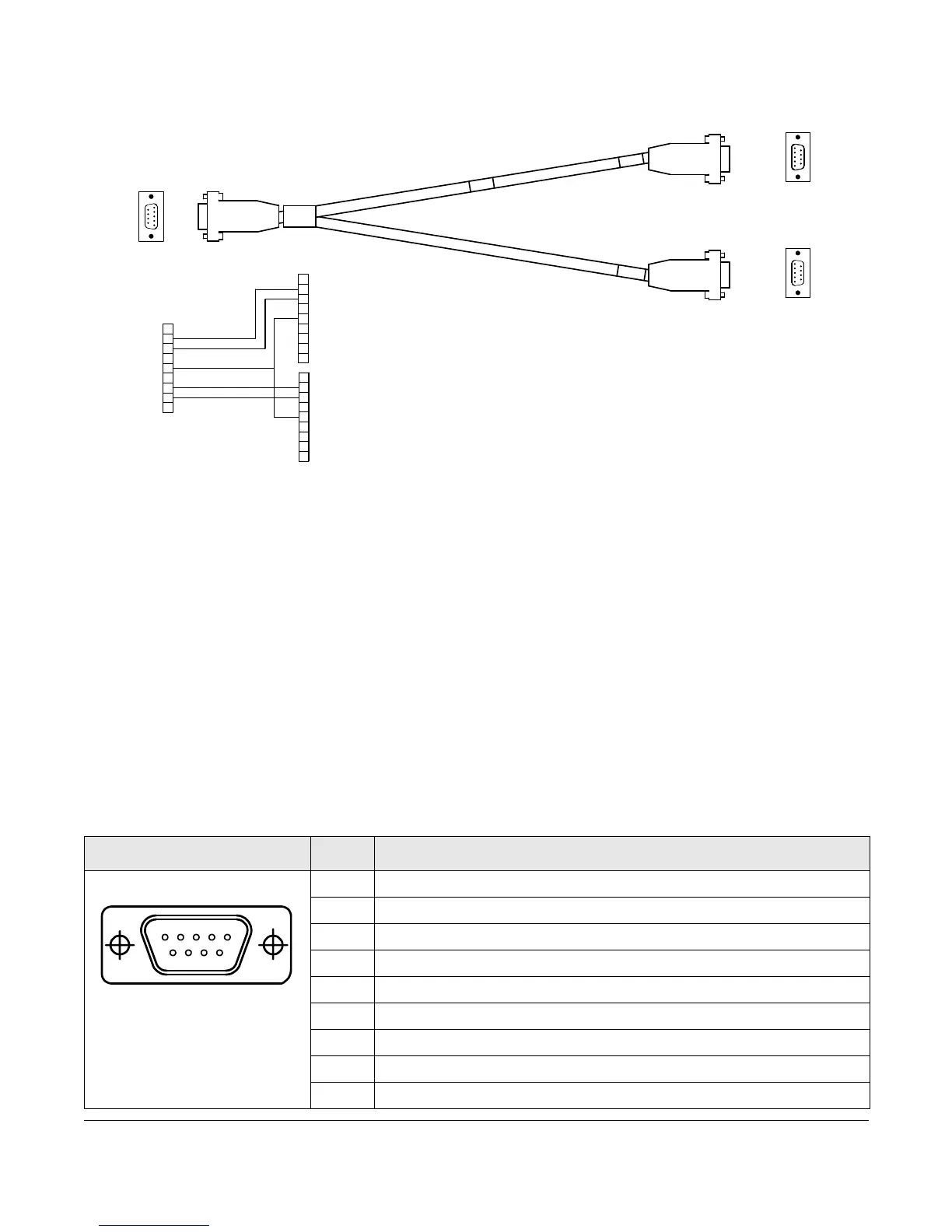
To access both radio and Wayside data, connect the DB-9 female RS-232 connector of the
Multipurpose Data Cable (shown) to the PTX-PRO RS-232 connector.
The Multipurpose Data Cable contains two DB-9 female connectors and one DB-9 male
connector and contains band markers indicating connections to HOST, WAYSIDE, and RS-232
connectors.
•The HOST DB-9 male connector is a Data Terminal Equipment (DTE) device that
connects to a PC. When you connect the Multipurpose Data Cable to a HOST DB-9 male
DTE device, you also must connect a null modem between the DTE device and the
HOST male connector. If the HOST connector is connected to a DCE device, you cannot
use a null modem cable, but you will need a straight pin-to-pin extension cable.
•The WAYSIDE DB-9 female connector is a Data Communication Equipment (DCE)
device connector that connects to a modem, GPS, etc. When you connect the
Multipurpose Data Cable to a WAYSIDE DB-9 female DCE device, you also must
connect a null modem between the DCE device and the WAYSIDE female connector. If
the WAYSIDE connector is connected to a DTE device, you cannot use a null modem
cable, but you will need a straight pin-to-pin extension cable.
The following table shows programming connections using the Multipurpose Data Cable.
Connector Pin Function
1N/C
2 Receive Data
3 Transmit Data
4N/C
5GND
6N/C
7 Transmit Data (sends Wayside data to an external device)
8 Receive Data (carries Wayside data from an external device)
9N/C
9
5
1
6
1
6
9
5
5
1
6
9
RED
WHT
5
7
6
4
3
2
1
8
9
9
8
1
2
3
4
6
7
5
9
8
1
2
3
4
6
7
5
WHT
RED
BLK
RADIO (M)
WAYSIDE (F)
RADIO (M)
WAYSIDE (F)
RADIO/WAYSIDE
(F)
RADIO/
WAYSIDE (F)
1
5
6
9



 To Next Page